Multiple Page System Explained: How to 5x Your Ad Impressions
On this page
In the competitive world of online publishing, maximizing revenue from your content is paramount. While generating traffic is crucial, turning that traffic into substantial earnings requires strategic optimization. One often-overlooked yet incredibly powerful technique is the implementation of a multiple page system. This strategy doesn’t just subtly boost your income; it can dramatically multiply your ad impressions, leading to significantly higher earnings.
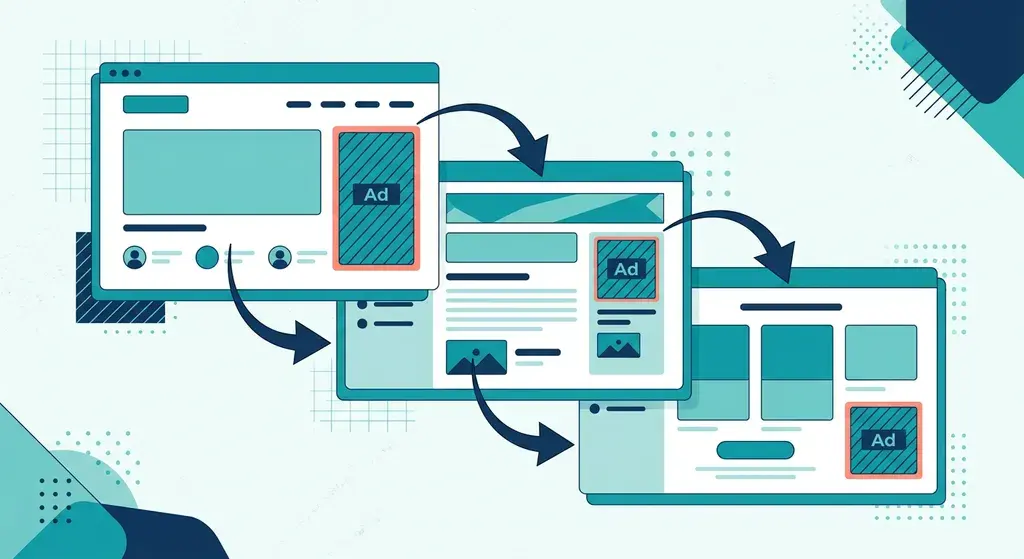
A multiple page system is a content delivery strategy where a single piece of content, such as a long article, guide, or gallery, is broken down and distributed across several consecutive web pages. This method is designed to increase ad impressions by requiring users to navigate through multiple pages to consume the entire content, thereby presenting more opportunities for advertisements to load and be viewed, effectively acting as an AdSense impressions multiplier.
#Understanding the Multiple Page System to Increase Ad Impressions
At its core, a multiple page system is about smart content segmentation. Instead of presenting a 3,000-word article on a single, long scrolling page, you divide it into logical segments, each residing on its own distinct URL. Users then click “Next Page” or “Continue Reading” to progress through the content. This approach fundamentally alters user interaction with your site, directly impacting your monetization potential.
#What is a Multiple Page System?
Imagine you have an in-depth tutorial, a comprehensive review, or a photo gallery with dozens of images. Instead of displaying everything on one URL, a multiple page system splits it. For a tutorial, Chapter 1 might be on `yourdomain.com/tutorial-part-1/`, Chapter 2 on `yourdomain.com/tutorial-part-2/`, and so on. For a photo gallery, each photo or a small group of photos gets its own page.
This isn’t just about pagination for archival content (like older blog posts). It’s a deliberate structural choice for a single, cohesive piece of content to maximize exposure to ads. While some might worry about user experience or SEO, when implemented correctly, a multiple page system can significantly enhance both, leading to a substantial increase in ad impressions.
#Why a Multiple Page System is an AdSense Impressions Multiplier
The primary reason this strategy acts as an AdSense impressions multiplier is simple: every new page load is an opportunity for new ad units to be served and viewed. Consider a user reading a long article:
- Single Page: The user loads one page. Your ad units (typically 2-3 content ads + sidebar/header/footer ads) load once. Even if they spend 10 minutes on the page, those same ads are counted as impressions only once (or sometimes twice if they are “sticky” or refresh after a long duration, but usually once per page load).
- Multiple Pages: The user loads Page 1, sees ads. They click “Next,” load Page 2, and new ads load. They click “Next” again, load Page 3, and more new ads load. If your article is split into 5 pages, a single user session could generate 5 times the ad impressions compared to a single-page version, assuming consistent ad placement.
This direct correlation between page loads and ad impressions is what makes the multiple page system so potent for revenue generation. It doesn’t necessarily require more unique visitors; it leverages the existing engagement of your current audience more effectively.
#Beyond Simple Pagination: The Strategic Advantage
It’s important to distinguish a strategic multiple page system from simple pagination often used for archives or comments. This is about taking a single, valuable piece of content and intentionally structuring it to optimize for monetization. It’s a calculated decision designed to extend user sessions and maximize the display of ad units.
The strategic advantage lies in transforming what would be a single pageview into multiple pageviews for the same content consumption. This not only increases ad impressions but also signals to search engines like Google that users are highly engaged with your content, spending more time on your site, which can indirectly benefit SEO.
#The Core Mechanism: How a Multiple Page System Boosts Your Earnings
To fully appreciate the power of this strategy, let’s look at the underlying mechanics that connect multiple page views to increased ad revenue.
#Pageviews vs. Ad Impressions: A Clarification
While often used interchangeably, “pageview” and “ad impression” are distinct metrics.
- Pageview: A request to load a single page of an internet site. One pageview can contain multiple ad units.
- Ad Impression: An instance of an advertisement being displayed on a page. If a page has three ad units, and a user loads that page, it counts as three ad impressions (assuming all ads load successfully).
The multiple page system directly impacts ad impressions. If you have an average of 3 ad units per page, and a user views 5 pages of your content, that’s 15 ad impressions from a single user session for that content piece. On a single page, that same content would only generate 3 ad impressions. This multiplicative effect is where the substantial earnings increase comes from.
#The Ad Refresh Cycle and User Engagement
Most ad networks, including AdSense, primarily count an impression when the ad unit loads and becomes visible. By forcing a page refresh (i.e., loading a new page), you effectively “reset” the ad display cycle. This means new ads are requested and displayed, generating fresh impressions.
Furthermore, longer time on site and more pageviews per session are strong indicators of user engagement. Ad networks often prioritize sites with high engagement, potentially leading to better-performing ads and higher CPMs (Cost Per Mille/Thousand impressions). By making users click through several pages, you naturally extend their time on your site, signaling higher engagement.
#Practical Strategies to Implement a Multiple Page System
Implementing a successful multiple page system requires careful planning and execution. Here’s how you can do it effectively.
#Content Segmentation and Pacing
The key is to break your content logically without frustrating users.
#Utilizing WP Safelink for Optimized Multi-Page Content
When implementing a multiple page system, managing external links becomes crucial. You want users to stay on your site to continue generating those valuable ad impressions. This is where a tool like WP Safelink becomes invaluable.
WP Safelink is a WordPress plugin designed to convert all external links on your site into internal links that pass through an interstitial “safelink” page. This page typically displays ads and requires the user to wait a few seconds before being redirected to the external destination.
How does this help with a multi-page system?
Integrating WP Safelink into your multi-page strategy is a powerful way to ensure you’re squeezing every possible ad impression out of your content and traffic, turning every click into an opportunity.
#Designing for User Experience (UX)
A poorly implemented multi-page system can frustrate users and increase bounce rates. UX is paramount.
#Ad Placement within a Multiple Page System
Strategic ad placement is crucial for an AdSense impressions multiplier effect.
#Case Study/Comparison: Single Page vs. Multiple Page for Ad Impressions
Let’s illustrate the potential impact with a simple comparison.
| Metric | Single-Page Content | Multiple-Page Content (5 Pages) |
|---|---|---|
| Article Length | 3000 words | 3000 words (600 words/page) |
| Ad Units per Page | 4 | 4 |
| Pageviews per User Session | 1 | 5 |
| Total Ad Impressions per User Session | 1 x 4 = 4 | 5 x 4 = 20 |
| Estimated AdSense CTR (Click-Through Rate) | 1.5% | 1.5% |
| Estimated Clicks per User Session | 0.06 (4 * 1.5%) | 0.3 (20 * 1.5%) |
| Estimated AdSense RPM (Revenue Per Mille Impressions) | $5.00 | $5.00 |
| Estimated Revenue per User Session | $0.02 | $0.10 |
| Total Ad Impressions for 10,000 Visitors | 40,000 | 200,000 |
| Total Estimated Revenue for 10,000 Visitors | $200.00 | $1,000.00 |
Note: These figures are illustrative and based on averages. Actual results can vary significantly based on niche, ad quality, user demographics, and ad placement optimization.
As you can see, a single piece of content, when strategically broken down into 5 pages, can theoretically increase ad impressions and revenue by 5 times for the same amount of traffic. This clearly demonstrates the power of the multiple page system as an AdSense impressions multiplier.
#Maximizing Your AdSense Impressions Multiplier: Advanced Tips
Beyond the basic implementation, these advanced tips can further supercharge your multi-page strategy.
#Common Pitfalls to Avoid When Implementing a Multiple Page System
While effective, a multiple page system isn’t without its potential downsides if not implemented carefully.
#WP Safelink: Your Ally for a Seamless Multiple Page System
We’ve discussed how a multiple page system can significantly increase ad impressions and boost your AdSense revenue. To truly optimize this strategy, especially concerning outbound links and user retention, WP Safelink offers a critical advantage.
By intelligently managing how users interact with external links, WP Safelink adds an extra layer of monetization to your multi-page content. It ensures that even when users click away, they pass through another ad-filled page, making every click count towards your overall ad impression goals. This integration turns an effective monetization strategy into an exceptionally powerful one, acting as another layer to your AdSense impressions multiplier.
Beyond just safelinks, consider other tools for engagement. For video content, plugins like PlayPoster can keep users on your site watching videos, contributing to longer session durations and more opportunities for ad impressions within those pages. Combining such tools creates a robust ecosystem for maximizing user engagement and ad revenue.
#Ready to 5x Your Ad Impressions?
Implementing a well-designed multiple page system is a proven strategy to significantly boost your ad revenue without necessarily needing more traffic. By breaking down your valuable content into engaging, digestible segments, you create more opportunities for ads to be seen, directly translating into higher earnings.
Don’t leave money on the table. Start leveraging the power of a multiple page system combined with smart tools like WP Safelink to transform your WordPress site into an ad impression powerhouse.
Ready to supercharge your site’s monetization? Get started with Themeson’s premium tools today and get started to higher ad impressions and revenue!
Sign Up Now and Transform Your Site!
Use discount code NEWHOPE at checkout for 25% off your purchase!
For more tips and strategies on optimizing your WordPress site for performance and profit, visit the Themeson Blog.
#Frequently Asked Questions (FAQ)
#Q1: Is a multiple page system good for SEO?
A well-implemented multiple page system can be good for SEO. While historically there were concerns about duplicate content or diluted link equity, modern search engines are sophisticated enough to understand paginated content. Proper use of internal linking, canonical tags (if necessary, though for sequential content each page is often self-canonical), and clear navigation signals to search engines that the pages are part of a coherent series. Furthermore, the increased time on site and more pageviews per session can be positive engagement signals that contribute to overall SEO. Focus on quality content and good user experience across all segments.
#Q2: How many pages should I break my content into?
The optimal number of pages depends on the content’s length and complexity. A good rule of thumb is to aim for logical breakpoints, with each page segment containing enough valuable content to justify the click, typically 300-700 words per page. For a 3000-word article, 4-6 pages might be ideal. For a photo gallery, grouping 1-3 images per page often works well. Avoid over-segmentation, as this can frustrate users and increase bounce rates.
#Q3: Does a multiple page system affect bounce rate?
It can, positively or negatively, depending on implementation. If users land on the first page and are immediately annoyed by slow loading times or poor navigation, they might bounce. However, if the content is engaging, navigation is clear, and pages load quickly, users are likely to click through multiple pages. In analytics, a “bounce” is typically defined as a single pageview session. By encouraging users to view multiple pages, you inherently reduce your bounce rate for those engaged users, as they are no longer single-pageview sessions.
#Q4: Can I use this strategy with any ad network, not just AdSense?
Yes, the principle of increasing pageviews to generate more ad impressions applies to virtually any ad network that serves display ads (e.g., Mediavine, Ezoic, AdThrive, or direct programmatic deals). The more pages a user views, the more opportunities there are for new ads to be served and counted as impressions, regardless of the ad provider. Always ensure compliance with the specific ad network’s policies regarding ad placement and density on paginated content.
Turn your traffic into revenue with WP Safelink
Join 2,000+ publishers monetising every download link since 2017. Use code NEWHOPE for 25% off — from just $9/year.