Multi-Language APK Sites with Playposter
Quick answer: Learn how to multi-language apk sites with playposter. Practical WordPress tutorial from Themeson.
On this page
#Monetization Considerations
#Ad Network Selection
Different regions perform differently:
- Tier 1 (high CPM): US, UK, AU, DE – AdSense excellent
- Tier 2 (medium CPM): BR, MX, ES – Consider alternatives
- Tier 3 (lower CPM): IN, ID, PH – Volume over CPM
#WP Safelink by Language
Configure different safelink settings per language:
- Adjust countdown timers (shorter for lower CPM regions)
- Customize ad placements by market
- Translate waiting messages
#Maintenance Tips
- Keep translations synced: Update all languages when content changes
- Monitor by language: Track performance separately
- Handle missing translations: Show default language or 404
- User feedback: Let users report translation errors
#Conclusion
Multi-language support multiplies your reach without multiplying your workload. With Playposter’s automation and a good translation strategy, you can serve global audiences efficiently. Start with 2-3 languages, perfect your workflow, then expand.
Ready to go global? Get Playposter and start building your multi-language APK empire.
#Content Strategy by Language
#What to Translate
- Must translate: App descriptions, download instructions, navigation
- Should translate: Categories, tags, meta descriptions
- Optional: Comments, user reviews (can show original)
#Localization Beyond Words
True localization goes beyond translation:
- Date formats: US (MM/DD/YYYY) vs EU (DD/MM/YYYY)
- Currency: Show local equivalents
- File sizes: Consider regional download speeds
- Screenshots: Use localized app screenshots when available
#SEO for Multi-Language Sites
#Technical SEO
- hreflang tags: Tell Google about language versions
- Sitemap: Include all language versions
- Canonical URLs: Point to correct language version
#Keyword Research by Language
Don’t just translate keywords – research them:
- Use local keyword tools
- Check search volume in target regions
- Identify language-specific search patterns
#Monetization Considerations
#Ad Network Selection
Different regions perform differently:
- Tier 1 (high CPM): US, UK, AU, DE – AdSense excellent
- Tier 2 (medium CPM): BR, MX, ES – Consider alternatives
- Tier 3 (lower CPM): IN, ID, PH – Volume over CPM
#WP Safelink by Language
Configure different safelink settings per language:
- Adjust countdown timers (shorter for lower CPM regions)
- Customize ad placements by market
- Translate waiting messages
#Maintenance Tips
- Keep translations synced: Update all languages when content changes
- Monitor by language: Track performance separately
- Handle missing translations: Show default language or 404
- User feedback: Let users report translation errors
#Conclusion
Multi-language support multiplies your reach without multiplying your workload. With Playposter’s automation and a good translation strategy, you can serve global audiences efficiently. Start with 2-3 languages, perfect your workflow, then expand.
Ready to go global? Get Playposter and start building your multi-language APK empire.
#Playposter Translation Workflow
#Method 1: Auto-Translation
Connect to translation APIs for automated translation:
- Configure API keys (DeepL, Google Translate, etc.)
- Enable auto-translate in Playposter settings
- Set target languages for new content
- Review and publish translated posts
#Method 2: Manual Translation
For higher quality:
- Export content to translation files
- Send to native translators
- Import translated content
- Link translations to original posts
#Method 3: Hybrid Approach (Recommended)
Combine automation with human review:
- Auto-translate bulk content
- Queue for human review
- Native speakers polish translations
- Publish reviewed content
#Content Strategy by Language
#What to Translate
- Must translate: App descriptions, download instructions, navigation
- Should translate: Categories, tags, meta descriptions
- Optional: Comments, user reviews (can show original)
#Localization Beyond Words
True localization goes beyond translation:
- Date formats: US (MM/DD/YYYY) vs EU (DD/MM/YYYY)
- Currency: Show local equivalents
- File sizes: Consider regional download speeds
- Screenshots: Use localized app screenshots when available
#SEO for Multi-Language Sites
#Technical SEO
- hreflang tags: Tell Google about language versions
- Sitemap: Include all language versions
- Canonical URLs: Point to correct language version
#Keyword Research by Language
Don’t just translate keywords – research them:
- Use local keyword tools
- Check search volume in target regions
- Identify language-specific search patterns
#Monetization Considerations
#Ad Network Selection
Different regions perform differently:
- Tier 1 (high CPM): US, UK, AU, DE – AdSense excellent
- Tier 2 (medium CPM): BR, MX, ES – Consider alternatives
- Tier 3 (lower CPM): IN, ID, PH – Volume over CPM
#WP Safelink by Language
Configure different safelink settings per language:
- Adjust countdown timers (shorter for lower CPM regions)
- Customize ad placements by market
- Translate waiting messages
#Maintenance Tips
- Keep translations synced: Update all languages when content changes
- Monitor by language: Track performance separately
- Handle missing translations: Show default language or 404
- User feedback: Let users report translation errors
#Conclusion
Multi-language support multiplies your reach without multiplying your workload. With Playposter’s automation and a good translation strategy, you can serve global audiences efficiently. Start with 2-3 languages, perfect your workflow, then expand.
Ready to go global? Get Playposter and start building your multi-language APK empire.
#Step 3: Configure URL Structure
Choose how languages appear in URLs:
- Directory: example.com/es/app-name (recommended)
- Subdomain: es.example.com/app-name
- Parameter: example.com/app-name?lang=es
#Playposter Translation Workflow
#Method 1: Auto-Translation
Connect to translation APIs for automated translation:
- Configure API keys (DeepL, Google Translate, etc.)
- Enable auto-translate in Playposter settings
- Set target languages for new content
- Review and publish translated posts
#Method 2: Manual Translation
For higher quality:
- Export content to translation files
- Send to native translators
- Import translated content
- Link translations to original posts
#Method 3: Hybrid Approach (Recommended)
Combine automation with human review:
- Auto-translate bulk content
- Queue for human review
- Native speakers polish translations
- Publish reviewed content
#Content Strategy by Language
#What to Translate
- Must translate: App descriptions, download instructions, navigation
- Should translate: Categories, tags, meta descriptions
- Optional: Comments, user reviews (can show original)
#Localization Beyond Words
True localization goes beyond translation:
- Date formats: US (MM/DD/YYYY) vs EU (DD/MM/YYYY)
- Currency: Show local equivalents
- File sizes: Consider regional download speeds
- Screenshots: Use localized app screenshots when available
#SEO for Multi-Language Sites
#Technical SEO
- hreflang tags: Tell Google about language versions
- Sitemap: Include all language versions
- Canonical URLs: Point to correct language version
#Keyword Research by Language
Don’t just translate keywords – research them:
- Use local keyword tools
- Check search volume in target regions
- Identify language-specific search patterns
#Monetization Considerations
#Ad Network Selection
Different regions perform differently:
- Tier 1 (high CPM): US, UK, AU, DE – AdSense excellent
- Tier 2 (medium CPM): BR, MX, ES – Consider alternatives
- Tier 3 (lower CPM): IN, ID, PH – Volume over CPM
#WP Safelink by Language
Configure different safelink settings per language:
- Adjust countdown timers (shorter for lower CPM regions)
- Customize ad placements by market
- Translate waiting messages
#Maintenance Tips
- Keep translations synced: Update all languages when content changes
- Monitor by language: Track performance separately
- Handle missing translations: Show default language or 404
- User feedback: Let users report translation errors
#Conclusion
Multi-language support multiplies your reach without multiplying your workload. With Playposter’s automation and a good translation strategy, you can serve global audiences efficiently. Start with 2-3 languages, perfect your workflow, then expand.
Ready to go global? Get Playposter and start building your multi-language APK empire.
Want to reach users worldwide? A multi-language APK site can dramatically increase your traffic and revenue. This guide shows you how to use Playposter to create and manage content in multiple languages efficiently.
#Why Go Multi-Language?
The benefits of supporting multiple languages are significant:
- 10x more traffic potential: Access users who search in their native language
- Higher engagement: Users stay longer on content they understand
- Better conversion: Downloads increase when instructions are clear
- Less competition: Many niches have few non-English competitors
#Setting Up Multi-Language Support
#Step 1: Choose Your Languages
Start with high-value languages based on your target market:
- Spanish: 500M+ speakers, huge Android market
- Portuguese (BR): 200M+ speakers, mobile-first users
- Indonesian: 270M population, high app usage
- Hindi: 600M+ speakers, growing smartphone adoption
- Arabic: 300M+ speakers across multiple countries
#Step 2: Install Translation Plugin
Playposter works with popular translation plugins:
- WPML (premium, full-featured)
- Polylang (free option available)
- TranslatePress (visual translation)
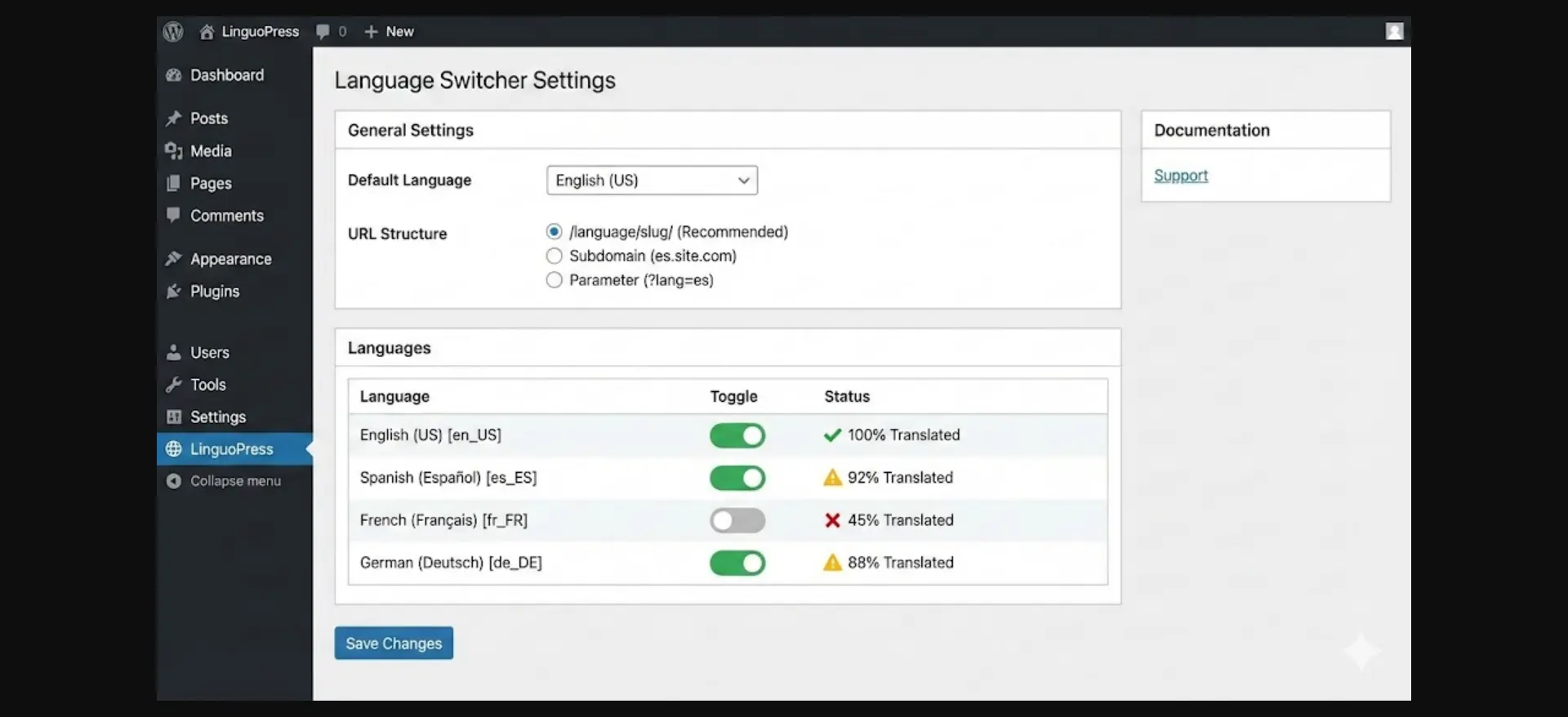
#Step 3: Configure URL Structure
Choose how languages appear in URLs:
- Directory: example.com/es/app-name (recommended)
- Subdomain: es.example.com/app-name
- Parameter: example.com/app-name?lang=es
#Playposter Translation Workflow
#Method 1: Auto-Translation
Connect to translation APIs for automated translation:
- Configure API keys (DeepL, Google Translate, etc.)
- Enable auto-translate in Playposter settings
- Set target languages for new content
- Review and publish translated posts
#Method 2: Manual Translation
For higher quality:
- Export content to translation files
- Send to native translators
- Import translated content
- Link translations to original posts
#Method 3: Hybrid Approach (Recommended)
Combine automation with human review:
- Auto-translate bulk content
- Queue for human review
- Native speakers polish translations
- Publish reviewed content
#Content Strategy by Language
#What to Translate
- Must translate: App descriptions, download instructions, navigation
- Should translate: Categories, tags, meta descriptions
- Optional: Comments, user reviews (can show original)
#Localization Beyond Words
True localization goes beyond translation:
- Date formats: US (MM/DD/YYYY) vs EU (DD/MM/YYYY)
- Currency: Show local equivalents
- File sizes: Consider regional download speeds
- Screenshots: Use localized app screenshots when available
#SEO for Multi-Language Sites
#Technical SEO
- hreflang tags: Tell Google about language versions
- Sitemap: Include all language versions
- Canonical URLs: Point to correct language version
#Keyword Research by Language
Don’t just translate keywords – research them:
- Use local keyword tools
- Check search volume in target regions
- Identify language-specific search patterns
#Monetization Considerations
#Ad Network Selection
Different regions perform differently:
- Tier 1 (high CPM): US, UK, AU, DE – AdSense excellent
- Tier 2 (medium CPM): BR, MX, ES – Consider alternatives
- Tier 3 (lower CPM): IN, ID, PH – Volume over CPM
#WP Safelink by Language
Configure different safelink settings per language:
- Adjust countdown timers (shorter for lower CPM regions)
- Customize ad placements by market
- Translate waiting messages
#Maintenance Tips
- Keep translations synced: Update all languages when content changes
- Monitor by language: Track performance separately
- Handle missing translations: Show default language or 404
- User feedback: Let users report translation errors
#Conclusion
Multi-language support multiplies your reach without multiplying your workload. With Playposter’s automation and a good translation strategy, you can serve global audiences efficiently. Start with 2-3 languages, perfect your workflow, then expand.
Ready to go global? Get Playposter and start building your multi-language APK empire.
#Monetization Considerations
#Ad Network Selection
Different regions perform differently:
- Tier 1 (high CPM): US, UK, AU, DE – AdSense excellent
- Tier 2 (medium CPM): BR, MX, ES – Consider alternatives
- Tier 3 (lower CPM): IN, ID, PH – Volume over CPM
#WP Safelink by Language
Configure different safelink settings per language:
- Adjust countdown timers (shorter for lower CPM regions)
- Customize ad placements by market
- Translate waiting messages
#Maintenance Tips
- Keep translations synced: Update all languages when content changes
- Monitor by language: Track performance separately
- Handle missing translations: Show default language or 404
- User feedback: Let users report translation errors
#Conclusion
Multi-language support multiplies your reach without multiplying your workload. With Playposter’s automation and a good translation strategy, you can serve global audiences efficiently. Start with 2-3 languages, perfect your workflow, then expand.
Ready to go global? Get Playposter and start building your multi-language APK empire.
Want to reach users worldwide? A multi-language APK site can dramatically increase your traffic and revenue. This guide shows you how to use Playposter to create and manage content in multiple languages efficiently.
#Why Go Multi-Language?
The benefits of supporting multiple languages are significant:
- 10x more traffic potential: Access users who search in their native language
- Higher engagement: Users stay longer on content they understand
- Better conversion: Downloads increase when instructions are clear
- Less competition: Many niches have few non-English competitors
#Setting Up Multi-Language Support
#Step 1: Choose Your Languages
Start with high-value languages based on your target market:
- Spanish: 500M+ speakers, huge Android market
- Portuguese (BR): 200M+ speakers, mobile-first users
- Indonesian: 270M population, high app usage
- Hindi: 600M+ speakers, growing smartphone adoption
- Arabic: 300M+ speakers across multiple countries
#Step 2: Install Translation Plugin
Playposter works with popular translation plugins:
- WPML (premium, full-featured)
- Polylang (free option available)
- TranslatePress (visual translation)
#Step 3: Configure URL Structure
Choose how languages appear in URLs:
- Directory: example.com/es/app-name (recommended)
- Subdomain: es.example.com/app-name
- Parameter: example.com/app-name?lang=es
#Playposter Translation Workflow
#Method 1: Auto-Translation
Connect to translation APIs for automated translation:
- Configure API keys (DeepL, Google Translate, etc.)
- Enable auto-translate in Playposter settings
- Set target languages for new content
- Review and publish translated posts
#Method 2: Manual Translation
For higher quality:
- Export content to translation files
- Send to native translators
- Import translated content
- Link translations to original posts
#Method 3: Hybrid Approach (Recommended)
Combine automation with human review:
- Auto-translate bulk content
- Queue for human review
- Native speakers polish translations
- Publish reviewed content
#Content Strategy by Language
#What to Translate
- Must translate: App descriptions, download instructions, navigation
- Should translate: Categories, tags, meta descriptions
- Optional: Comments, user reviews (can show original)
#Localization Beyond Words
True localization goes beyond translation:
- Date formats: US (MM/DD/YYYY) vs EU (DD/MM/YYYY)
- Currency: Show local equivalents
- File sizes: Consider regional download speeds
- Screenshots: Use localized app screenshots when available
#SEO for Multi-Language Sites
#Technical SEO
- hreflang tags: Tell Google about language versions
- Sitemap: Include all language versions
- Canonical URLs: Point to correct language version
#Keyword Research by Language
Don’t just translate keywords – research them:
- Use local keyword tools
- Check search volume in target regions
- Identify language-specific search patterns
#Monetization Considerations
#Ad Network Selection
Different regions perform differently:
- Tier 1 (high CPM): US, UK, AU, DE – AdSense excellent
- Tier 2 (medium CPM): BR, MX, ES – Consider alternatives
- Tier 3 (lower CPM): IN, ID, PH – Volume over CPM
#WP Safelink by Language
Configure different safelink settings per language:
- Adjust countdown timers (shorter for lower CPM regions)
- Customize ad placements by market
- Translate waiting messages
#Maintenance Tips
- Keep translations synced: Update all languages when content changes
- Monitor by language: Track performance separately
- Handle missing translations: Show default language or 404
- User feedback: Let users report translation errors
#Conclusion
Multi-language support multiplies your reach without multiplying your workload. With Playposter’s automation and a good translation strategy, you can serve global audiences efficiently. Start with 2-3 languages, perfect your workflow, then expand.
Ready to go global? Get Playposter and start building your multi-language APK empire.
#SEO for Multi-Language Sites
#Technical SEO
- hreflang tags: Tell Google about language versions
- Sitemap: Include all language versions
- Canonical URLs: Point to correct language version
#Keyword Research by Language
Don’t just translate keywords – research them:
- Use local keyword tools
- Check search volume in target regions
- Identify language-specific search patterns
#Monetization Considerations
#Ad Network Selection
Different regions perform differently:
- Tier 1 (high CPM): US, UK, AU, DE – AdSense excellent
- Tier 2 (medium CPM): BR, MX, ES – Consider alternatives
- Tier 3 (lower CPM): IN, ID, PH – Volume over CPM
#WP Safelink by Language
Configure different safelink settings per language:
- Adjust countdown timers (shorter for lower CPM regions)
- Customize ad placements by market
- Translate waiting messages
#Maintenance Tips
- Keep translations synced: Update all languages when content changes
- Monitor by language: Track performance separately
- Handle missing translations: Show default language or 404
- User feedback: Let users report translation errors
#Conclusion
Multi-language support multiplies your reach without multiplying your workload. With Playposter’s automation and a good translation strategy, you can serve global audiences efficiently. Start with 2-3 languages, perfect your workflow, then expand.
Ready to go global? Get Playposter and start building your multi-language APK empire.
Want to reach users worldwide? A multi-language APK site can dramatically increase your traffic and revenue. This guide shows you how to use Playposter to create and manage content in multiple languages efficiently.
#Why Go Multi-Language?
The benefits of supporting multiple languages are significant:
- 10x more traffic potential: Access users who search in their native language
- Higher engagement: Users stay longer on content they understand
- Better conversion: Downloads increase when instructions are clear
- Less competition: Many niches have few non-English competitors
#Setting Up Multi-Language Support
#Step 1: Choose Your Languages
Start with high-value languages based on your target market:
- Spanish: 500M+ speakers, huge Android market
- Portuguese (BR): 200M+ speakers, mobile-first users
- Indonesian: 270M population, high app usage
- Hindi: 600M+ speakers, growing smartphone adoption
- Arabic: 300M+ speakers across multiple countries
#Step 2: Install Translation Plugin
Playposter works with popular translation plugins:
- WPML (premium, full-featured)
- Polylang (free option available)
- TranslatePress (visual translation)
#Step 3: Configure URL Structure
Choose how languages appear in URLs:
- Directory: example.com/es/app-name (recommended)
- Subdomain: es.example.com/app-name
- Parameter: example.com/app-name?lang=es
#Playposter Translation Workflow
#Method 1: Auto-Translation
Connect to translation APIs for automated translation:
- Configure API keys (DeepL, Google Translate, etc.)
- Enable auto-translate in Playposter settings
- Set target languages for new content
- Review and publish translated posts
#Method 2: Manual Translation
For higher quality:
- Export content to translation files
- Send to native translators
- Import translated content
- Link translations to original posts
#Method 3: Hybrid Approach (Recommended)
Combine automation with human review:
- Auto-translate bulk content
- Queue for human review
- Native speakers polish translations
- Publish reviewed content
#Content Strategy by Language
#What to Translate
- Must translate: App descriptions, download instructions, navigation
- Should translate: Categories, tags, meta descriptions
- Optional: Comments, user reviews (can show original)
#Localization Beyond Words
True localization goes beyond translation:
- Date formats: US (MM/DD/YYYY) vs EU (DD/MM/YYYY)
- Currency: Show local equivalents
- File sizes: Consider regional download speeds
- Screenshots: Use localized app screenshots when available
#SEO for Multi-Language Sites
#Technical SEO
- hreflang tags: Tell Google about language versions
- Sitemap: Include all language versions
- Canonical URLs: Point to correct language version
#Keyword Research by Language
Don’t just translate keywords – research them:
- Use local keyword tools
- Check search volume in target regions
- Identify language-specific search patterns
#Monetization Considerations
#Ad Network Selection
Different regions perform differently:
- Tier 1 (high CPM): US, UK, AU, DE – AdSense excellent
- Tier 2 (medium CPM): BR, MX, ES – Consider alternatives
- Tier 3 (lower CPM): IN, ID, PH – Volume over CPM
#WP Safelink by Language
Configure different safelink settings per language:
- Adjust countdown timers (shorter for lower CPM regions)
- Customize ad placements by market
- Translate waiting messages
#Maintenance Tips
- Keep translations synced: Update all languages when content changes
- Monitor by language: Track performance separately
- Handle missing translations: Show default language or 404
- User feedback: Let users report translation errors
#Conclusion
Multi-language support multiplies your reach without multiplying your workload. With Playposter’s automation and a good translation strategy, you can serve global audiences efficiently. Start with 2-3 languages, perfect your workflow, then expand.
Ready to go global? Get Playposter and start building your multi-language APK empire.
#Content Strategy by Language
#What to Translate
- Must translate: App descriptions, download instructions, navigation
- Should translate: Categories, tags, meta descriptions
- Optional: Comments, user reviews (can show original)
#Localization Beyond Words
True localization goes beyond translation:
- Date formats: US (MM/DD/YYYY) vs EU (DD/MM/YYYY)
- Currency: Show local equivalents
- File sizes: Consider regional download speeds
- Screenshots: Use localized app screenshots when available
#SEO for Multi-Language Sites
#Technical SEO
- hreflang tags: Tell Google about language versions
- Sitemap: Include all language versions
- Canonical URLs: Point to correct language version
#Keyword Research by Language
Don’t just translate keywords – research them:
- Use local keyword tools
- Check search volume in target regions
- Identify language-specific search patterns
#Monetization Considerations
#Ad Network Selection
Different regions perform differently:
- Tier 1 (high CPM): US, UK, AU, DE – AdSense excellent
- Tier 2 (medium CPM): BR, MX, ES – Consider alternatives
- Tier 3 (lower CPM): IN, ID, PH – Volume over CPM
#WP Safelink by Language
Configure different safelink settings per language:
- Adjust countdown timers (shorter for lower CPM regions)
- Customize ad placements by market
- Translate waiting messages
#Maintenance Tips
- Keep translations synced: Update all languages when content changes
- Monitor by language: Track performance separately
- Handle missing translations: Show default language or 404
- User feedback: Let users report translation errors
#Conclusion
Multi-language support multiplies your reach without multiplying your workload. With Playposter’s automation and a good translation strategy, you can serve global audiences efficiently. Start with 2-3 languages, perfect your workflow, then expand.
Ready to go global? Get Playposter and start building your multi-language APK empire.
Want to reach users worldwide? A multi-language APK site can dramatically increase your traffic and revenue. This guide shows you how to use Playposter to create and manage content in multiple languages efficiently.
#Why Go Multi-Language?
The benefits of supporting multiple languages are significant:
- 10x more traffic potential: Access users who search in their native language
- Higher engagement: Users stay longer on content they understand
- Better conversion: Downloads increase when instructions are clear
- Less competition: Many niches have few non-English competitors
#Setting Up Multi-Language Support
#Step 1: Choose Your Languages
Start with high-value languages based on your target market:
- Spanish: 500M+ speakers, huge Android market
- Portuguese (BR): 200M+ speakers, mobile-first users
- Indonesian: 270M population, high app usage
- Hindi: 600M+ speakers, growing smartphone adoption
- Arabic: 300M+ speakers across multiple countries
#Step 2: Install Translation Plugin
Playposter works with popular translation plugins:
- WPML (premium, full-featured)
- Polylang (free option available)
- TranslatePress (visual translation)
#Step 3: Configure URL Structure
Choose how languages appear in URLs:
- Directory: example.com/es/app-name (recommended)
- Subdomain: es.example.com/app-name
- Parameter: example.com/app-name?lang=es
#Playposter Translation Workflow
#Method 1: Auto-Translation
Connect to translation APIs for automated translation:
- Configure API keys (DeepL, Google Translate, etc.)
- Enable auto-translate in Playposter settings
- Set target languages for new content
- Review and publish translated posts
#Method 2: Manual Translation
For higher quality:
- Export content to translation files
- Send to native translators
- Import translated content
- Link translations to original posts
#Method 3: Hybrid Approach (Recommended)
Combine automation with human review:
- Auto-translate bulk content
- Queue for human review
- Native speakers polish translations
- Publish reviewed content
#Content Strategy by Language
#What to Translate
- Must translate: App descriptions, download instructions, navigation
- Should translate: Categories, tags, meta descriptions
- Optional: Comments, user reviews (can show original)
#Localization Beyond Words
True localization goes beyond translation:
- Date formats: US (MM/DD/YYYY) vs EU (DD/MM/YYYY)
- Currency: Show local equivalents
- File sizes: Consider regional download speeds
- Screenshots: Use localized app screenshots when available
#SEO for Multi-Language Sites
#Technical SEO
- hreflang tags: Tell Google about language versions
- Sitemap: Include all language versions
- Canonical URLs: Point to correct language version
#Keyword Research by Language
Don’t just translate keywords – research them:
- Use local keyword tools
- Check search volume in target regions
- Identify language-specific search patterns
#Monetization Considerations
#Ad Network Selection
Different regions perform differently:
- Tier 1 (high CPM): US, UK, AU, DE – AdSense excellent
- Tier 2 (medium CPM): BR, MX, ES – Consider alternatives
- Tier 3 (lower CPM): IN, ID, PH – Volume over CPM
#WP Safelink by Language
Configure different safelink settings per language:
- Adjust countdown timers (shorter for lower CPM regions)
- Customize ad placements by market
- Translate waiting messages
#Maintenance Tips
- Keep translations synced: Update all languages when content changes
- Monitor by language: Track performance separately
- Handle missing translations: Show default language or 404
- User feedback: Let users report translation errors
#Conclusion
Multi-language support multiplies your reach without multiplying your workload. With Playposter’s automation and a good translation strategy, you can serve global audiences efficiently. Start with 2-3 languages, perfect your workflow, then expand.
Ready to go global? Get Playposter and start building your multi-language APK empire.
#Playposter Translation Workflow
#Method 1: Auto-Translation
Connect to translation APIs for automated translation:
- Configure API keys (DeepL, Google Translate, etc.)
- Enable auto-translate in Playposter settings
- Set target languages for new content
- Review and publish translated posts
#Method 2: Manual Translation
For higher quality:
- Export content to translation files
- Send to native translators
- Import translated content
- Link translations to original posts
#Method 3: Hybrid Approach (Recommended)
Combine automation with human review:
- Auto-translate bulk content
- Queue for human review
- Native speakers polish translations
- Publish reviewed content
#Content Strategy by Language
#What to Translate
- Must translate: App descriptions, download instructions, navigation
- Should translate: Categories, tags, meta descriptions
- Optional: Comments, user reviews (can show original)
#Localization Beyond Words
True localization goes beyond translation:
- Date formats: US (MM/DD/YYYY) vs EU (DD/MM/YYYY)
- Currency: Show local equivalents
- File sizes: Consider regional download speeds
- Screenshots: Use localized app screenshots when available
#SEO for Multi-Language Sites
#Technical SEO
- hreflang tags: Tell Google about language versions
- Sitemap: Include all language versions
- Canonical URLs: Point to correct language version
#Keyword Research by Language
Don’t just translate keywords – research them:
- Use local keyword tools
- Check search volume in target regions
- Identify language-specific search patterns
#Monetization Considerations
#Ad Network Selection
Different regions perform differently:
- Tier 1 (high CPM): US, UK, AU, DE – AdSense excellent
- Tier 2 (medium CPM): BR, MX, ES – Consider alternatives
- Tier 3 (lower CPM): IN, ID, PH – Volume over CPM
#WP Safelink by Language
Configure different safelink settings per language:
- Adjust countdown timers (shorter for lower CPM regions)
- Customize ad placements by market
- Translate waiting messages
#Maintenance Tips
- Keep translations synced: Update all languages when content changes
- Monitor by language: Track performance separately
- Handle missing translations: Show default language or 404
- User feedback: Let users report translation errors
#Conclusion
Multi-language support multiplies your reach without multiplying your workload. With Playposter’s automation and a good translation strategy, you can serve global audiences efficiently. Start with 2-3 languages, perfect your workflow, then expand.
Ready to go global? Get Playposter and start building your multi-language APK empire.
Want to reach users worldwide? A multi-language APK site can dramatically increase your traffic and revenue. This guide shows you how to use Playposter to create and manage content in multiple languages efficiently.
#Why Go Multi-Language?
The benefits of supporting multiple languages are significant:
- 10x more traffic potential: Access users who search in their native language
- Higher engagement: Users stay longer on content they understand
- Better conversion: Downloads increase when instructions are clear
- Less competition: Many niches have few non-English competitors
#Setting Up Multi-Language Support
#Step 1: Choose Your Languages
Start with high-value languages based on your target market:
- Spanish: 500M+ speakers, huge Android market
- Portuguese (BR): 200M+ speakers, mobile-first users
- Indonesian: 270M population, high app usage
- Hindi: 600M+ speakers, growing smartphone adoption
- Arabic: 300M+ speakers across multiple countries
#Step 2: Install Translation Plugin
Playposter works with popular translation plugins:
- WPML (premium, full-featured)
- Polylang (free option available)
- TranslatePress (visual translation)
#Step 3: Configure URL Structure
Choose how languages appear in URLs:
- Directory: example.com/es/app-name (recommended)
- Subdomain: es.example.com/app-name
- Parameter: example.com/app-name?lang=es
#Playposter Translation Workflow
#Method 1: Auto-Translation
Connect to translation APIs for automated translation:
- Configure API keys (DeepL, Google Translate, etc.)
- Enable auto-translate in Playposter settings
- Set target languages for new content
- Review and publish translated posts
#Method 2: Manual Translation
For higher quality:
- Export content to translation files
- Send to native translators
- Import translated content
- Link translations to original posts
#Method 3: Hybrid Approach (Recommended)
Combine automation with human review:
- Auto-translate bulk content
- Queue for human review
- Native speakers polish translations
- Publish reviewed content
#Content Strategy by Language
#What to Translate
- Must translate: App descriptions, download instructions, navigation
- Should translate: Categories, tags, meta descriptions
- Optional: Comments, user reviews (can show original)
#Localization Beyond Words
True localization goes beyond translation:
- Date formats: US (MM/DD/YYYY) vs EU (DD/MM/YYYY)
- Currency: Show local equivalents
- File sizes: Consider regional download speeds
- Screenshots: Use localized app screenshots when available
#SEO for Multi-Language Sites
#Technical SEO
- hreflang tags: Tell Google about language versions
- Sitemap: Include all language versions
- Canonical URLs: Point to correct language version
#Keyword Research by Language
Don’t just translate keywords – research them:
- Use local keyword tools
- Check search volume in target regions
- Identify language-specific search patterns
#Monetization Considerations
#Ad Network Selection
Different regions perform differently:
- Tier 1 (high CPM): US, UK, AU, DE – AdSense excellent
- Tier 2 (medium CPM): BR, MX, ES – Consider alternatives
- Tier 3 (lower CPM): IN, ID, PH – Volume over CPM
#WP Safelink by Language
Configure different safelink settings per language:
- Adjust countdown timers (shorter for lower CPM regions)
- Customize ad placements by market
- Translate waiting messages
#Maintenance Tips
- Keep translations synced: Update all languages when content changes
- Monitor by language: Track performance separately
- Handle missing translations: Show default language or 404
- User feedback: Let users report translation errors
#Conclusion
Multi-language support multiplies your reach without multiplying your workload. With Playposter’s automation and a good translation strategy, you can serve global audiences efficiently. Start with 2-3 languages, perfect your workflow, then expand.
Ready to go global? Get Playposter and start building your multi-language APK empire.
#Step 3: Configure URL Structure
Choose how languages appear in URLs:
- Directory: example.com/es/app-name (recommended)
- Subdomain: es.example.com/app-name
- Parameter: example.com/app-name?lang=es
#Playposter Translation Workflow
#Method 1: Auto-Translation
Connect to translation APIs for automated translation:
- Configure API keys (DeepL, Google Translate, etc.)
- Enable auto-translate in Playposter settings
- Set target languages for new content
- Review and publish translated posts
#Method 2: Manual Translation
For higher quality:
- Export content to translation files
- Send to native translators
- Import translated content
- Link translations to original posts
#Method 3: Hybrid Approach (Recommended)
Combine automation with human review:
- Auto-translate bulk content
- Queue for human review
- Native speakers polish translations
- Publish reviewed content
#Content Strategy by Language
#What to Translate
- Must translate: App descriptions, download instructions, navigation
- Should translate: Categories, tags, meta descriptions
- Optional: Comments, user reviews (can show original)
#Localization Beyond Words
True localization goes beyond translation:
- Date formats: US (MM/DD/YYYY) vs EU (DD/MM/YYYY)
- Currency: Show local equivalents
- File sizes: Consider regional download speeds
- Screenshots: Use localized app screenshots when available
#SEO for Multi-Language Sites
#Technical SEO
- hreflang tags: Tell Google about language versions
- Sitemap: Include all language versions
- Canonical URLs: Point to correct language version
#Keyword Research by Language
Don’t just translate keywords – research them:
- Use local keyword tools
- Check search volume in target regions
- Identify language-specific search patterns
#Monetization Considerations
#Ad Network Selection
Different regions perform differently:
- Tier 1 (high CPM): US, UK, AU, DE – AdSense excellent
- Tier 2 (medium CPM): BR, MX, ES – Consider alternatives
- Tier 3 (lower CPM): IN, ID, PH – Volume over CPM
#WP Safelink by Language
Configure different safelink settings per language:
- Adjust countdown timers (shorter for lower CPM regions)
- Customize ad placements by market
- Translate waiting messages
#Maintenance Tips
- Keep translations synced: Update all languages when content changes
- Monitor by language: Track performance separately
- Handle missing translations: Show default language or 404
- User feedback: Let users report translation errors
#Conclusion
Multi-language support multiplies your reach without multiplying your workload. With Playposter’s automation and a good translation strategy, you can serve global audiences efficiently. Start with 2-3 languages, perfect your workflow, then expand.
Ready to go global? Get Playposter and start building your multi-language APK empire.
Want to reach users worldwide? A multi-language APK site can dramatically increase your traffic and revenue. This guide shows you how to use Playposter to create and manage content in multiple languages efficiently.
#Why Go Multi-Language?
The benefits of supporting multiple languages are significant:
- 10x more traffic potential: Access users who search in their native language
- Higher engagement: Users stay longer on content they understand
- Better conversion: Downloads increase when instructions are clear
- Less competition: Many niches have few non-English competitors
#Setting Up Multi-Language Support
#Step 1: Choose Your Languages
Start with high-value languages based on your target market:
- Spanish: 500M+ speakers, huge Android market
- Portuguese (BR): 200M+ speakers, mobile-first users
- Indonesian: 270M population, high app usage
- Hindi: 600M+ speakers, growing smartphone adoption
- Arabic: 300M+ speakers across multiple countries
#Step 2: Install Translation Plugin
Playposter works with popular translation plugins:
- WPML (premium, full-featured)
- Polylang (free option available)
- TranslatePress (visual translation)
#Step 3: Configure URL Structure
Choose how languages appear in URLs:
- Directory: example.com/es/app-name (recommended)
- Subdomain: es.example.com/app-name
- Parameter: example.com/app-name?lang=es
#Playposter Translation Workflow
#Method 1: Auto-Translation
Connect to translation APIs for automated translation:
- Configure API keys (DeepL, Google Translate, etc.)
- Enable auto-translate in Playposter settings
- Set target languages for new content
- Review and publish translated posts
#Method 2: Manual Translation
For higher quality:
- Export content to translation files
- Send to native translators
- Import translated content
- Link translations to original posts
#Method 3: Hybrid Approach (Recommended)
Combine automation with human review:
- Auto-translate bulk content
- Queue for human review
- Native speakers polish translations
- Publish reviewed content
#Content Strategy by Language
#What to Translate
- Must translate: App descriptions, download instructions, navigation
- Should translate: Categories, tags, meta descriptions
- Optional: Comments, user reviews (can show original)
#Localization Beyond Words
True localization goes beyond translation:
- Date formats: US (MM/DD/YYYY) vs EU (DD/MM/YYYY)
- Currency: Show local equivalents
- File sizes: Consider regional download speeds
- Screenshots: Use localized app screenshots when available
#SEO for Multi-Language Sites
#Technical SEO
- hreflang tags: Tell Google about language versions
- Sitemap: Include all language versions
- Canonical URLs: Point to correct language version
#Keyword Research by Language
Don’t just translate keywords – research them:
- Use local keyword tools
- Check search volume in target regions
- Identify language-specific search patterns
#Monetization Considerations
#Ad Network Selection
Different regions perform differently:
- Tier 1 (high CPM): US, UK, AU, DE – AdSense excellent
- Tier 2 (medium CPM): BR, MX, ES – Consider alternatives
- Tier 3 (lower CPM): IN, ID, PH – Volume over CPM
#WP Safelink by Language
Configure different safelink settings per language:
- Adjust countdown timers (shorter for lower CPM regions)
- Customize ad placements by market
- Translate waiting messages
#Maintenance Tips
- Keep translations synced: Update all languages when content changes
- Monitor by language: Track performance separately
- Handle missing translations: Show default language or 404
- User feedback: Let users report translation errors
#Conclusion
Multi-language support multiplies your reach without multiplying your workload. With Playposter’s automation and a good translation strategy, you can serve global audiences efficiently. Start with 2-3 languages, perfect your workflow, then expand.
Ready to go global? Get Playposter and start building your multi-language APK empire.
#Monetization Considerations
#Ad Network Selection
Different regions perform differently:
- Tier 1 (high CPM): US, UK, AU, DE – AdSense excellent
- Tier 2 (medium CPM): BR, MX, ES – Consider alternatives
- Tier 3 (lower CPM): IN, ID, PH – Volume over CPM
#WP Safelink by Language
Configure different safelink settings per language:
- Adjust countdown timers (shorter for lower CPM regions)
- Customize ad placements by market
- Translate waiting messages
#Maintenance Tips
- Keep translations synced: Update all languages when content changes
- Monitor by language: Track performance separately
- Handle missing translations: Show default language or 404
- User feedback: Let users report translation errors
#Conclusion
Multi-language support multiplies your reach without multiplying your workload. With Playposter’s automation and a good translation strategy, you can serve global audiences efficiently. Start with 2-3 languages, perfect your workflow, then expand.
Ready to go global? Get Playposter and start building your multi-language APK empire.
#Step 3: Configure URL Structure
Choose how languages appear in URLs:
- Directory: example.com/es/app-name (recommended)
- Subdomain: es.example.com/app-name
- Parameter: example.com/app-name?lang=es
#Playposter Translation Workflow
#Method 1: Auto-Translation
Connect to translation APIs for automated translation:
- Configure API keys (DeepL, Google Translate, etc.)
- Enable auto-translate in Playposter settings
- Set target languages for new content
- Review and publish translated posts
#Method 2: Manual Translation
For higher quality:
- Export content to translation files
- Send to native translators
- Import translated content
- Link translations to original posts
#Method 3: Hybrid Approach (Recommended)
Combine automation with human review:
- Auto-translate bulk content
- Queue for human review
- Native speakers polish translations
- Publish reviewed content
#Content Strategy by Language
#What to Translate
- Must translate: App descriptions, download instructions, navigation
- Should translate: Categories, tags, meta descriptions
- Optional: Comments, user reviews (can show original)
#Localization Beyond Words
True localization goes beyond translation:
- Date formats: US (MM/DD/YYYY) vs EU (DD/MM/YYYY)
- Currency: Show local equivalents
- File sizes: Consider regional download speeds
- Screenshots: Use localized app screenshots when available
#SEO for Multi-Language Sites
#Technical SEO
- hreflang tags: Tell Google about language versions
- Sitemap: Include all language versions
- Canonical URLs: Point to correct language version
#Keyword Research by Language
Don’t just translate keywords – research them:
- Use local keyword tools
- Check search volume in target regions
- Identify language-specific search patterns
#Monetization Considerations
#Ad Network Selection
Different regions perform differently:
- Tier 1 (high CPM): US, UK, AU, DE – AdSense excellent
- Tier 2 (medium CPM): BR, MX, ES – Consider alternatives
- Tier 3 (lower CPM): IN, ID, PH – Volume over CPM
#WP Safelink by Language
Configure different safelink settings per language:
- Adjust countdown timers (shorter for lower CPM regions)
- Customize ad placements by market
- Translate waiting messages
#Maintenance Tips
- Keep translations synced: Update all languages when content changes
- Monitor by language: Track performance separately
- Handle missing translations: Show default language or 404
- User feedback: Let users report translation errors
#Conclusion
Multi-language support multiplies your reach without multiplying your workload. With Playposter’s automation and a good translation strategy, you can serve global audiences efficiently. Start with 2-3 languages, perfect your workflow, then expand.
Ready to go global? Get Playposter and start building your multi-language APK empire.
Want to reach users worldwide? A multi-language APK site can dramatically increase your traffic and revenue. This guide shows you how to use Playposter to create and manage content in multiple languages efficiently.
#Why Go Multi-Language?
The benefits of supporting multiple languages are significant:
- 10x more traffic potential: Access users who search in their native language
- Higher engagement: Users stay longer on content they understand
- Better conversion: Downloads increase when instructions are clear
- Less competition: Many niches have few non-English competitors
#Setting Up Multi-Language Support
#Step 1: Choose Your Languages
Start with high-value languages based on your target market:
- Spanish: 500M+ speakers, huge Android market
- Portuguese (BR): 200M+ speakers, mobile-first users
- Indonesian: 270M population, high app usage
- Hindi: 600M+ speakers, growing smartphone adoption
- Arabic: 300M+ speakers across multiple countries
#Step 2: Install Translation Plugin
Playposter works with popular translation plugins:
- WPML (premium, full-featured)
- Polylang (free option available)
- TranslatePress (visual translation)
#Step 3: Configure URL Structure
Choose how languages appear in URLs:
- Directory: example.com/es/app-name (recommended)
- Subdomain: es.example.com/app-name
- Parameter: example.com/app-name?lang=es
#Playposter Translation Workflow
#Method 1: Auto-Translation
Connect to translation APIs for automated translation:
- Configure API keys (DeepL, Google Translate, etc.)
- Enable auto-translate in Playposter settings
- Set target languages for new content
- Review and publish translated posts
#Method 2: Manual Translation
For higher quality:
- Export content to translation files
- Send to native translators
- Import translated content
- Link translations to original posts
#Method 3: Hybrid Approach (Recommended)
Combine automation with human review:
- Auto-translate bulk content
- Queue for human review
- Native speakers polish translations
- Publish reviewed content
#Content Strategy by Language
#What to Translate
- Must translate: App descriptions, download instructions, navigation
- Should translate: Categories, tags, meta descriptions
- Optional: Comments, user reviews (can show original)
#Localization Beyond Words
True localization goes beyond translation:
- Date formats: US (MM/DD/YYYY) vs EU (DD/MM/YYYY)
- Currency: Show local equivalents
- File sizes: Consider regional download speeds
- Screenshots: Use localized app screenshots when available
#SEO for Multi-Language Sites
#Technical SEO
- hreflang tags: Tell Google about language versions
- Sitemap: Include all language versions
- Canonical URLs: Point to correct language version
#Keyword Research by Language
Don’t just translate keywords – research them:
- Use local keyword tools
- Check search volume in target regions
- Identify language-specific search patterns
#Monetization Considerations
#Ad Network Selection
Different regions perform differently:
- Tier 1 (high CPM): US, UK, AU, DE – AdSense excellent
- Tier 2 (medium CPM): BR, MX, ES – Consider alternatives
- Tier 3 (lower CPM): IN, ID, PH – Volume over CPM
#WP Safelink by Language
Configure different safelink settings per language:
- Adjust countdown timers (shorter for lower CPM regions)
- Customize ad placements by market
- Translate waiting messages
#Maintenance Tips
- Keep translations synced: Update all languages when content changes
- Monitor by language: Track performance separately
- Handle missing translations: Show default language or 404
- User feedback: Let users report translation errors
#Conclusion
Multi-language support multiplies your reach without multiplying your workload. With Playposter’s automation and a good translation strategy, you can serve global audiences efficiently. Start with 2-3 languages, perfect your workflow, then expand.
Ready to go global? Get Playposter and start building your multi-language APK empire.
#SEO for Multi-Language Sites
#Technical SEO
- hreflang tags: Tell Google about language versions
- Sitemap: Include all language versions
- Canonical URLs: Point to correct language version
#Keyword Research by Language
Don’t just translate keywords – research them:
- Use local keyword tools
- Check search volume in target regions
- Identify language-specific search patterns
#Monetization Considerations
#Ad Network Selection
Different regions perform differently:
- Tier 1 (high CPM): US, UK, AU, DE – AdSense excellent
- Tier 2 (medium CPM): BR, MX, ES – Consider alternatives
- Tier 3 (lower CPM): IN, ID, PH – Volume over CPM
#WP Safelink by Language
Configure different safelink settings per language:
- Adjust countdown timers (shorter for lower CPM regions)
- Customize ad placements by market
- Translate waiting messages
#Maintenance Tips
- Keep translations synced: Update all languages when content changes
- Monitor by language: Track performance separately
- Handle missing translations: Show default language or 404
- User feedback: Let users report translation errors
#Conclusion
Multi-language support multiplies your reach without multiplying your workload. With Playposter’s automation and a good translation strategy, you can serve global audiences efficiently. Start with 2-3 languages, perfect your workflow, then expand.
Ready to go global? Get Playposter and start building your multi-language APK empire.
#Step 3: Configure URL Structure
Choose how languages appear in URLs:
- Directory: example.com/es/app-name (recommended)
- Subdomain: es.example.com/app-name
- Parameter: example.com/app-name?lang=es
#Playposter Translation Workflow
#Method 1: Auto-Translation
Connect to translation APIs for automated translation:
- Configure API keys (DeepL, Google Translate, etc.)
- Enable auto-translate in Playposter settings
- Set target languages for new content
- Review and publish translated posts
#Method 2: Manual Translation
For higher quality:
- Export content to translation files
- Send to native translators
- Import translated content
- Link translations to original posts
#Method 3: Hybrid Approach (Recommended)
Combine automation with human review:
- Auto-translate bulk content
- Queue for human review
- Native speakers polish translations
- Publish reviewed content
#Content Strategy by Language
#What to Translate
- Must translate: App descriptions, download instructions, navigation
- Should translate: Categories, tags, meta descriptions
- Optional: Comments, user reviews (can show original)
#Localization Beyond Words
True localization goes beyond translation:
- Date formats: US (MM/DD/YYYY) vs EU (DD/MM/YYYY)
- Currency: Show local equivalents
- File sizes: Consider regional download speeds
- Screenshots: Use localized app screenshots when available
#SEO for Multi-Language Sites
#Technical SEO
- hreflang tags: Tell Google about language versions
- Sitemap: Include all language versions
- Canonical URLs: Point to correct language version
#Keyword Research by Language
Don’t just translate keywords – research them:
- Use local keyword tools
- Check search volume in target regions
- Identify language-specific search patterns
#Monetization Considerations
#Ad Network Selection
Different regions perform differently:
- Tier 1 (high CPM): US, UK, AU, DE – AdSense excellent
- Tier 2 (medium CPM): BR, MX, ES – Consider alternatives
- Tier 3 (lower CPM): IN, ID, PH – Volume over CPM
#WP Safelink by Language
Configure different safelink settings per language:
- Adjust countdown timers (shorter for lower CPM regions)
- Customize ad placements by market
- Translate waiting messages
#Maintenance Tips
- Keep translations synced: Update all languages when content changes
- Monitor by language: Track performance separately
- Handle missing translations: Show default language or 404
- User feedback: Let users report translation errors
#Conclusion
Multi-language support multiplies your reach without multiplying your workload. With Playposter’s automation and a good translation strategy, you can serve global audiences efficiently. Start with 2-3 languages, perfect your workflow, then expand.
Ready to go global? Get Playposter and start building your multi-language APK empire.
Want to reach users worldwide? A multi-language APK site can dramatically increase your traffic and revenue. This guide shows you how to use Playposter to create and manage content in multiple languages efficiently.
#Why Go Multi-Language?
The benefits of supporting multiple languages are significant:
- 10x more traffic potential: Access users who search in their native language
- Higher engagement: Users stay longer on content they understand
- Better conversion: Downloads increase when instructions are clear
- Less competition: Many niches have few non-English competitors
#Setting Up Multi-Language Support
#Step 1: Choose Your Languages
Start with high-value languages based on your target market:
- Spanish: 500M+ speakers, huge Android market
- Portuguese (BR): 200M+ speakers, mobile-first users
- Indonesian: 270M population, high app usage
- Hindi: 600M+ speakers, growing smartphone adoption
- Arabic: 300M+ speakers across multiple countries
#Step 2: Install Translation Plugin
Playposter works with popular translation plugins:
- WPML (premium, full-featured)
- Polylang (free option available)
- TranslatePress (visual translation)
#Step 3: Configure URL Structure
Choose how languages appear in URLs:
- Directory: example.com/es/app-name (recommended)
- Subdomain: es.example.com/app-name
- Parameter: example.com/app-name?lang=es
#Playposter Translation Workflow
#Method 1: Auto-Translation
Connect to translation APIs for automated translation:
- Configure API keys (DeepL, Google Translate, etc.)
- Enable auto-translate in Playposter settings
- Set target languages for new content
- Review and publish translated posts
#Method 2: Manual Translation
For higher quality:
- Export content to translation files
- Send to native translators
- Import translated content
- Link translations to original posts
#Method 3: Hybrid Approach (Recommended)
Combine automation with human review:
- Auto-translate bulk content
- Queue for human review
- Native speakers polish translations
- Publish reviewed content
#Content Strategy by Language
#What to Translate
- Must translate: App descriptions, download instructions, navigation
- Should translate: Categories, tags, meta descriptions
- Optional: Comments, user reviews (can show original)
#Localization Beyond Words
True localization goes beyond translation:
- Date formats: US (MM/DD/YYYY) vs EU (DD/MM/YYYY)
- Currency: Show local equivalents
- File sizes: Consider regional download speeds
- Screenshots: Use localized app screenshots when available
#SEO for Multi-Language Sites
#Technical SEO
- hreflang tags: Tell Google about language versions
- Sitemap: Include all language versions
- Canonical URLs: Point to correct language version
#Keyword Research by Language
Don’t just translate keywords – research them:
- Use local keyword tools
- Check search volume in target regions
- Identify language-specific search patterns
#Monetization Considerations
#Ad Network Selection
Different regions perform differently:
- Tier 1 (high CPM): US, UK, AU, DE – AdSense excellent
- Tier 2 (medium CPM): BR, MX, ES – Consider alternatives
- Tier 3 (lower CPM): IN, ID, PH – Volume over CPM
#WP Safelink by Language
Configure different safelink settings per language:
- Adjust countdown timers (shorter for lower CPM regions)
- Customize ad placements by market
- Translate waiting messages
#Maintenance Tips
- Keep translations synced: Update all languages when content changes
- Monitor by language: Track performance separately
- Handle missing translations: Show default language or 404
- User feedback: Let users report translation errors
#Conclusion
Multi-language support multiplies your reach without multiplying your workload. With Playposter’s automation and a good translation strategy, you can serve global audiences efficiently. Start with 2-3 languages, perfect your workflow, then expand.
Ready to go global? Get Playposter and start building your multi-language APK empire.
#Content Strategy by Language
#What to Translate
- Must translate: App descriptions, download instructions, navigation
- Should translate: Categories, tags, meta descriptions
- Optional: Comments, user reviews (can show original)
#Localization Beyond Words
True localization goes beyond translation:
- Date formats: US (MM/DD/YYYY) vs EU (DD/MM/YYYY)
- Currency: Show local equivalents
- File sizes: Consider regional download speeds
- Screenshots: Use localized app screenshots when available
#SEO for Multi-Language Sites
#Technical SEO
- hreflang tags: Tell Google about language versions
- Sitemap: Include all language versions
- Canonical URLs: Point to correct language version
#Keyword Research by Language
Don’t just translate keywords – research them:
- Use local keyword tools
- Check search volume in target regions
- Identify language-specific search patterns
#Monetization Considerations
#Ad Network Selection
Different regions perform differently:
- Tier 1 (high CPM): US, UK, AU, DE – AdSense excellent
- Tier 2 (medium CPM): BR, MX, ES – Consider alternatives
- Tier 3 (lower CPM): IN, ID, PH – Volume over CPM
#WP Safelink by Language
Configure different safelink settings per language:
- Adjust countdown timers (shorter for lower CPM regions)
- Customize ad placements by market
- Translate waiting messages
#Maintenance Tips
- Keep translations synced: Update all languages when content changes
- Monitor by language: Track performance separately
- Handle missing translations: Show default language or 404
- User feedback: Let users report translation errors
#Conclusion
Multi-language support multiplies your reach without multiplying your workload. With Playposter’s automation and a good translation strategy, you can serve global audiences efficiently. Start with 2-3 languages, perfect your workflow, then expand.
Ready to go global? Get Playposter and start building your multi-language APK empire.
#Step 3: Configure URL Structure
Choose how languages appear in URLs:
- Directory: example.com/es/app-name (recommended)
- Subdomain: es.example.com/app-name
- Parameter: example.com/app-name?lang=es
#Playposter Translation Workflow
#Method 1: Auto-Translation
Connect to translation APIs for automated translation:
- Configure API keys (DeepL, Google Translate, etc.)
- Enable auto-translate in Playposter settings
- Set target languages for new content
- Review and publish translated posts
#Method 2: Manual Translation
For higher quality:
- Export content to translation files
- Send to native translators
- Import translated content
- Link translations to original posts
#Method 3: Hybrid Approach (Recommended)
Combine automation with human review:
- Auto-translate bulk content
- Queue for human review
- Native speakers polish translations
- Publish reviewed content
#Content Strategy by Language
#What to Translate
- Must translate: App descriptions, download instructions, navigation
- Should translate: Categories, tags, meta descriptions
- Optional: Comments, user reviews (can show original)
#Localization Beyond Words
True localization goes beyond translation:
- Date formats: US (MM/DD/YYYY) vs EU (DD/MM/YYYY)
- Currency: Show local equivalents
- File sizes: Consider regional download speeds
- Screenshots: Use localized app screenshots when available
#SEO for Multi-Language Sites
#Technical SEO
- hreflang tags: Tell Google about language versions
- Sitemap: Include all language versions
- Canonical URLs: Point to correct language version
#Keyword Research by Language
Don’t just translate keywords – research them:
- Use local keyword tools
- Check search volume in target regions
- Identify language-specific search patterns
#Monetization Considerations
#Ad Network Selection
Different regions perform differently:
- Tier 1 (high CPM): US, UK, AU, DE – AdSense excellent
- Tier 2 (medium CPM): BR, MX, ES – Consider alternatives
- Tier 3 (lower CPM): IN, ID, PH – Volume over CPM
#WP Safelink by Language
Configure different safelink settings per language:
- Adjust countdown timers (shorter for lower CPM regions)
- Customize ad placements by market
- Translate waiting messages
#Maintenance Tips
- Keep translations synced: Update all languages when content changes
- Monitor by language: Track performance separately
- Handle missing translations: Show default language or 404
- User feedback: Let users report translation errors
#Conclusion
Multi-language support multiplies your reach without multiplying your workload. With Playposter’s automation and a good translation strategy, you can serve global audiences efficiently. Start with 2-3 languages, perfect your workflow, then expand.
Ready to go global? Get Playposter and start building your multi-language APK empire.
Want to reach users worldwide? A multi-language APK site can dramatically increase your traffic and revenue. This guide shows you how to use Playposter to create and manage content in multiple languages efficiently.
#Why Go Multi-Language?
The benefits of supporting multiple languages are significant:
- 10x more traffic potential: Access users who search in their native language
- Higher engagement: Users stay longer on content they understand
- Better conversion: Downloads increase when instructions are clear
- Less competition: Many niches have few non-English competitors
#Setting Up Multi-Language Support
#Step 1: Choose Your Languages
Start with high-value languages based on your target market:
- Spanish: 500M+ speakers, huge Android market
- Portuguese (BR): 200M+ speakers, mobile-first users
- Indonesian: 270M population, high app usage
- Hindi: 600M+ speakers, growing smartphone adoption
- Arabic: 300M+ speakers across multiple countries
#Step 2: Install Translation Plugin
Playposter works with popular translation plugins:
- WPML (premium, full-featured)
- Polylang (free option available)
- TranslatePress (visual translation)
#Step 3: Configure URL Structure
Choose how languages appear in URLs:
- Directory: example.com/es/app-name (recommended)
- Subdomain: es.example.com/app-name
- Parameter: example.com/app-name?lang=es
#Playposter Translation Workflow
#Method 1: Auto-Translation
Connect to translation APIs for automated translation:
- Configure API keys (DeepL, Google Translate, etc.)
- Enable auto-translate in Playposter settings
- Set target languages for new content
- Review and publish translated posts
#Method 2: Manual Translation
For higher quality:
- Export content to translation files
- Send to native translators
- Import translated content
- Link translations to original posts
#Method 3: Hybrid Approach (Recommended)
Combine automation with human review:
- Auto-translate bulk content
- Queue for human review
- Native speakers polish translations
- Publish reviewed content
#Content Strategy by Language
#What to Translate
- Must translate: App descriptions, download instructions, navigation
- Should translate: Categories, tags, meta descriptions
- Optional: Comments, user reviews (can show original)
#Localization Beyond Words
True localization goes beyond translation:
- Date formats: US (MM/DD/YYYY) vs EU (DD/MM/YYYY)
- Currency: Show local equivalents
- File sizes: Consider regional download speeds
- Screenshots: Use localized app screenshots when available
#SEO for Multi-Language Sites
#Technical SEO
- hreflang tags: Tell Google about language versions
- Sitemap: Include all language versions
- Canonical URLs: Point to correct language version
#Keyword Research by Language
Don’t just translate keywords – research them:
- Use local keyword tools
- Check search volume in target regions
- Identify language-specific search patterns
#Monetization Considerations
#Ad Network Selection
Different regions perform differently:
- Tier 1 (high CPM): US, UK, AU, DE – AdSense excellent
- Tier 2 (medium CPM): BR, MX, ES – Consider alternatives
- Tier 3 (lower CPM): IN, ID, PH – Volume over CPM
#WP Safelink by Language
Configure different safelink settings per language:
- Adjust countdown timers (shorter for lower CPM regions)
- Customize ad placements by market
- Translate waiting messages
#Maintenance Tips
- Keep translations synced: Update all languages when content changes
- Monitor by language: Track performance separately
- Handle missing translations: Show default language or 404
- User feedback: Let users report translation errors
#Conclusion
Multi-language support multiplies your reach without multiplying your workload. With Playposter’s automation and a good translation strategy, you can serve global audiences efficiently. Start with 2-3 languages, perfect your workflow, then expand.
Ready to go global? Get Playposter and start building your multi-language APK empire.
#Playposter Translation Workflow
#Method 1: Auto-Translation
Connect to translation APIs for automated translation:
- Configure API keys (DeepL, Google Translate, etc.)
- Enable auto-translate in Playposter settings
- Set target languages for new content
- Review and publish translated posts
#Method 2: Manual Translation
For higher quality:
- Export content to translation files
- Send to native translators
- Import translated content
- Link translations to original posts
#Method 3: Hybrid Approach (Recommended)
Combine automation with human review:
- Auto-translate bulk content
- Queue for human review
- Native speakers polish translations
- Publish reviewed content
#Content Strategy by Language
#What to Translate
- Must translate: App descriptions, download instructions, navigation
- Should translate: Categories, tags, meta descriptions
- Optional: Comments, user reviews (can show original)
#Localization Beyond Words
True localization goes beyond translation:
- Date formats: US (MM/DD/YYYY) vs EU (DD/MM/YYYY)
- Currency: Show local equivalents
- File sizes: Consider regional download speeds
- Screenshots: Use localized app screenshots when available
#SEO for Multi-Language Sites
#Technical SEO
- hreflang tags: Tell Google about language versions
- Sitemap: Include all language versions
- Canonical URLs: Point to correct language version
#Keyword Research by Language
Don’t just translate keywords – research them:
- Use local keyword tools
- Check search volume in target regions
- Identify language-specific search patterns
#Monetization Considerations
#Ad Network Selection
Different regions perform differently:
- Tier 1 (high CPM): US, UK, AU, DE – AdSense excellent
- Tier 2 (medium CPM): BR, MX, ES – Consider alternatives
- Tier 3 (lower CPM): IN, ID, PH – Volume over CPM
#WP Safelink by Language
Configure different safelink settings per language:
- Adjust countdown timers (shorter for lower CPM regions)
- Customize ad placements by market
- Translate waiting messages
#Maintenance Tips
- Keep translations synced: Update all languages when content changes
- Monitor by language: Track performance separately
- Handle missing translations: Show default language or 404
- User feedback: Let users report translation errors
#Conclusion
Multi-language support multiplies your reach without multiplying your workload. With Playposter’s automation and a good translation strategy, you can serve global audiences efficiently. Start with 2-3 languages, perfect your workflow, then expand.
Ready to go global? Get Playposter and start building your multi-language APK empire.
#Step 3: Configure URL Structure
Choose how languages appear in URLs:
- Directory: example.com/es/app-name (recommended)
- Subdomain: es.example.com/app-name
- Parameter: example.com/app-name?lang=es
#Playposter Translation Workflow
#Method 1: Auto-Translation
Connect to translation APIs for automated translation:
- Configure API keys (DeepL, Google Translate, etc.)
- Enable auto-translate in Playposter settings
- Set target languages for new content
- Review and publish translated posts
#Method 2: Manual Translation
For higher quality:
- Export content to translation files
- Send to native translators
- Import translated content
- Link translations to original posts
#Method 3: Hybrid Approach (Recommended)
Combine automation with human review:
- Auto-translate bulk content
- Queue for human review
- Native speakers polish translations
- Publish reviewed content
#Content Strategy by Language
#What to Translate
- Must translate: App descriptions, download instructions, navigation
- Should translate: Categories, tags, meta descriptions
- Optional: Comments, user reviews (can show original)
#Localization Beyond Words
True localization goes beyond translation:
- Date formats: US (MM/DD/YYYY) vs EU (DD/MM/YYYY)
- Currency: Show local equivalents
- File sizes: Consider regional download speeds
- Screenshots: Use localized app screenshots when available
#SEO for Multi-Language Sites
#Technical SEO
- hreflang tags: Tell Google about language versions
- Sitemap: Include all language versions
- Canonical URLs: Point to correct language version
#Keyword Research by Language
Don’t just translate keywords – research them:
- Use local keyword tools
- Check search volume in target regions
- Identify language-specific search patterns
#Monetization Considerations
#Ad Network Selection
Different regions perform differently:
- Tier 1 (high CPM): US, UK, AU, DE – AdSense excellent
- Tier 2 (medium CPM): BR, MX, ES – Consider alternatives
- Tier 3 (lower CPM): IN, ID, PH – Volume over CPM
#WP Safelink by Language
Configure different safelink settings per language:
- Adjust countdown timers (shorter for lower CPM regions)
- Customize ad placements by market
- Translate waiting messages
#Maintenance Tips
- Keep translations synced: Update all languages when content changes
- Monitor by language: Track performance separately
- Handle missing translations: Show default language or 404
- User feedback: Let users report translation errors
#Conclusion
Multi-language support multiplies your reach without multiplying your workload. With Playposter’s automation and a good translation strategy, you can serve global audiences efficiently. Start with 2-3 languages, perfect your workflow, then expand.
Ready to go global? Get Playposter and start building your multi-language APK empire.
Want to reach users worldwide? A multi-language APK site can dramatically increase your traffic and revenue. This guide shows you how to use Playposter to create and manage content in multiple languages efficiently.
#Why Go Multi-Language?
The benefits of supporting multiple languages are significant:
- 10x more traffic potential: Access users who search in their native language
- Higher engagement: Users stay longer on content they understand
- Better conversion: Downloads increase when instructions are clear
- Less competition: Many niches have few non-English competitors
#Setting Up Multi-Language Support
#Step 1: Choose Your Languages
Start with high-value languages based on your target market:
- Spanish: 500M+ speakers, huge Android market
- Portuguese (BR): 200M+ speakers, mobile-first users
- Indonesian: 270M population, high app usage
- Hindi: 600M+ speakers, growing smartphone adoption
- Arabic: 300M+ speakers across multiple countries
#Step 2: Install Translation Plugin
Playposter works with popular translation plugins:
- WPML (premium, full-featured)
- Polylang (free option available)
- TranslatePress (visual translation)
#Step 3: Configure URL Structure
Choose how languages appear in URLs:
- Directory: example.com/es/app-name (recommended)
- Subdomain: es.example.com/app-name
- Parameter: example.com/app-name?lang=es
#Playposter Translation Workflow
#Method 1: Auto-Translation
Connect to translation APIs for automated translation:
- Configure API keys (DeepL, Google Translate, etc.)
- Enable auto-translate in Playposter settings
- Set target languages for new content
- Review and publish translated posts
#Method 2: Manual Translation
For higher quality:
- Export content to translation files
- Send to native translators
- Import translated content
- Link translations to original posts
#Method 3: Hybrid Approach (Recommended)
Combine automation with human review:
- Auto-translate bulk content
- Queue for human review
- Native speakers polish translations
- Publish reviewed content
#Content Strategy by Language
#What to Translate
- Must translate: App descriptions, download instructions, navigation
- Should translate: Categories, tags, meta descriptions
- Optional: Comments, user reviews (can show original)
#Localization Beyond Words
True localization goes beyond translation:
- Date formats: US (MM/DD/YYYY) vs EU (DD/MM/YYYY)
- Currency: Show local equivalents
- File sizes: Consider regional download speeds
- Screenshots: Use localized app screenshots when available
#SEO for Multi-Language Sites
#Technical SEO
- hreflang tags: Tell Google about language versions
- Sitemap: Include all language versions
- Canonical URLs: Point to correct language version
#Keyword Research by Language
Don’t just translate keywords – research them:
- Use local keyword tools
- Check search volume in target regions
- Identify language-specific search patterns
#Monetization Considerations
#Ad Network Selection
Different regions perform differently:
- Tier 1 (high CPM): US, UK, AU, DE – AdSense excellent
- Tier 2 (medium CPM): BR, MX, ES – Consider alternatives
- Tier 3 (lower CPM): IN, ID, PH – Volume over CPM
#WP Safelink by Language
Configure different safelink settings per language:
- Adjust countdown timers (shorter for lower CPM regions)
- Customize ad placements by market
- Translate waiting messages
#Maintenance Tips
- Keep translations synced: Update all languages when content changes
- Monitor by language: Track performance separately
- Handle missing translations: Show default language or 404
- User feedback: Let users report translation errors
#Conclusion
Multi-language support multiplies your reach without multiplying your workload. With Playposter’s automation and a good translation strategy, you can serve global audiences efficiently. Start with 2-3 languages, perfect your workflow, then expand.
Ready to go global? Get Playposter and start building your multi-language APK empire.
#Monetization Considerations
#Ad Network Selection
Different regions perform differently:
- Tier 1 (high CPM): US, UK, AU, DE – AdSense excellent
- Tier 2 (medium CPM): BR, MX, ES – Consider alternatives
- Tier 3 (lower CPM): IN, ID, PH – Volume over CPM
#WP Safelink by Language
Configure different safelink settings per language:
- Adjust countdown timers (shorter for lower CPM regions)
- Customize ad placements by market
- Translate waiting messages
#Maintenance Tips
- Keep translations synced: Update all languages when content changes
- Monitor by language: Track performance separately
- Handle missing translations: Show default language or 404
- User feedback: Let users report translation errors
#Conclusion
Multi-language support multiplies your reach without multiplying your workload. With Playposter’s automation and a good translation strategy, you can serve global audiences efficiently. Start with 2-3 languages, perfect your workflow, then expand.
Ready to go global? Get Playposter and start building your multi-language APK empire.
#Playposter Translation Workflow
#Method 1: Auto-Translation
Connect to translation APIs for automated translation:
- Configure API keys (DeepL, Google Translate, etc.)
- Enable auto-translate in Playposter settings
- Set target languages for new content
- Review and publish translated posts
#Method 2: Manual Translation
For higher quality:
- Export content to translation files
- Send to native translators
- Import translated content
- Link translations to original posts
#Method 3: Hybrid Approach (Recommended)
Combine automation with human review:
- Auto-translate bulk content
- Queue for human review
- Native speakers polish translations
- Publish reviewed content
#Content Strategy by Language
#What to Translate
- Must translate: App descriptions, download instructions, navigation
- Should translate: Categories, tags, meta descriptions
- Optional: Comments, user reviews (can show original)
#Localization Beyond Words
True localization goes beyond translation:
- Date formats: US (MM/DD/YYYY) vs EU (DD/MM/YYYY)
- Currency: Show local equivalents
- File sizes: Consider regional download speeds
- Screenshots: Use localized app screenshots when available
#SEO for Multi-Language Sites
#Technical SEO
- hreflang tags: Tell Google about language versions
- Sitemap: Include all language versions
- Canonical URLs: Point to correct language version
#Keyword Research by Language
Don’t just translate keywords – research them:
- Use local keyword tools
- Check search volume in target regions
- Identify language-specific search patterns
#Monetization Considerations
#Ad Network Selection
Different regions perform differently:
- Tier 1 (high CPM): US, UK, AU, DE – AdSense excellent
- Tier 2 (medium CPM): BR, MX, ES – Consider alternatives
- Tier 3 (lower CPM): IN, ID, PH – Volume over CPM
#WP Safelink by Language
Configure different safelink settings per language:
- Adjust countdown timers (shorter for lower CPM regions)
- Customize ad placements by market
- Translate waiting messages
#Maintenance Tips
- Keep translations synced: Update all languages when content changes
- Monitor by language: Track performance separately
- Handle missing translations: Show default language or 404
- User feedback: Let users report translation errors
#Conclusion
Multi-language support multiplies your reach without multiplying your workload. With Playposter’s automation and a good translation strategy, you can serve global audiences efficiently. Start with 2-3 languages, perfect your workflow, then expand.
Ready to go global? Get Playposter and start building your multi-language APK empire.
#Step 3: Configure URL Structure
Choose how languages appear in URLs:
- Directory: example.com/es/app-name (recommended)
- Subdomain: es.example.com/app-name
- Parameter: example.com/app-name?lang=es
#Playposter Translation Workflow
#Method 1: Auto-Translation
Connect to translation APIs for automated translation:
- Configure API keys (DeepL, Google Translate, etc.)
- Enable auto-translate in Playposter settings
- Set target languages for new content
- Review and publish translated posts
#Method 2: Manual Translation
For higher quality:
- Export content to translation files
- Send to native translators
- Import translated content
- Link translations to original posts
#Method 3: Hybrid Approach (Recommended)
Combine automation with human review:
- Auto-translate bulk content
- Queue for human review
- Native speakers polish translations
- Publish reviewed content
#Content Strategy by Language
#What to Translate
- Must translate: App descriptions, download instructions, navigation
- Should translate: Categories, tags, meta descriptions
- Optional: Comments, user reviews (can show original)
#Localization Beyond Words
True localization goes beyond translation:
- Date formats: US (MM/DD/YYYY) vs EU (DD/MM/YYYY)
- Currency: Show local equivalents
- File sizes: Consider regional download speeds
- Screenshots: Use localized app screenshots when available
#SEO for Multi-Language Sites
#Technical SEO
- hreflang tags: Tell Google about language versions
- Sitemap: Include all language versions
- Canonical URLs: Point to correct language version
#Keyword Research by Language
Don’t just translate keywords – research them:
- Use local keyword tools
- Check search volume in target regions
- Identify language-specific search patterns
#Monetization Considerations
#Ad Network Selection
Different regions perform differently:
- Tier 1 (high CPM): US, UK, AU, DE – AdSense excellent
- Tier 2 (medium CPM): BR, MX, ES – Consider alternatives
- Tier 3 (lower CPM): IN, ID, PH – Volume over CPM
#WP Safelink by Language
Configure different safelink settings per language:
- Adjust countdown timers (shorter for lower CPM regions)
- Customize ad placements by market
- Translate waiting messages
#Maintenance Tips
- Keep translations synced: Update all languages when content changes
- Monitor by language: Track performance separately
- Handle missing translations: Show default language or 404
- User feedback: Let users report translation errors
#Conclusion
Multi-language support multiplies your reach without multiplying your workload. With Playposter’s automation and a good translation strategy, you can serve global audiences efficiently. Start with 2-3 languages, perfect your workflow, then expand.
Ready to go global? Get Playposter and start building your multi-language APK empire.
Want to reach users worldwide? A multi-language APK site can dramatically increase your traffic and revenue. This guide shows you how to use Playposter to create and manage content in multiple languages efficiently.
#Why Go Multi-Language?
The benefits of supporting multiple languages are significant:
- 10x more traffic potential: Access users who search in their native language
- Higher engagement: Users stay longer on content they understand
- Better conversion: Downloads increase when instructions are clear
- Less competition: Many niches have few non-English competitors
#Setting Up Multi-Language Support
#Step 1: Choose Your Languages
Start with high-value languages based on your target market:
- Spanish: 500M+ speakers, huge Android market
- Portuguese (BR): 200M+ speakers, mobile-first users
- Indonesian: 270M population, high app usage
- Hindi: 600M+ speakers, growing smartphone adoption
- Arabic: 300M+ speakers across multiple countries
#Step 2: Install Translation Plugin
Playposter works with popular translation plugins:
- WPML (premium, full-featured)
- Polylang (free option available)
- TranslatePress (visual translation)
#Step 3: Configure URL Structure
Choose how languages appear in URLs:
- Directory: example.com/es/app-name (recommended)
- Subdomain: es.example.com/app-name
- Parameter: example.com/app-name?lang=es
#Playposter Translation Workflow
#Method 1: Auto-Translation
Connect to translation APIs for automated translation:
- Configure API keys (DeepL, Google Translate, etc.)
- Enable auto-translate in Playposter settings
- Set target languages for new content
- Review and publish translated posts
#Method 2: Manual Translation
For higher quality:
- Export content to translation files
- Send to native translators
- Import translated content
- Link translations to original posts
#Method 3: Hybrid Approach (Recommended)
Combine automation with human review:
- Auto-translate bulk content
- Queue for human review
- Native speakers polish translations
- Publish reviewed content
#Content Strategy by Language
#What to Translate
- Must translate: App descriptions, download instructions, navigation
- Should translate: Categories, tags, meta descriptions
- Optional: Comments, user reviews (can show original)
#Localization Beyond Words
True localization goes beyond translation:
- Date formats: US (MM/DD/YYYY) vs EU (DD/MM/YYYY)
- Currency: Show local equivalents
- File sizes: Consider regional download speeds
- Screenshots: Use localized app screenshots when available
#SEO for Multi-Language Sites
#Technical SEO
- hreflang tags: Tell Google about language versions
- Sitemap: Include all language versions
- Canonical URLs: Point to correct language version
#Keyword Research by Language
Don’t just translate keywords – research them:
- Use local keyword tools
- Check search volume in target regions
- Identify language-specific search patterns
#Monetization Considerations
#Ad Network Selection
Different regions perform differently:
- Tier 1 (high CPM): US, UK, AU, DE – AdSense excellent
- Tier 2 (medium CPM): BR, MX, ES – Consider alternatives
- Tier 3 (lower CPM): IN, ID, PH – Volume over CPM
#WP Safelink by Language
Configure different safelink settings per language:
- Adjust countdown timers (shorter for lower CPM regions)
- Customize ad placements by market
- Translate waiting messages
#Maintenance Tips
- Keep translations synced: Update all languages when content changes
- Monitor by language: Track performance separately
- Handle missing translations: Show default language or 404
- User feedback: Let users report translation errors
#Conclusion
Multi-language support multiplies your reach without multiplying your workload. With Playposter’s automation and a good translation strategy, you can serve global audiences efficiently. Start with 2-3 languages, perfect your workflow, then expand.
Ready to go global? Get Playposter and start building your multi-language APK empire.
#SEO for Multi-Language Sites
#Technical SEO
- hreflang tags: Tell Google about language versions
- Sitemap: Include all language versions
- Canonical URLs: Point to correct language version
#Keyword Research by Language
Don’t just translate keywords – research them:
- Use local keyword tools
- Check search volume in target regions
- Identify language-specific search patterns
#Monetization Considerations
#Ad Network Selection
Different regions perform differently:
- Tier 1 (high CPM): US, UK, AU, DE – AdSense excellent
- Tier 2 (medium CPM): BR, MX, ES – Consider alternatives
- Tier 3 (lower CPM): IN, ID, PH – Volume over CPM
#WP Safelink by Language
Configure different safelink settings per language:
- Adjust countdown timers (shorter for lower CPM regions)
- Customize ad placements by market
- Translate waiting messages
#Maintenance Tips
- Keep translations synced: Update all languages when content changes
- Monitor by language: Track performance separately
- Handle missing translations: Show default language or 404
- User feedback: Let users report translation errors
#Conclusion
Multi-language support multiplies your reach without multiplying your workload. With Playposter’s automation and a good translation strategy, you can serve global audiences efficiently. Start with 2-3 languages, perfect your workflow, then expand.
Ready to go global? Get Playposter and start building your multi-language APK empire.
#Playposter Translation Workflow
#Method 1: Auto-Translation
Connect to translation APIs for automated translation:
- Configure API keys (DeepL, Google Translate, etc.)
- Enable auto-translate in Playposter settings
- Set target languages for new content
- Review and publish translated posts
#Method 2: Manual Translation
For higher quality:
- Export content to translation files
- Send to native translators
- Import translated content
- Link translations to original posts
#Method 3: Hybrid Approach (Recommended)
Combine automation with human review:
- Auto-translate bulk content
- Queue for human review
- Native speakers polish translations
- Publish reviewed content
#Content Strategy by Language
#What to Translate
- Must translate: App descriptions, download instructions, navigation
- Should translate: Categories, tags, meta descriptions
- Optional: Comments, user reviews (can show original)
#Localization Beyond Words
True localization goes beyond translation:
- Date formats: US (MM/DD/YYYY) vs EU (DD/MM/YYYY)
- Currency: Show local equivalents
- File sizes: Consider regional download speeds
- Screenshots: Use localized app screenshots when available
#SEO for Multi-Language Sites
#Technical SEO
- hreflang tags: Tell Google about language versions
- Sitemap: Include all language versions
- Canonical URLs: Point to correct language version
#Keyword Research by Language
Don’t just translate keywords – research them:
- Use local keyword tools
- Check search volume in target regions
- Identify language-specific search patterns
#Monetization Considerations
#Ad Network Selection
Different regions perform differently:
- Tier 1 (high CPM): US, UK, AU, DE – AdSense excellent
- Tier 2 (medium CPM): BR, MX, ES – Consider alternatives
- Tier 3 (lower CPM): IN, ID, PH – Volume over CPM
#WP Safelink by Language
Configure different safelink settings per language:
- Adjust countdown timers (shorter for lower CPM regions)
- Customize ad placements by market
- Translate waiting messages
#Maintenance Tips
- Keep translations synced: Update all languages when content changes
- Monitor by language: Track performance separately
- Handle missing translations: Show default language or 404
- User feedback: Let users report translation errors
#Conclusion
Multi-language support multiplies your reach without multiplying your workload. With Playposter’s automation and a good translation strategy, you can serve global audiences efficiently. Start with 2-3 languages, perfect your workflow, then expand.
Ready to go global? Get Playposter and start building your multi-language APK empire.
#Step 3: Configure URL Structure
Choose how languages appear in URLs:
- Directory: example.com/es/app-name (recommended)
- Subdomain: es.example.com/app-name
- Parameter: example.com/app-name?lang=es
#Playposter Translation Workflow
#Method 1: Auto-Translation
Connect to translation APIs for automated translation:
- Configure API keys (DeepL, Google Translate, etc.)
- Enable auto-translate in Playposter settings
- Set target languages for new content
- Review and publish translated posts
#Method 2: Manual Translation
For higher quality:
- Export content to translation files
- Send to native translators
- Import translated content
- Link translations to original posts
#Method 3: Hybrid Approach (Recommended)
Combine automation with human review:
- Auto-translate bulk content
- Queue for human review
- Native speakers polish translations
- Publish reviewed content
#Content Strategy by Language
#What to Translate
- Must translate: App descriptions, download instructions, navigation
- Should translate: Categories, tags, meta descriptions
- Optional: Comments, user reviews (can show original)
#Localization Beyond Words
True localization goes beyond translation:
- Date formats: US (MM/DD/YYYY) vs EU (DD/MM/YYYY)
- Currency: Show local equivalents
- File sizes: Consider regional download speeds
- Screenshots: Use localized app screenshots when available
#SEO for Multi-Language Sites
#Technical SEO
- hreflang tags: Tell Google about language versions
- Sitemap: Include all language versions
- Canonical URLs: Point to correct language version
#Keyword Research by Language
Don’t just translate keywords – research them:
- Use local keyword tools
- Check search volume in target regions
- Identify language-specific search patterns
#Monetization Considerations
#Ad Network Selection
Different regions perform differently:
- Tier 1 (high CPM): US, UK, AU, DE – AdSense excellent
- Tier 2 (medium CPM): BR, MX, ES – Consider alternatives
- Tier 3 (lower CPM): IN, ID, PH – Volume over CPM
#WP Safelink by Language
Configure different safelink settings per language:
- Adjust countdown timers (shorter for lower CPM regions)
- Customize ad placements by market
- Translate waiting messages
#Maintenance Tips
- Keep translations synced: Update all languages when content changes
- Monitor by language: Track performance separately
- Handle missing translations: Show default language or 404
- User feedback: Let users report translation errors
#Conclusion
Multi-language support multiplies your reach without multiplying your workload. With Playposter’s automation and a good translation strategy, you can serve global audiences efficiently. Start with 2-3 languages, perfect your workflow, then expand.
Ready to go global? Get Playposter and start building your multi-language APK empire.
Want to reach users worldwide? A multi-language APK site can dramatically increase your traffic and revenue. This guide shows you how to use Playposter to create and manage content in multiple languages efficiently.
#Why Go Multi-Language?
The benefits of supporting multiple languages are significant:
- 10x more traffic potential: Access users who search in their native language
- Higher engagement: Users stay longer on content they understand
- Better conversion: Downloads increase when instructions are clear
- Less competition: Many niches have few non-English competitors
#Setting Up Multi-Language Support
#Step 1: Choose Your Languages
Start with high-value languages based on your target market:
- Spanish: 500M+ speakers, huge Android market
- Portuguese (BR): 200M+ speakers, mobile-first users
- Indonesian: 270M population, high app usage
- Hindi: 600M+ speakers, growing smartphone adoption
- Arabic: 300M+ speakers across multiple countries
#Step 2: Install Translation Plugin
Playposter works with popular translation plugins:
- WPML (premium, full-featured)
- Polylang (free option available)
- TranslatePress (visual translation)
#Step 3: Configure URL Structure
Choose how languages appear in URLs:
- Directory: example.com/es/app-name (recommended)
- Subdomain: es.example.com/app-name
- Parameter: example.com/app-name?lang=es
#Playposter Translation Workflow
#Method 1: Auto-Translation
Connect to translation APIs for automated translation:
- Configure API keys (DeepL, Google Translate, etc.)
- Enable auto-translate in Playposter settings
- Set target languages for new content
- Review and publish translated posts
#Method 2: Manual Translation
For higher quality:
- Export content to translation files
- Send to native translators
- Import translated content
- Link translations to original posts
#Method 3: Hybrid Approach (Recommended)
Combine automation with human review:
- Auto-translate bulk content
- Queue for human review
- Native speakers polish translations
- Publish reviewed content
#Content Strategy by Language
#What to Translate
- Must translate: App descriptions, download instructions, navigation
- Should translate: Categories, tags, meta descriptions
- Optional: Comments, user reviews (can show original)
#Localization Beyond Words
True localization goes beyond translation:
- Date formats: US (MM/DD/YYYY) vs EU (DD/MM/YYYY)
- Currency: Show local equivalents
- File sizes: Consider regional download speeds
- Screenshots: Use localized app screenshots when available
#SEO for Multi-Language Sites
#Technical SEO
- hreflang tags: Tell Google about language versions
- Sitemap: Include all language versions
- Canonical URLs: Point to correct language version
#Keyword Research by Language
Don’t just translate keywords – research them:
- Use local keyword tools
- Check search volume in target regions
- Identify language-specific search patterns
#Monetization Considerations
#Ad Network Selection
Different regions perform differently:
- Tier 1 (high CPM): US, UK, AU, DE – AdSense excellent
- Tier 2 (medium CPM): BR, MX, ES – Consider alternatives
- Tier 3 (lower CPM): IN, ID, PH – Volume over CPM
#WP Safelink by Language
Configure different safelink settings per language:
- Adjust countdown timers (shorter for lower CPM regions)
- Customize ad placements by market
- Translate waiting messages
#Maintenance Tips
- Keep translations synced: Update all languages when content changes
- Monitor by language: Track performance separately
- Handle missing translations: Show default language or 404
- User feedback: Let users report translation errors
#Conclusion
Multi-language support multiplies your reach without multiplying your workload. With Playposter’s automation and a good translation strategy, you can serve global audiences efficiently. Start with 2-3 languages, perfect your workflow, then expand.
Ready to go global? Get Playposter and start building your multi-language APK empire.
#Content Strategy by Language
#What to Translate
- Must translate: App descriptions, download instructions, navigation
- Should translate: Categories, tags, meta descriptions
- Optional: Comments, user reviews (can show original)
#Localization Beyond Words
True localization goes beyond translation:
- Date formats: US (MM/DD/YYYY) vs EU (DD/MM/YYYY)
- Currency: Show local equivalents
- File sizes: Consider regional download speeds
- Screenshots: Use localized app screenshots when available
#SEO for Multi-Language Sites
#Technical SEO
- hreflang tags: Tell Google about language versions
- Sitemap: Include all language versions
- Canonical URLs: Point to correct language version
#Keyword Research by Language
Don’t just translate keywords – research them:
- Use local keyword tools
- Check search volume in target regions
- Identify language-specific search patterns
#Monetization Considerations
#Ad Network Selection
Different regions perform differently:
- Tier 1 (high CPM): US, UK, AU, DE – AdSense excellent
- Tier 2 (medium CPM): BR, MX, ES – Consider alternatives
- Tier 3 (lower CPM): IN, ID, PH – Volume over CPM
#WP Safelink by Language
Configure different safelink settings per language:
- Adjust countdown timers (shorter for lower CPM regions)
- Customize ad placements by market
- Translate waiting messages
#Maintenance Tips
- Keep translations synced: Update all languages when content changes
- Monitor by language: Track performance separately
- Handle missing translations: Show default language or 404
- User feedback: Let users report translation errors
#Conclusion
Multi-language support multiplies your reach without multiplying your workload. With Playposter’s automation and a good translation strategy, you can serve global audiences efficiently. Start with 2-3 languages, perfect your workflow, then expand.
Ready to go global? Get Playposter and start building your multi-language APK empire.
#Playposter Translation Workflow
#Method 1: Auto-Translation
Connect to translation APIs for automated translation:
- Configure API keys (DeepL, Google Translate, etc.)
- Enable auto-translate in Playposter settings
- Set target languages for new content
- Review and publish translated posts
#Method 2: Manual Translation
For higher quality:
- Export content to translation files
- Send to native translators
- Import translated content
- Link translations to original posts
#Method 3: Hybrid Approach (Recommended)
Combine automation with human review:
- Auto-translate bulk content
- Queue for human review
- Native speakers polish translations
- Publish reviewed content
#Content Strategy by Language
#What to Translate
- Must translate: App descriptions, download instructions, navigation
- Should translate: Categories, tags, meta descriptions
- Optional: Comments, user reviews (can show original)
#Localization Beyond Words
True localization goes beyond translation:
- Date formats: US (MM/DD/YYYY) vs EU (DD/MM/YYYY)
- Currency: Show local equivalents
- File sizes: Consider regional download speeds
- Screenshots: Use localized app screenshots when available
#SEO for Multi-Language Sites
#Technical SEO
- hreflang tags: Tell Google about language versions
- Sitemap: Include all language versions
- Canonical URLs: Point to correct language version
#Keyword Research by Language
Don’t just translate keywords – research them:
- Use local keyword tools
- Check search volume in target regions
- Identify language-specific search patterns
#Monetization Considerations
#Ad Network Selection
Different regions perform differently:
- Tier 1 (high CPM): US, UK, AU, DE – AdSense excellent
- Tier 2 (medium CPM): BR, MX, ES – Consider alternatives
- Tier 3 (lower CPM): IN, ID, PH – Volume over CPM
#WP Safelink by Language
Configure different safelink settings per language:
- Adjust countdown timers (shorter for lower CPM regions)
- Customize ad placements by market
- Translate waiting messages
#Maintenance Tips
- Keep translations synced: Update all languages when content changes
- Monitor by language: Track performance separately
- Handle missing translations: Show default language or 404
- User feedback: Let users report translation errors
#Conclusion
Multi-language support multiplies your reach without multiplying your workload. With Playposter’s automation and a good translation strategy, you can serve global audiences efficiently. Start with 2-3 languages, perfect your workflow, then expand.
Ready to go global? Get Playposter and start building your multi-language APK empire.
#Step 3: Configure URL Structure
Choose how languages appear in URLs:
- Directory: example.com/es/app-name (recommended)
- Subdomain: es.example.com/app-name
- Parameter: example.com/app-name?lang=es
#Playposter Translation Workflow
#Method 1: Auto-Translation
Connect to translation APIs for automated translation:
- Configure API keys (DeepL, Google Translate, etc.)
- Enable auto-translate in Playposter settings
- Set target languages for new content
- Review and publish translated posts
#Method 2: Manual Translation
For higher quality:
- Export content to translation files
- Send to native translators
- Import translated content
- Link translations to original posts
#Method 3: Hybrid Approach (Recommended)
Combine automation with human review:
- Auto-translate bulk content
- Queue for human review
- Native speakers polish translations
- Publish reviewed content
#Content Strategy by Language
#What to Translate
- Must translate: App descriptions, download instructions, navigation
- Should translate: Categories, tags, meta descriptions
- Optional: Comments, user reviews (can show original)
#Localization Beyond Words
True localization goes beyond translation:
- Date formats: US (MM/DD/YYYY) vs EU (DD/MM/YYYY)
- Currency: Show local equivalents
- File sizes: Consider regional download speeds
- Screenshots: Use localized app screenshots when available
#SEO for Multi-Language Sites
#Technical SEO
- hreflang tags: Tell Google about language versions
- Sitemap: Include all language versions
- Canonical URLs: Point to correct language version
#Keyword Research by Language
Don’t just translate keywords – research them:
- Use local keyword tools
- Check search volume in target regions
- Identify language-specific search patterns
#Monetization Considerations
#Ad Network Selection
Different regions perform differently:
- Tier 1 (high CPM): US, UK, AU, DE – AdSense excellent
- Tier 2 (medium CPM): BR, MX, ES – Consider alternatives
- Tier 3 (lower CPM): IN, ID, PH – Volume over CPM
#WP Safelink by Language
Configure different safelink settings per language:
- Adjust countdown timers (shorter for lower CPM regions)
- Customize ad placements by market
- Translate waiting messages
#Maintenance Tips
- Keep translations synced: Update all languages when content changes
- Monitor by language: Track performance separately
- Handle missing translations: Show default language or 404
- User feedback: Let users report translation errors
#Conclusion
Multi-language support multiplies your reach without multiplying your workload. With Playposter’s automation and a good translation strategy, you can serve global audiences efficiently. Start with 2-3 languages, perfect your workflow, then expand.
Ready to go global? Get Playposter and start building your multi-language APK empire.
Want to reach users worldwide? A multi-language APK site can dramatically increase your traffic and revenue. This guide shows you how to use Playposter to create and manage content in multiple languages efficiently.
#Why Go Multi-Language?
The benefits of supporting multiple languages are significant:
- 10x more traffic potential: Access users who search in their native language
- Higher engagement: Users stay longer on content they understand
- Better conversion: Downloads increase when instructions are clear
- Less competition: Many niches have few non-English competitors
#Setting Up Multi-Language Support
#Step 1: Choose Your Languages
Start with high-value languages based on your target market:
- Spanish: 500M+ speakers, huge Android market
- Portuguese (BR): 200M+ speakers, mobile-first users
- Indonesian: 270M population, high app usage
- Hindi: 600M+ speakers, growing smartphone adoption
- Arabic: 300M+ speakers across multiple countries
#Step 2: Install Translation Plugin
Playposter works with popular translation plugins:
- WPML (premium, full-featured)
- Polylang (free option available)
- TranslatePress (visual translation)
#Step 3: Configure URL Structure
Choose how languages appear in URLs:
- Directory: example.com/es/app-name (recommended)
- Subdomain: es.example.com/app-name
- Parameter: example.com/app-name?lang=es
#Playposter Translation Workflow
#Method 1: Auto-Translation
Connect to translation APIs for automated translation:
- Configure API keys (DeepL, Google Translate, etc.)
- Enable auto-translate in Playposter settings
- Set target languages for new content
- Review and publish translated posts
#Method 2: Manual Translation
For higher quality:
- Export content to translation files
- Send to native translators
- Import translated content
- Link translations to original posts
#Method 3: Hybrid Approach (Recommended)
Combine automation with human review:
- Auto-translate bulk content
- Queue for human review
- Native speakers polish translations
- Publish reviewed content
#Content Strategy by Language
#What to Translate
- Must translate: App descriptions, download instructions, navigation
- Should translate: Categories, tags, meta descriptions
- Optional: Comments, user reviews (can show original)
#Localization Beyond Words
True localization goes beyond translation:
- Date formats: US (MM/DD/YYYY) vs EU (DD/MM/YYYY)
- Currency: Show local equivalents
- File sizes: Consider regional download speeds
- Screenshots: Use localized app screenshots when available
#SEO for Multi-Language Sites
#Technical SEO
- hreflang tags: Tell Google about language versions
- Sitemap: Include all language versions
- Canonical URLs: Point to correct language version
#Keyword Research by Language
Don’t just translate keywords – research them:
- Use local keyword tools
- Check search volume in target regions
- Identify language-specific search patterns
#Monetization Considerations
#Ad Network Selection
Different regions perform differently:
- Tier 1 (high CPM): US, UK, AU, DE – AdSense excellent
- Tier 2 (medium CPM): BR, MX, ES – Consider alternatives
- Tier 3 (lower CPM): IN, ID, PH – Volume over CPM
#WP Safelink by Language
Configure different safelink settings per language:
- Adjust countdown timers (shorter for lower CPM regions)
- Customize ad placements by market
- Translate waiting messages
#Maintenance Tips
- Keep translations synced: Update all languages when content changes
- Monitor by language: Track performance separately
- Handle missing translations: Show default language or 404
- User feedback: Let users report translation errors
#Conclusion
Multi-language support multiplies your reach without multiplying your workload. With Playposter’s automation and a good translation strategy, you can serve global audiences efficiently. Start with 2-3 languages, perfect your workflow, then expand.
Ready to go global? Get Playposter and start building your multi-language APK empire.
#Monetization Considerations
#Ad Network Selection
Different regions perform differently:
- Tier 1 (high CPM): US, UK, AU, DE – AdSense excellent
- Tier 2 (medium CPM): BR, MX, ES – Consider alternatives
- Tier 3 (lower CPM): IN, ID, PH – Volume over CPM
#WP Safelink by Language
Configure different safelink settings per language:
- Adjust countdown timers (shorter for lower CPM regions)
- Customize ad placements by market
- Translate waiting messages
#Maintenance Tips
- Keep translations synced: Update all languages when content changes
- Monitor by language: Track performance separately
- Handle missing translations: Show default language or 404
- User feedback: Let users report translation errors
#Conclusion
Multi-language support multiplies your reach without multiplying your workload. With Playposter’s automation and a good translation strategy, you can serve global audiences efficiently. Start with 2-3 languages, perfect your workflow, then expand.
Ready to go global? Get Playposter and start building your multi-language APK empire.
#Content Strategy by Language
#What to Translate
- Must translate: App descriptions, download instructions, navigation
- Should translate: Categories, tags, meta descriptions
- Optional: Comments, user reviews (can show original)
#Localization Beyond Words
True localization goes beyond translation:
- Date formats: US (MM/DD/YYYY) vs EU (DD/MM/YYYY)
- Currency: Show local equivalents
- File sizes: Consider regional download speeds
- Screenshots: Use localized app screenshots when available
#SEO for Multi-Language Sites
#Technical SEO
- hreflang tags: Tell Google about language versions
- Sitemap: Include all language versions
- Canonical URLs: Point to correct language version
#Keyword Research by Language
Don’t just translate keywords – research them:
- Use local keyword tools
- Check search volume in target regions
- Identify language-specific search patterns
#Monetization Considerations
#Ad Network Selection
Different regions perform differently:
- Tier 1 (high CPM): US, UK, AU, DE – AdSense excellent
- Tier 2 (medium CPM): BR, MX, ES – Consider alternatives
- Tier 3 (lower CPM): IN, ID, PH – Volume over CPM
#WP Safelink by Language
Configure different safelink settings per language:
- Adjust countdown timers (shorter for lower CPM regions)
- Customize ad placements by market
- Translate waiting messages
#Maintenance Tips
- Keep translations synced: Update all languages when content changes
- Monitor by language: Track performance separately
- Handle missing translations: Show default language or 404
- User feedback: Let users report translation errors
#Conclusion
Multi-language support multiplies your reach without multiplying your workload. With Playposter’s automation and a good translation strategy, you can serve global audiences efficiently. Start with 2-3 languages, perfect your workflow, then expand.
Ready to go global? Get Playposter and start building your multi-language APK empire.
#Playposter Translation Workflow
#Method 1: Auto-Translation
Connect to translation APIs for automated translation:
- Configure API keys (DeepL, Google Translate, etc.)
- Enable auto-translate in Playposter settings
- Set target languages for new content
- Review and publish translated posts
#Method 2: Manual Translation
For higher quality:
- Export content to translation files
- Send to native translators
- Import translated content
- Link translations to original posts
#Method 3: Hybrid Approach (Recommended)
Combine automation with human review:
- Auto-translate bulk content
- Queue for human review
- Native speakers polish translations
- Publish reviewed content
#Content Strategy by Language
#What to Translate
- Must translate: App descriptions, download instructions, navigation
- Should translate: Categories, tags, meta descriptions
- Optional: Comments, user reviews (can show original)
#Localization Beyond Words
True localization goes beyond translation:
- Date formats: US (MM/DD/YYYY) vs EU (DD/MM/YYYY)
- Currency: Show local equivalents
- File sizes: Consider regional download speeds
- Screenshots: Use localized app screenshots when available
#SEO for Multi-Language Sites
#Technical SEO
- hreflang tags: Tell Google about language versions
- Sitemap: Include all language versions
- Canonical URLs: Point to correct language version
#Keyword Research by Language
Don’t just translate keywords – research them:
- Use local keyword tools
- Check search volume in target regions
- Identify language-specific search patterns
#Monetization Considerations
#Ad Network Selection
Different regions perform differently:
- Tier 1 (high CPM): US, UK, AU, DE – AdSense excellent
- Tier 2 (medium CPM): BR, MX, ES – Consider alternatives
- Tier 3 (lower CPM): IN, ID, PH – Volume over CPM
#WP Safelink by Language
Configure different safelink settings per language:
- Adjust countdown timers (shorter for lower CPM regions)
- Customize ad placements by market
- Translate waiting messages
#Maintenance Tips
- Keep translations synced: Update all languages when content changes
- Monitor by language: Track performance separately
- Handle missing translations: Show default language or 404
- User feedback: Let users report translation errors
#Conclusion
Multi-language support multiplies your reach without multiplying your workload. With Playposter’s automation and a good translation strategy, you can serve global audiences efficiently. Start with 2-3 languages, perfect your workflow, then expand.
Ready to go global? Get Playposter and start building your multi-language APK empire.
#Step 3: Configure URL Structure
Choose how languages appear in URLs:
- Directory: example.com/es/app-name (recommended)
- Subdomain: es.example.com/app-name
- Parameter: example.com/app-name?lang=es
#Playposter Translation Workflow
#Method 1: Auto-Translation
Connect to translation APIs for automated translation:
- Configure API keys (DeepL, Google Translate, etc.)
- Enable auto-translate in Playposter settings
- Set target languages for new content
- Review and publish translated posts
#Method 2: Manual Translation
For higher quality:
- Export content to translation files
- Send to native translators
- Import translated content
- Link translations to original posts
#Method 3: Hybrid Approach (Recommended)
Combine automation with human review:
- Auto-translate bulk content
- Queue for human review
- Native speakers polish translations
- Publish reviewed content
#Content Strategy by Language
#What to Translate
- Must translate: App descriptions, download instructions, navigation
- Should translate: Categories, tags, meta descriptions
- Optional: Comments, user reviews (can show original)
#Localization Beyond Words
True localization goes beyond translation:
- Date formats: US (MM/DD/YYYY) vs EU (DD/MM/YYYY)
- Currency: Show local equivalents
- File sizes: Consider regional download speeds
- Screenshots: Use localized app screenshots when available
#SEO for Multi-Language Sites
#Technical SEO
- hreflang tags: Tell Google about language versions
- Sitemap: Include all language versions
- Canonical URLs: Point to correct language version
#Keyword Research by Language
Don’t just translate keywords – research them:
- Use local keyword tools
- Check search volume in target regions
- Identify language-specific search patterns
#Monetization Considerations
#Ad Network Selection
Different regions perform differently:
- Tier 1 (high CPM): US, UK, AU, DE – AdSense excellent
- Tier 2 (medium CPM): BR, MX, ES – Consider alternatives
- Tier 3 (lower CPM): IN, ID, PH – Volume over CPM
#WP Safelink by Language
Configure different safelink settings per language:
- Adjust countdown timers (shorter for lower CPM regions)
- Customize ad placements by market
- Translate waiting messages
#Maintenance Tips
- Keep translations synced: Update all languages when content changes
- Monitor by language: Track performance separately
- Handle missing translations: Show default language or 404
- User feedback: Let users report translation errors
#Conclusion
Multi-language support multiplies your reach without multiplying your workload. With Playposter’s automation and a good translation strategy, you can serve global audiences efficiently. Start with 2-3 languages, perfect your workflow, then expand.
Ready to go global? Get Playposter and start building your multi-language APK empire.
Want to reach users worldwide? A multi-language APK site can dramatically increase your traffic and revenue. This guide shows you how to use Playposter to create and manage content in multiple languages efficiently.
#Why Go Multi-Language?
The benefits of supporting multiple languages are significant:
- 10x more traffic potential: Access users who search in their native language
- Higher engagement: Users stay longer on content they understand
- Better conversion: Downloads increase when instructions are clear
- Less competition: Many niches have few non-English competitors
#Setting Up Multi-Language Support
#Step 1: Choose Your Languages
Start with high-value languages based on your target market:
- Spanish: 500M+ speakers, huge Android market
- Portuguese (BR): 200M+ speakers, mobile-first users
- Indonesian: 270M population, high app usage
- Hindi: 600M+ speakers, growing smartphone adoption
- Arabic: 300M+ speakers across multiple countries
#Step 2: Install Translation Plugin
Playposter works with popular translation plugins:
- WPML (premium, full-featured)
- Polylang (free option available)
- TranslatePress (visual translation)
#Step 3: Configure URL Structure
Choose how languages appear in URLs:
- Directory: example.com/es/app-name (recommended)
- Subdomain: es.example.com/app-name
- Parameter: example.com/app-name?lang=es
#Playposter Translation Workflow
#Method 1: Auto-Translation
Connect to translation APIs for automated translation:
- Configure API keys (DeepL, Google Translate, etc.)
- Enable auto-translate in Playposter settings
- Set target languages for new content
- Review and publish translated posts
#Method 2: Manual Translation
For higher quality:
- Export content to translation files
- Send to native translators
- Import translated content
- Link translations to original posts
#Method 3: Hybrid Approach (Recommended)
Combine automation with human review:
- Auto-translate bulk content
- Queue for human review
- Native speakers polish translations
- Publish reviewed content
#Content Strategy by Language
#What to Translate
- Must translate: App descriptions, download instructions, navigation
- Should translate: Categories, tags, meta descriptions
- Optional: Comments, user reviews (can show original)
#Localization Beyond Words
True localization goes beyond translation:
- Date formats: US (MM/DD/YYYY) vs EU (DD/MM/YYYY)
- Currency: Show local equivalents
- File sizes: Consider regional download speeds
- Screenshots: Use localized app screenshots when available
#SEO for Multi-Language Sites
#Technical SEO
- hreflang tags: Tell Google about language versions
- Sitemap: Include all language versions
- Canonical URLs: Point to correct language version
#Keyword Research by Language
Don’t just translate keywords – research them:
- Use local keyword tools
- Check search volume in target regions
- Identify language-specific search patterns
#Monetization Considerations
#Ad Network Selection
Different regions perform differently:
- Tier 1 (high CPM): US, UK, AU, DE – AdSense excellent
- Tier 2 (medium CPM): BR, MX, ES – Consider alternatives
- Tier 3 (lower CPM): IN, ID, PH – Volume over CPM
#WP Safelink by Language
Configure different safelink settings per language:
- Adjust countdown timers (shorter for lower CPM regions)
- Customize ad placements by market
- Translate waiting messages
#Maintenance Tips
- Keep translations synced: Update all languages when content changes
- Monitor by language: Track performance separately
- Handle missing translations: Show default language or 404
- User feedback: Let users report translation errors
#Conclusion
Multi-language support multiplies your reach without multiplying your workload. With Playposter’s automation and a good translation strategy, you can serve global audiences efficiently. Start with 2-3 languages, perfect your workflow, then expand.
Ready to go global? Get Playposter and start building your multi-language APK empire.
#SEO for Multi-Language Sites
#Technical SEO
- hreflang tags: Tell Google about language versions
- Sitemap: Include all language versions
- Canonical URLs: Point to correct language version
#Keyword Research by Language
Don’t just translate keywords – research them:
- Use local keyword tools
- Check search volume in target regions
- Identify language-specific search patterns
#Monetization Considerations
#Ad Network Selection
Different regions perform differently:
- Tier 1 (high CPM): US, UK, AU, DE – AdSense excellent
- Tier 2 (medium CPM): BR, MX, ES – Consider alternatives
- Tier 3 (lower CPM): IN, ID, PH – Volume over CPM
#WP Safelink by Language
Configure different safelink settings per language:
- Adjust countdown timers (shorter for lower CPM regions)
- Customize ad placements by market
- Translate waiting messages
#Maintenance Tips
- Keep translations synced: Update all languages when content changes
- Monitor by language: Track performance separately
- Handle missing translations: Show default language or 404
- User feedback: Let users report translation errors
#Conclusion
Multi-language support multiplies your reach without multiplying your workload. With Playposter’s automation and a good translation strategy, you can serve global audiences efficiently. Start with 2-3 languages, perfect your workflow, then expand.
Ready to go global? Get Playposter and start building your multi-language APK empire.
#Content Strategy by Language
#What to Translate
- Must translate: App descriptions, download instructions, navigation
- Should translate: Categories, tags, meta descriptions
- Optional: Comments, user reviews (can show original)
#Localization Beyond Words
True localization goes beyond translation:
- Date formats: US (MM/DD/YYYY) vs EU (DD/MM/YYYY)
- Currency: Show local equivalents
- File sizes: Consider regional download speeds
- Screenshots: Use localized app screenshots when available
#SEO for Multi-Language Sites
#Technical SEO
- hreflang tags: Tell Google about language versions
- Sitemap: Include all language versions
- Canonical URLs: Point to correct language version
#Keyword Research by Language
Don’t just translate keywords – research them:
- Use local keyword tools
- Check search volume in target regions
- Identify language-specific search patterns
#Monetization Considerations
#Ad Network Selection
Different regions perform differently:
- Tier 1 (high CPM): US, UK, AU, DE – AdSense excellent
- Tier 2 (medium CPM): BR, MX, ES – Consider alternatives
- Tier 3 (lower CPM): IN, ID, PH – Volume over CPM
#WP Safelink by Language
Configure different safelink settings per language:
- Adjust countdown timers (shorter for lower CPM regions)
- Customize ad placements by market
- Translate waiting messages
#Maintenance Tips
- Keep translations synced: Update all languages when content changes
- Monitor by language: Track performance separately
- Handle missing translations: Show default language or 404
- User feedback: Let users report translation errors
#Conclusion
Multi-language support multiplies your reach without multiplying your workload. With Playposter’s automation and a good translation strategy, you can serve global audiences efficiently. Start with 2-3 languages, perfect your workflow, then expand.
Ready to go global? Get Playposter and start building your multi-language APK empire.
#Playposter Translation Workflow
#Method 1: Auto-Translation
Connect to translation APIs for automated translation:
- Configure API keys (DeepL, Google Translate, etc.)
- Enable auto-translate in Playposter settings
- Set target languages for new content
- Review and publish translated posts
#Method 2: Manual Translation
For higher quality:
- Export content to translation files
- Send to native translators
- Import translated content
- Link translations to original posts
#Method 3: Hybrid Approach (Recommended)
Combine automation with human review:
- Auto-translate bulk content
- Queue for human review
- Native speakers polish translations
- Publish reviewed content
#Content Strategy by Language
#What to Translate
- Must translate: App descriptions, download instructions, navigation
- Should translate: Categories, tags, meta descriptions
- Optional: Comments, user reviews (can show original)
#Localization Beyond Words
True localization goes beyond translation:
- Date formats: US (MM/DD/YYYY) vs EU (DD/MM/YYYY)
- Currency: Show local equivalents
- File sizes: Consider regional download speeds
- Screenshots: Use localized app screenshots when available
#SEO for Multi-Language Sites
#Technical SEO
- hreflang tags: Tell Google about language versions
- Sitemap: Include all language versions
- Canonical URLs: Point to correct language version
#Keyword Research by Language
Don’t just translate keywords – research them:
- Use local keyword tools
- Check search volume in target regions
- Identify language-specific search patterns
#Monetization Considerations
#Ad Network Selection
Different regions perform differently:
- Tier 1 (high CPM): US, UK, AU, DE – AdSense excellent
- Tier 2 (medium CPM): BR, MX, ES – Consider alternatives
- Tier 3 (lower CPM): IN, ID, PH – Volume over CPM
#WP Safelink by Language
Configure different safelink settings per language:
- Adjust countdown timers (shorter for lower CPM regions)
- Customize ad placements by market
- Translate waiting messages
#Maintenance Tips
- Keep translations synced: Update all languages when content changes
- Monitor by language: Track performance separately
- Handle missing translations: Show default language or 404
- User feedback: Let users report translation errors
#Conclusion
Multi-language support multiplies your reach without multiplying your workload. With Playposter’s automation and a good translation strategy, you can serve global audiences efficiently. Start with 2-3 languages, perfect your workflow, then expand.
Ready to go global? Get Playposter and start building your multi-language APK empire.
#Step 3: Configure URL Structure
Choose how languages appear in URLs:
- Directory: example.com/es/app-name (recommended)
- Subdomain: es.example.com/app-name
- Parameter: example.com/app-name?lang=es
#Playposter Translation Workflow
#Method 1: Auto-Translation
Connect to translation APIs for automated translation:
- Configure API keys (DeepL, Google Translate, etc.)
- Enable auto-translate in Playposter settings
- Set target languages for new content
- Review and publish translated posts
#Method 2: Manual Translation
For higher quality:
- Export content to translation files
- Send to native translators
- Import translated content
- Link translations to original posts
#Method 3: Hybrid Approach (Recommended)
Combine automation with human review:
- Auto-translate bulk content
- Queue for human review
- Native speakers polish translations
- Publish reviewed content
#Content Strategy by Language
#What to Translate
- Must translate: App descriptions, download instructions, navigation
- Should translate: Categories, tags, meta descriptions
- Optional: Comments, user reviews (can show original)
#Localization Beyond Words
True localization goes beyond translation:
- Date formats: US (MM/DD/YYYY) vs EU (DD/MM/YYYY)
- Currency: Show local equivalents
- File sizes: Consider regional download speeds
- Screenshots: Use localized app screenshots when available
#SEO for Multi-Language Sites
#Technical SEO
- hreflang tags: Tell Google about language versions
- Sitemap: Include all language versions
- Canonical URLs: Point to correct language version
#Keyword Research by Language
Don’t just translate keywords – research them:
- Use local keyword tools
- Check search volume in target regions
- Identify language-specific search patterns
#Monetization Considerations
#Ad Network Selection
Different regions perform differently:
- Tier 1 (high CPM): US, UK, AU, DE – AdSense excellent
- Tier 2 (medium CPM): BR, MX, ES – Consider alternatives
- Tier 3 (lower CPM): IN, ID, PH – Volume over CPM
#WP Safelink by Language
Configure different safelink settings per language:
- Adjust countdown timers (shorter for lower CPM regions)
- Customize ad placements by market
- Translate waiting messages
#Maintenance Tips
- Keep translations synced: Update all languages when content changes
- Monitor by language: Track performance separately
- Handle missing translations: Show default language or 404
- User feedback: Let users report translation errors
#Conclusion
Multi-language support multiplies your reach without multiplying your workload. With Playposter’s automation and a good translation strategy, you can serve global audiences efficiently. Start with 2-3 languages, perfect your workflow, then expand.
Ready to go global? Get Playposter and start building your multi-language APK empire.
Want to reach users worldwide? A multi-language APK site can dramatically increase your traffic and revenue. This guide shows you how to use Playposter to create and manage content in multiple languages efficiently.
#Why Go Multi-Language?
The benefits of supporting multiple languages are significant:
- 10x more traffic potential: Access users who search in their native language
- Higher engagement: Users stay longer on content they understand
- Better conversion: Downloads increase when instructions are clear
- Less competition: Many niches have few non-English competitors
#Setting Up Multi-Language Support
#Step 1: Choose Your Languages
Start with high-value languages based on your target market:
- Spanish: 500M+ speakers, huge Android market
- Portuguese (BR): 200M+ speakers, mobile-first users
- Indonesian: 270M population, high app usage
- Hindi: 600M+ speakers, growing smartphone adoption
- Arabic: 300M+ speakers across multiple countries
#Step 2: Install Translation Plugin
Playposter works with popular translation plugins:
- WPML (premium, full-featured)
- Polylang (free option available)
- TranslatePress (visual translation)
#Step 3: Configure URL Structure
Choose how languages appear in URLs:
- Directory: example.com/es/app-name (recommended)
- Subdomain: es.example.com/app-name
- Parameter: example.com/app-name?lang=es
#Playposter Translation Workflow
#Method 1: Auto-Translation
Connect to translation APIs for automated translation:
- Configure API keys (DeepL, Google Translate, etc.)
- Enable auto-translate in Playposter settings
- Set target languages for new content
- Review and publish translated posts
#Method 2: Manual Translation
For higher quality:
- Export content to translation files
- Send to native translators
- Import translated content
- Link translations to original posts
#Method 3: Hybrid Approach (Recommended)
Combine automation with human review:
- Auto-translate bulk content
- Queue for human review
- Native speakers polish translations
- Publish reviewed content
#Content Strategy by Language
#What to Translate
- Must translate: App descriptions, download instructions, navigation
- Should translate: Categories, tags, meta descriptions
- Optional: Comments, user reviews (can show original)
#Localization Beyond Words
True localization goes beyond translation:
- Date formats: US (MM/DD/YYYY) vs EU (DD/MM/YYYY)
- Currency: Show local equivalents
- File sizes: Consider regional download speeds
- Screenshots: Use localized app screenshots when available
#SEO for Multi-Language Sites
#Technical SEO
- hreflang tags: Tell Google about language versions
- Sitemap: Include all language versions
- Canonical URLs: Point to correct language version
#Keyword Research by Language
Don’t just translate keywords – research them:
- Use local keyword tools
- Check search volume in target regions
- Identify language-specific search patterns
#Monetization Considerations
#Ad Network Selection
Different regions perform differently:
- Tier 1 (high CPM): US, UK, AU, DE – AdSense excellent
- Tier 2 (medium CPM): BR, MX, ES – Consider alternatives
- Tier 3 (lower CPM): IN, ID, PH – Volume over CPM
#WP Safelink by Language
Configure different safelink settings per language:
- Adjust countdown timers (shorter for lower CPM regions)
- Customize ad placements by market
- Translate waiting messages
#Maintenance Tips
- Keep translations synced: Update all languages when content changes
- Monitor by language: Track performance separately
- Handle missing translations: Show default language or 404
- User feedback: Let users report translation errors
#Conclusion
Multi-language support multiplies your reach without multiplying your workload. With Playposter’s automation and a good translation strategy, you can serve global audiences efficiently. Start with 2-3 languages, perfect your workflow, then expand.
Ready to go global? Get Playposter and start building your multi-language APK empire.
#Monetization Considerations
#Ad Network Selection
Different regions perform differently:
- Tier 1 (high CPM): US, UK, AU, DE – AdSense excellent
- Tier 2 (medium CPM): BR, MX, ES – Consider alternatives
- Tier 3 (lower CPM): IN, ID, PH – Volume over CPM
#WP Safelink by Language
Configure different safelink settings per language:
- Adjust countdown timers (shorter for lower CPM regions)
- Customize ad placements by market
- Translate waiting messages
#Maintenance Tips
- Keep translations synced: Update all languages when content changes
- Monitor by language: Track performance separately
- Handle missing translations: Show default language or 404
- User feedback: Let users report translation errors
#Conclusion
Multi-language support multiplies your reach without multiplying your workload. With Playposter’s automation and a good translation strategy, you can serve global audiences efficiently. Start with 2-3 languages, perfect your workflow, then expand.
Ready to go global? Get Playposter and start building your multi-language APK empire.
#SEO for Multi-Language Sites
#Technical SEO
- hreflang tags: Tell Google about language versions
- Sitemap: Include all language versions
- Canonical URLs: Point to correct language version
#Keyword Research by Language
Don’t just translate keywords – research them:
- Use local keyword tools
- Check search volume in target regions
- Identify language-specific search patterns
#Monetization Considerations
#Ad Network Selection
Different regions perform differently:
- Tier 1 (high CPM): US, UK, AU, DE – AdSense excellent
- Tier 2 (medium CPM): BR, MX, ES – Consider alternatives
- Tier 3 (lower CPM): IN, ID, PH – Volume over CPM
#WP Safelink by Language
Configure different safelink settings per language:
- Adjust countdown timers (shorter for lower CPM regions)
- Customize ad placements by market
- Translate waiting messages
#Maintenance Tips
- Keep translations synced: Update all languages when content changes
- Monitor by language: Track performance separately
- Handle missing translations: Show default language or 404
- User feedback: Let users report translation errors
#Conclusion
Multi-language support multiplies your reach without multiplying your workload. With Playposter’s automation and a good translation strategy, you can serve global audiences efficiently. Start with 2-3 languages, perfect your workflow, then expand.
Ready to go global? Get Playposter and start building your multi-language APK empire.
#Content Strategy by Language
#What to Translate
- Must translate: App descriptions, download instructions, navigation
- Should translate: Categories, tags, meta descriptions
- Optional: Comments, user reviews (can show original)
#Localization Beyond Words
True localization goes beyond translation:
- Date formats: US (MM/DD/YYYY) vs EU (DD/MM/YYYY)
- Currency: Show local equivalents
- File sizes: Consider regional download speeds
- Screenshots: Use localized app screenshots when available
#SEO for Multi-Language Sites
#Technical SEO
- hreflang tags: Tell Google about language versions
- Sitemap: Include all language versions
- Canonical URLs: Point to correct language version
#Keyword Research by Language
Don’t just translate keywords – research them:
- Use local keyword tools
- Check search volume in target regions
- Identify language-specific search patterns
#Monetization Considerations
#Ad Network Selection
Different regions perform differently:
- Tier 1 (high CPM): US, UK, AU, DE – AdSense excellent
- Tier 2 (medium CPM): BR, MX, ES – Consider alternatives
- Tier 3 (lower CPM): IN, ID, PH – Volume over CPM
#WP Safelink by Language
Configure different safelink settings per language:
- Adjust countdown timers (shorter for lower CPM regions)
- Customize ad placements by market
- Translate waiting messages
#Maintenance Tips
- Keep translations synced: Update all languages when content changes
- Monitor by language: Track performance separately
- Handle missing translations: Show default language or 404
- User feedback: Let users report translation errors
#Conclusion
Multi-language support multiplies your reach without multiplying your workload. With Playposter’s automation and a good translation strategy, you can serve global audiences efficiently. Start with 2-3 languages, perfect your workflow, then expand.
Ready to go global? Get Playposter and start building your multi-language APK empire.
#Playposter Translation Workflow
#Method 1: Auto-Translation
Connect to translation APIs for automated translation:
- Configure API keys (DeepL, Google Translate, etc.)
- Enable auto-translate in Playposter settings
- Set target languages for new content
- Review and publish translated posts
#Method 2: Manual Translation
For higher quality:
- Export content to translation files
- Send to native translators
- Import translated content
- Link translations to original posts
#Method 3: Hybrid Approach (Recommended)
Combine automation with human review:
- Auto-translate bulk content
- Queue for human review
- Native speakers polish translations
- Publish reviewed content
#Content Strategy by Language
#What to Translate
- Must translate: App descriptions, download instructions, navigation
- Should translate: Categories, tags, meta descriptions
- Optional: Comments, user reviews (can show original)
#Localization Beyond Words
True localization goes beyond translation:
- Date formats: US (MM/DD/YYYY) vs EU (DD/MM/YYYY)
- Currency: Show local equivalents
- File sizes: Consider regional download speeds
- Screenshots: Use localized app screenshots when available
#SEO for Multi-Language Sites
#Technical SEO
- hreflang tags: Tell Google about language versions
- Sitemap: Include all language versions
- Canonical URLs: Point to correct language version
#Keyword Research by Language
Don’t just translate keywords – research them:
- Use local keyword tools
- Check search volume in target regions
- Identify language-specific search patterns
#Monetization Considerations
#Ad Network Selection
Different regions perform differently:
- Tier 1 (high CPM): US, UK, AU, DE – AdSense excellent
- Tier 2 (medium CPM): BR, MX, ES – Consider alternatives
- Tier 3 (lower CPM): IN, ID, PH – Volume over CPM
#WP Safelink by Language
Configure different safelink settings per language:
- Adjust countdown timers (shorter for lower CPM regions)
- Customize ad placements by market
- Translate waiting messages
#Maintenance Tips
- Keep translations synced: Update all languages when content changes
- Monitor by language: Track performance separately
- Handle missing translations: Show default language or 404
- User feedback: Let users report translation errors
#Conclusion
Multi-language support multiplies your reach without multiplying your workload. With Playposter’s automation and a good translation strategy, you can serve global audiences efficiently. Start with 2-3 languages, perfect your workflow, then expand.
Ready to go global? Get Playposter and start building your multi-language APK empire.
#Step 3: Configure URL Structure
Choose how languages appear in URLs:
- Directory: example.com/es/app-name (recommended)
- Subdomain: es.example.com/app-name
- Parameter: example.com/app-name?lang=es
#Playposter Translation Workflow
#Method 1: Auto-Translation
Connect to translation APIs for automated translation:
- Configure API keys (DeepL, Google Translate, etc.)
- Enable auto-translate in Playposter settings
- Set target languages for new content
- Review and publish translated posts
#Method 2: Manual Translation
For higher quality:
- Export content to translation files
- Send to native translators
- Import translated content
- Link translations to original posts
#Method 3: Hybrid Approach (Recommended)
Combine automation with human review:
- Auto-translate bulk content
- Queue for human review
- Native speakers polish translations
- Publish reviewed content
#Content Strategy by Language
#What to Translate
- Must translate: App descriptions, download instructions, navigation
- Should translate: Categories, tags, meta descriptions
- Optional: Comments, user reviews (can show original)
#Localization Beyond Words
True localization goes beyond translation:
- Date formats: US (MM/DD/YYYY) vs EU (DD/MM/YYYY)
- Currency: Show local equivalents
- File sizes: Consider regional download speeds
- Screenshots: Use localized app screenshots when available
#SEO for Multi-Language Sites
#Technical SEO
- hreflang tags: Tell Google about language versions
- Sitemap: Include all language versions
- Canonical URLs: Point to correct language version
#Keyword Research by Language
Don’t just translate keywords – research them:
- Use local keyword tools
- Check search volume in target regions
- Identify language-specific search patterns
#Monetization Considerations
#Ad Network Selection
Different regions perform differently:
- Tier 1 (high CPM): US, UK, AU, DE – AdSense excellent
- Tier 2 (medium CPM): BR, MX, ES – Consider alternatives
- Tier 3 (lower CPM): IN, ID, PH – Volume over CPM
#WP Safelink by Language
Configure different safelink settings per language:
- Adjust countdown timers (shorter for lower CPM regions)
- Customize ad placements by market
- Translate waiting messages
#Maintenance Tips
- Keep translations synced: Update all languages when content changes
- Monitor by language: Track performance separately
- Handle missing translations: Show default language or 404
- User feedback: Let users report translation errors
#Conclusion
Multi-language support multiplies your reach without multiplying your workload. With Playposter’s automation and a good translation strategy, you can serve global audiences efficiently. Start with 2-3 languages, perfect your workflow, then expand.
Ready to go global? Get Playposter and start building your multi-language APK empire.
Want to reach users worldwide? A multi-language APK site can dramatically increase your traffic and revenue. This guide shows you how to use Playposter to create and manage content in multiple languages efficiently.
#Why Go Multi-Language?
The benefits of supporting multiple languages are significant:
- 10x more traffic potential: Access users who search in their native language
- Higher engagement: Users stay longer on content they understand
- Better conversion: Downloads increase when instructions are clear
- Less competition: Many niches have few non-English competitors
#Setting Up Multi-Language Support
#Step 1: Choose Your Languages
Start with high-value languages based on your target market:
- Spanish: 500M+ speakers, huge Android market
- Portuguese (BR): 200M+ speakers, mobile-first users
- Indonesian: 270M population, high app usage
- Hindi: 600M+ speakers, growing smartphone adoption
- Arabic: 300M+ speakers across multiple countries
#Step 2: Install Translation Plugin
Playposter works with popular translation plugins:
- WPML (premium, full-featured)
- Polylang (free option available)
- TranslatePress (visual translation)
#Step 3: Configure URL Structure
Choose how languages appear in URLs:
- Directory: example.com/es/app-name (recommended)
- Subdomain: es.example.com/app-name
- Parameter: example.com/app-name?lang=es
#Playposter Translation Workflow
#Method 1: Auto-Translation
Connect to translation APIs for automated translation:
- Configure API keys (DeepL, Google Translate, etc.)
- Enable auto-translate in Playposter settings
- Set target languages for new content
- Review and publish translated posts
#Method 2: Manual Translation
For higher quality:
- Export content to translation files
- Send to native translators
- Import translated content
- Link translations to original posts
#Method 3: Hybrid Approach (Recommended)
Combine automation with human review:
- Auto-translate bulk content
- Queue for human review
- Native speakers polish translations
- Publish reviewed content
#Content Strategy by Language
#What to Translate
- Must translate: App descriptions, download instructions, navigation
- Should translate: Categories, tags, meta descriptions
- Optional: Comments, user reviews (can show original)
#Localization Beyond Words
True localization goes beyond translation:
- Date formats: US (MM/DD/YYYY) vs EU (DD/MM/YYYY)
- Currency: Show local equivalents
- File sizes: Consider regional download speeds
- Screenshots: Use localized app screenshots when available
#SEO for Multi-Language Sites
#Technical SEO
- hreflang tags: Tell Google about language versions
- Sitemap: Include all language versions
- Canonical URLs: Point to correct language version
#Keyword Research by Language
Don’t just translate keywords – research them:
- Use local keyword tools
- Check search volume in target regions
- Identify language-specific search patterns
#Monetization Considerations
#Ad Network Selection
Different regions perform differently:
- Tier 1 (high CPM): US, UK, AU, DE – AdSense excellent
- Tier 2 (medium CPM): BR, MX, ES – Consider alternatives
- Tier 3 (lower CPM): IN, ID, PH – Volume over CPM
#WP Safelink by Language
Configure different safelink settings per language:
- Adjust countdown timers (shorter for lower CPM regions)
- Customize ad placements by market
- Translate waiting messages
#Maintenance Tips
- Keep translations synced: Update all languages when content changes
- Monitor by language: Track performance separately
- Handle missing translations: Show default language or 404
- User feedback: Let users report translation errors
#Conclusion
Multi-language support multiplies your reach without multiplying your workload. With Playposter’s automation and a good translation strategy, you can serve global audiences efficiently. Start with 2-3 languages, perfect your workflow, then expand.
Ready to go global? Get Playposter and start building your multi-language APK empire.
#Maintenance Tips
- Keep translations synced: Update all languages when content changes
- Monitor by language: Track performance separately
- Handle missing translations: Show default language or 404
- User feedback: Let users report translation errors
#Conclusion
Multi-language support multiplies your reach without multiplying your workload. With Playposter’s automation and a good translation strategy, you can serve global audiences efficiently. Start with 2-3 languages, perfect your workflow, then expand.
Ready to go global? Get Playposter and start building your multi-language APK empire.
#Monetization Considerations
#Ad Network Selection
Different regions perform differently:
- Tier 1 (high CPM): US, UK, AU, DE – AdSense excellent
- Tier 2 (medium CPM): BR, MX, ES – Consider alternatives
- Tier 3 (lower CPM): IN, ID, PH – Volume over CPM
#WP Safelink by Language
Configure different safelink settings per language:
- Adjust countdown timers (shorter for lower CPM regions)
- Customize ad placements by market
- Translate waiting messages
#Maintenance Tips
- Keep translations synced: Update all languages when content changes
- Monitor by language: Track performance separately
- Handle missing translations: Show default language or 404
- User feedback: Let users report translation errors
#Conclusion
Multi-language support multiplies your reach without multiplying your workload. With Playposter’s automation and a good translation strategy, you can serve global audiences efficiently. Start with 2-3 languages, perfect your workflow, then expand.
Ready to go global? Get Playposter and start building your multi-language APK empire.
#SEO for Multi-Language Sites
#Technical SEO
- hreflang tags: Tell Google about language versions
- Sitemap: Include all language versions
- Canonical URLs: Point to correct language version
#Keyword Research by Language
Don’t just translate keywords – research them:
- Use local keyword tools
- Check search volume in target regions
- Identify language-specific search patterns
#Monetization Considerations
#Ad Network Selection
Different regions perform differently:
- Tier 1 (high CPM): US, UK, AU, DE – AdSense excellent
- Tier 2 (medium CPM): BR, MX, ES – Consider alternatives
- Tier 3 (lower CPM): IN, ID, PH – Volume over CPM
#WP Safelink by Language
Configure different safelink settings per language:
- Adjust countdown timers (shorter for lower CPM regions)
- Customize ad placements by market
- Translate waiting messages
#Maintenance Tips
- Keep translations synced: Update all languages when content changes
- Monitor by language: Track performance separately
- Handle missing translations: Show default language or 404
- User feedback: Let users report translation errors
#Conclusion
Multi-language support multiplies your reach without multiplying your workload. With Playposter’s automation and a good translation strategy, you can serve global audiences efficiently. Start with 2-3 languages, perfect your workflow, then expand.
Ready to go global? Get Playposter and start building your multi-language APK empire.
#Content Strategy by Language
#What to Translate
- Must translate: App descriptions, download instructions, navigation
- Should translate: Categories, tags, meta descriptions
- Optional: Comments, user reviews (can show original)
#Localization Beyond Words
True localization goes beyond translation:
- Date formats: US (MM/DD/YYYY) vs EU (DD/MM/YYYY)
- Currency: Show local equivalents
- File sizes: Consider regional download speeds
- Screenshots: Use localized app screenshots when available
#SEO for Multi-Language Sites
#Technical SEO
- hreflang tags: Tell Google about language versions
- Sitemap: Include all language versions
- Canonical URLs: Point to correct language version
#Keyword Research by Language
Don’t just translate keywords – research them:
- Use local keyword tools
- Check search volume in target regions
- Identify language-specific search patterns
#Monetization Considerations
#Ad Network Selection
Different regions perform differently:
- Tier 1 (high CPM): US, UK, AU, DE – AdSense excellent
- Tier 2 (medium CPM): BR, MX, ES – Consider alternatives
- Tier 3 (lower CPM): IN, ID, PH – Volume over CPM
#WP Safelink by Language
Configure different safelink settings per language:
- Adjust countdown timers (shorter for lower CPM regions)
- Customize ad placements by market
- Translate waiting messages
#Maintenance Tips
- Keep translations synced: Update all languages when content changes
- Monitor by language: Track performance separately
- Handle missing translations: Show default language or 404
- User feedback: Let users report translation errors
#Conclusion
Multi-language support multiplies your reach without multiplying your workload. With Playposter’s automation and a good translation strategy, you can serve global audiences efficiently. Start with 2-3 languages, perfect your workflow, then expand.
Ready to go global? Get Playposter and start building your multi-language APK empire.
#Playposter Translation Workflow
#Method 1: Auto-Translation
Connect to translation APIs for automated translation:
- Configure API keys (DeepL, Google Translate, etc.)
- Enable auto-translate in Playposter settings
- Set target languages for new content
- Review and publish translated posts
#Method 2: Manual Translation
For higher quality:
- Export content to translation files
- Send to native translators
- Import translated content
- Link translations to original posts
#Method 3: Hybrid Approach (Recommended)
Combine automation with human review:
- Auto-translate bulk content
- Queue for human review
- Native speakers polish translations
- Publish reviewed content
#Content Strategy by Language
#What to Translate
- Must translate: App descriptions, download instructions, navigation
- Should translate: Categories, tags, meta descriptions
- Optional: Comments, user reviews (can show original)
#Localization Beyond Words
True localization goes beyond translation:
- Date formats: US (MM/DD/YYYY) vs EU (DD/MM/YYYY)
- Currency: Show local equivalents
- File sizes: Consider regional download speeds
- Screenshots: Use localized app screenshots when available
#SEO for Multi-Language Sites
#Technical SEO
- hreflang tags: Tell Google about language versions
- Sitemap: Include all language versions
- Canonical URLs: Point to correct language version
#Keyword Research by Language
Don’t just translate keywords – research them:
- Use local keyword tools
- Check search volume in target regions
- Identify language-specific search patterns
#Monetization Considerations
#Ad Network Selection
Different regions perform differently:
- Tier 1 (high CPM): US, UK, AU, DE – AdSense excellent
- Tier 2 (medium CPM): BR, MX, ES – Consider alternatives
- Tier 3 (lower CPM): IN, ID, PH – Volume over CPM
#WP Safelink by Language
Configure different safelink settings per language:
- Adjust countdown timers (shorter for lower CPM regions)
- Customize ad placements by market
- Translate waiting messages
#Maintenance Tips
- Keep translations synced: Update all languages when content changes
- Monitor by language: Track performance separately
- Handle missing translations: Show default language or 404
- User feedback: Let users report translation errors
#Conclusion
Multi-language support multiplies your reach without multiplying your workload. With Playposter’s automation and a good translation strategy, you can serve global audiences efficiently. Start with 2-3 languages, perfect your workflow, then expand.
Ready to go global? Get Playposter and start building your multi-language APK empire.
#Step 3: Configure URL Structure
Choose how languages appear in URLs:
- Directory: example.com/es/app-name (recommended)
- Subdomain: es.example.com/app-name
- Parameter: example.com/app-name?lang=es
#Playposter Translation Workflow
#Method 1: Auto-Translation
Connect to translation APIs for automated translation:
- Configure API keys (DeepL, Google Translate, etc.)
- Enable auto-translate in Playposter settings
- Set target languages for new content
- Review and publish translated posts
#Method 2: Manual Translation
For higher quality:
- Export content to translation files
- Send to native translators
- Import translated content
- Link translations to original posts
#Method 3: Hybrid Approach (Recommended)
Combine automation with human review:
- Auto-translate bulk content
- Queue for human review
- Native speakers polish translations
- Publish reviewed content
#Content Strategy by Language
#What to Translate
- Must translate: App descriptions, download instructions, navigation
- Should translate: Categories, tags, meta descriptions
- Optional: Comments, user reviews (can show original)
#Localization Beyond Words
True localization goes beyond translation:
- Date formats: US (MM/DD/YYYY) vs EU (DD/MM/YYYY)
- Currency: Show local equivalents
- File sizes: Consider regional download speeds
- Screenshots: Use localized app screenshots when available
#SEO for Multi-Language Sites
#Technical SEO
- hreflang tags: Tell Google about language versions
- Sitemap: Include all language versions
- Canonical URLs: Point to correct language version
#Keyword Research by Language
Don’t just translate keywords – research them:
- Use local keyword tools
- Check search volume in target regions
- Identify language-specific search patterns
#Monetization Considerations
#Ad Network Selection
Different regions perform differently:
- Tier 1 (high CPM): US, UK, AU, DE – AdSense excellent
- Tier 2 (medium CPM): BR, MX, ES – Consider alternatives
- Tier 3 (lower CPM): IN, ID, PH – Volume over CPM
#WP Safelink by Language
Configure different safelink settings per language:
- Adjust countdown timers (shorter for lower CPM regions)
- Customize ad placements by market
- Translate waiting messages
#Maintenance Tips
- Keep translations synced: Update all languages when content changes
- Monitor by language: Track performance separately
- Handle missing translations: Show default language or 404
- User feedback: Let users report translation errors
#Conclusion
Multi-language support multiplies your reach without multiplying your workload. With Playposter’s automation and a good translation strategy, you can serve global audiences efficiently. Start with 2-3 languages, perfect your workflow, then expand.
Ready to go global? Get Playposter and start building your multi-language APK empire.
Want to reach users worldwide? A multi-language APK site can dramatically increase your traffic and revenue. This guide shows you how to use Playposter to create and manage content in multiple languages efficiently.
#Why Go Multi-Language?
The benefits of supporting multiple languages are significant:
- 10x more traffic potential: Access users who search in their native language
- Higher engagement: Users stay longer on content they understand
- Better conversion: Downloads increase when instructions are clear
- Less competition: Many niches have few non-English competitors
#Setting Up Multi-Language Support
#Step 1: Choose Your Languages
Start with high-value languages based on your target market:
- Spanish: 500M+ speakers, huge Android market
- Portuguese (BR): 200M+ speakers, mobile-first users
- Indonesian: 270M population, high app usage
- Hindi: 600M+ speakers, growing smartphone adoption
- Arabic: 300M+ speakers across multiple countries
#Step 2: Install Translation Plugin
Playposter works with popular translation plugins:
- WPML (premium, full-featured)
- Polylang (free option available)
- TranslatePress (visual translation)
#Step 3: Configure URL Structure
Choose how languages appear in URLs:
- Directory: example.com/es/app-name (recommended)
- Subdomain: es.example.com/app-name
- Parameter: example.com/app-name?lang=es
#Playposter Translation Workflow
#Method 1: Auto-Translation
Connect to translation APIs for automated translation:
- Configure API keys (DeepL, Google Translate, etc.)
- Enable auto-translate in Playposter settings
- Set target languages for new content
- Review and publish translated posts
#Method 2: Manual Translation
For higher quality:
- Export content to translation files
- Send to native translators
- Import translated content
- Link translations to original posts
#Method 3: Hybrid Approach (Recommended)
Combine automation with human review:
- Auto-translate bulk content
- Queue for human review
- Native speakers polish translations
- Publish reviewed content
#Content Strategy by Language
#What to Translate
- Must translate: App descriptions, download instructions, navigation
- Should translate: Categories, tags, meta descriptions
- Optional: Comments, user reviews (can show original)
#Localization Beyond Words
True localization goes beyond translation:
- Date formats: US (MM/DD/YYYY) vs EU (DD/MM/YYYY)
- Currency: Show local equivalents
- File sizes: Consider regional download speeds
- Screenshots: Use localized app screenshots when available
#SEO for Multi-Language Sites
#Technical SEO
- hreflang tags: Tell Google about language versions
- Sitemap: Include all language versions
- Canonical URLs: Point to correct language version
#Keyword Research by Language
Don’t just translate keywords – research them:
- Use local keyword tools
- Check search volume in target regions
- Identify language-specific search patterns
#Monetization Considerations
#Ad Network Selection
Different regions perform differently:
- Tier 1 (high CPM): US, UK, AU, DE – AdSense excellent
- Tier 2 (medium CPM): BR, MX, ES – Consider alternatives
- Tier 3 (lower CPM): IN, ID, PH – Volume over CPM
#WP Safelink by Language
Configure different safelink settings per language:
- Adjust countdown timers (shorter for lower CPM regions)
- Customize ad placements by market
- Translate waiting messages
#Maintenance Tips
- Keep translations synced: Update all languages when content changes
- Monitor by language: Track performance separately
- Handle missing translations: Show default language or 404
- User feedback: Let users report translation errors
#Conclusion
Multi-language support multiplies your reach without multiplying your workload. With Playposter’s automation and a good translation strategy, you can serve global audiences efficiently. Start with 2-3 languages, perfect your workflow, then expand.
Ready to go global? Get Playposter and start building your multi-language APK empire.
Start Building Your APK Download Site Today
Join 288+ site owners using Playposter to create profitable APK download portals on autopilot. Plugin + theme included — launch in under 30 minutes.