Search traffic pays you twice 1:01

Search traffic pays you twice 1:01
In the dynamic world of online content, website owners constantly seek innovative ways to enhance user experience, boost monetization, and maintain robust SEO. One of the most effective yet often misunderstood tools in this arsenal is the concept of a “safelink” – particularly in the context of Google redirects within a WordPress environment. For publishers, bloggers, and content creators, navigating the complexities of external links, ad-blocking software, and user retention is a perennial challenge. This is where a solution like WP Safelink comes into play, offering a powerful mechanism to transform the way your website handles outbound links, providing significant benefits for both your users and your revenue streams.
Imagine a scenario where every external link on your site not only passes through a secure, controlled gateway but also generates revenue, bypasses intrusive ad blockers, and even contributes positively to your site’s engagement metrics. Sounds like a dream, right? This article will dive deep into the mechanics of WP Safelink Google Redirect, demystifying how it operates, why it has become an essential tool for forward-thinking WordPress site owners, and how you can leverage its capabilities to unlock new levels of performance and profitability.
The concept of a safelink, especially one integrated with Google Redirect functionality, is crucial for modern web monetization. Here’s a concise explanation:
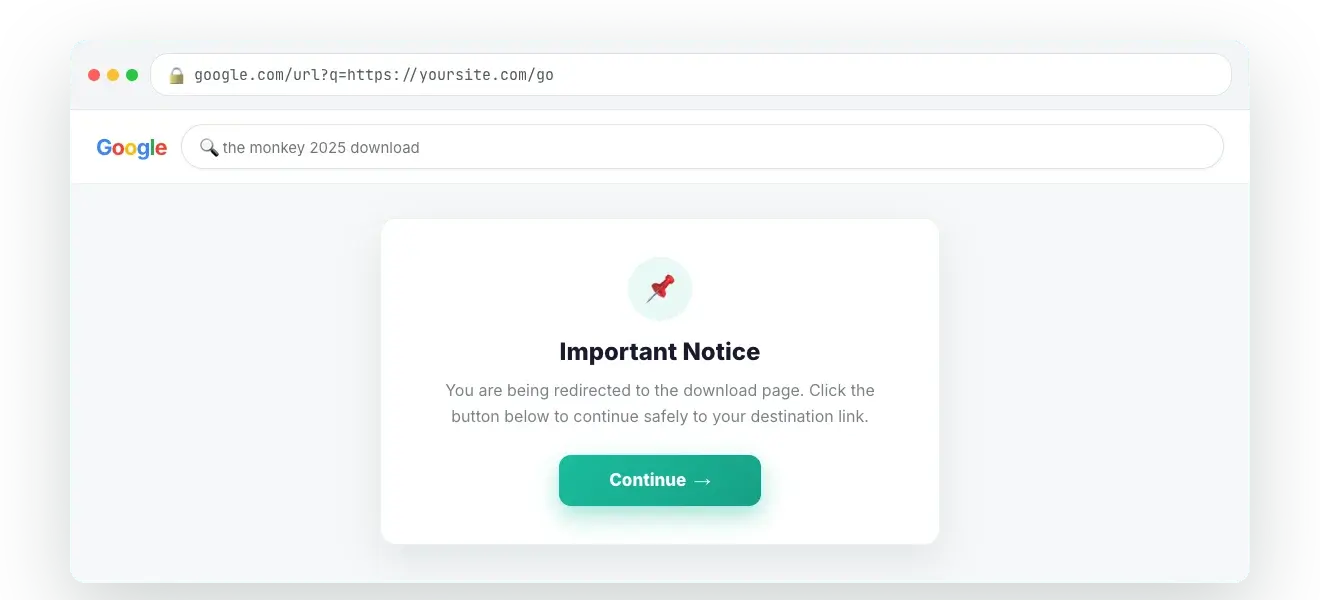
WP Safelink Google Redirect is a specialized WordPress plugin designed to intercept and transform external outbound links on your website. Instead of directly sending users to an external destination, it first redirects them through an internal, temporary landing page hosted on your domain. This interstitial page typically displays advertisements and often includes a short countdown timer before automatically forwarding the user to their intended external link. This mechanism is primarily used to bypass ad blockers, generate additional ad revenue, and improve user experience by centralizing outbound link management, all while maintaining SEO integrity and providing a secure, safe redirect WordPress solution.
At its core, the operation of a Google Redirect safelink system like WP Safelink is elegantly simple yet incredibly effective. Let’s break down the step-by-step process that occurs when a user clicks an external link managed by the plugin:
This entire process happens rapidly, often within seconds, ensuring a relatively smooth user experience while maximizing your monetization potential. The key is that the initial redirection is internal to your site, making the displayed ads appear as part of your content, which is a primary reason for its effectiveness against ad blockers.
The benefits of implementing a WP Safelink redirect system extend far beyond mere link cloaking. It’s a multi-faceted solution that addresses some of the most pressing challenges faced by WordPress site owners today. Let’s explore the compelling reasons why it’s an essential tool:
One of the most significant revenue drains for content creators is the widespread use of ad-blocking software. Studies show that a substantial portion of internet users employ ad blockers, effectively nullifying your display ad income. WP Safelink circumvents this issue by serving ads on an internal page. Since the ads are embedded directly within your site’s content and not flagged as typical third-party ad scripts, they are far less likely to be detected and blocked. This means more impressions, more clicks, and ultimately, significantly higher ad revenue for your website.
While an interstitial page might seem counter-intuitive to user experience, when implemented correctly, WP Safelink can actually enhance it. Here’s how:
While Google’s stance on link cloaking is generally cautious, a properly implemented Google Redirect safelink system can offer several indirect SEO benefits without violating guidelines:
WP Safelink offers a centralized dashboard to manage all your external links. This means you can:
Implementing WP Safelink on your WordPress site is straightforward. Here’s a practical guide to get you started, ensuring you can quickly set up a robust Google Redirect safelink system.
yourdomain.com/go/your-target-link).This is where the monetization happens.
By following these steps, you will have successfully implemented WP Safelink redirect on your WordPress site, ready to enhance monetization and streamline outbound link management.
Beyond the basic setup, WP Safelink offers a range of advanced features that can significantly optimize your Google Redirect safelink system. Leveraging these capabilities allows for greater control, better monetization, and an even smoother user experience.
Not all external links need to pass through the safelink system. For instance, you might want to exclude links to your own social media profiles, internal affiliate networks, or highly trusted sources that you prefer users to access directly. WP Safelink typically provides an option to:
facebook.com, twitter.com) that should bypass the safelink redirect.For a truly optimized monetization strategy, GEO-targeting is invaluable. This feature allows you to display different ads or even redirect users to different external links based on their geographical location. For example, you could show:
This personalization can dramatically increase ad click-through rates and conversion rates for affiliate products.
WP Safelink often doubles as a URL shortener and cloaker. This means you can:
yourdomain.com/go/product-x) for long, messy affiliate links or download links.Understanding user behavior is key to optimization. WP Safelink integrates with popular analytics platforms (like Google Analytics) or offers its own internal tracking capabilities. This allows you to monitor:
To provide a truly professional safe redirect WordPress experience, customizing the look and feel of your interstitial page is paramount. Look for options that allow you to:
By leveraging these advanced features, you can transform your basic WP Safelink redirect system into a highly optimized, user-friendly, and revenue-generating powerhouse.
While WP Safelink is designed to enhance security and user trust, its effectiveness hinges on responsible implementation. Adhering to best practices ensures your safe redirect WordPress environment remains secure, compliant, and beneficial for your users.
The quality of ads displayed on your interstitial pages directly impacts user perception. Stick to well-known and reputable ad networks like Google AdSense, Media.net, Ezoic, or others with strict ad quality policies. Avoid obscure networks that might serve low-quality, intrusive, or even malicious ads, which could erode user trust and potentially lead to penalties from search engines or ad providers.
Aggressive monetization can backfire. While increasing ad revenue is a goal, overwhelming users with too many ads, excessively long countdowns, or intrusive ad formats on your interstitial page can lead to frustration and higher bounce rates. Aim for a balanced approach: a reasonable countdown (5-10 seconds), clear ad placement, and a clean design that guides users to their destination without undue distraction.
Even with WP Safelink, the ultimate destination of your links matters. Regularly audit your external links to ensure they are still valid, relevant, and lead to safe content. Broken links or links to questionable sites can damage your SEO and user trust. Many WordPress SEO plugins offer link checking tools, or you can use dedicated external services.
If you’re serving ads, especially those involving user data (even anonymized), it’s crucial to comply with privacy regulations like GDPR (General Data Protection Regulation) and CCPA (California Consumer Privacy Act). This means having a clear privacy policy, obtaining user consent for cookies (if your ad network uses them), and ensuring your ad networks also comply with these regulations. Your interstitial page is an ideal place to remind users about your privacy policy or cookie consent.
An SSL certificate (HTTPS) is non-negotiable for modern websites. Not only is it a significant SEO ranking factor, but it also encrypts data transmitted between your users and your site, building trust. When implementing a Google Redirect safelink system, ensuring your entire domain, including the interstitial pages, is served over HTTPS is critical for a truly secure user experience.
While WP Safelink is built with security in mind, no system is entirely foolproof. Regularly monitor your site for any unexpected redirects, unauthorized content on your interstitial pages, or signs of compromise. Keep your WordPress core, themes, and all plugins (including WP Safelink) updated to the latest versions to patch any known vulnerabilities.
By adhering to these best practices, you can ensure that your WP Safelink redirect system remains a powerful, secure, and positive tool for both your website and your audience.
To truly appreciate the value of WP Safelink, it’s helpful to compare it against other common methods of handling outbound links on a WordPress site. This comparison highlights why WP Safelink is often the superior choice for monetizing and managing a safe redirect WordPress environment.
| Feature/Method | No Redirect (Direct External Link) | Manual 301/302 Redirect (e.g., via .htaccess) | Generic Link Cloaker Plugin | WP Safelink Google Redirect |
|---|---|---|---|---|
| Ease of Implementation | Very Easy (just paste link) | Complex (requires server access/technical knowledge) | Easy (plugin setup) | Easy (plugin setup & configuration) |
| Monetization Potential | None (direct to external site) | None (direct to external site) | Limited (cloaking only, no interstitial ads) | High (interstitial ads, ad blocker bypass) |
| Ad Blocker Bypass | No (ads on destination site still blocked) | N/A | No | Highly Effective (ads served from internal page) |
| User Experience | Direct, but no control/trust indicator | Direct, potentially seamless | Direct, but original URL is hidden | Controlled, branded, clear expectation (with countdown) |
| SEO Impact (Outbound Links) | Standard (passes link juice, no on-site time) | Positive (passes link juice, no on-site time) | Neutral (cloaking can be seen as manipulative if misused) | Neutral/Positive (increased on-site time, managed redirects) |
| Link Management | Manual update per link instance | Manual .htaccess updates (risky) | Centralized for cloaked links only | Centralized, automatic conversion, easy updates |
| Security & Trust (User Perception) | Low (unknown external site) | Low (unknown external site) | Moderate (hides destination, can be suspicious) | High (branded interstitial, controlled gateway, transparent) |
| Analytics & Tracking | Requires external tools | Limited to destination site analytics | Basic click tracking | Comprehensive (internal click tracking, ad performance) |
| Customization | None | None | Limited (usually just URL prefix) | Extensive (interstitial page design, ads, messages) |
| Best Use Case | General content linking | Permanent URL changes (SEO) | Simple affiliate link cloaking | Monetization, enhanced UX, link control, ad blocker circumvention |
As evident from the table, while other methods serve specific purposes, none offer the comprehensive blend of monetization, user experience enhancement, and robust link management that WP Safelink provides, especially when focused on creating a profitable and safe redirect WordPress environment.
While display advertising on the interstitial page is a primary monetization method for the WP Safelink redirect system, its capabilities extend to various other strategies. Understanding these can further diversify your income streams and maximize the value of every outbound click.
Affiliate marketing is a natural fit for WP Safelink. Instead of directly linking to a lengthy, often branded affiliate URL, you can:
yourdomain.com/go/product-name instead of a raw affiliate link. This looks more professional and trustworthy to users, potentially increasing click-through rates.The interstitial page doesn’t have to be just for external ads. You can strategically use this brief moment to promote your own:
For sponsored content where you’re linking to a partner’s site, WP Safelink can add an extra layer of value:
With proper consent and adherence to privacy regulations, the interstitial page can be used to set retargeting pixels. This allows you to build custom audiences of users who show high intent (by clicking an external link) and retarget them with highly relevant ads on other platforms. Remember to explicitly inform users about this in your privacy policy and obtain necessary consent.
By thinking creatively, WP Safelink transforms a simple redirect into a powerful, multi-channel monetization and engagement hub, making every outbound click an opportunity.
In the evolving landscape of digital publishing, merely creating great content is often not enough. To truly succeed, WordPress site owners must adopt smart strategies that enhance user experience, secure their links, and, crucially, unlock sustainable monetization. The WP Safelink Google Redirect system stands out as a powerful, all-in-one solution that addresses these critical needs.
By effectively bypassing ad blockers, offering a safe redirect WordPress environment, providing centralized link management, and opening up diverse monetization avenues, WP Safelink empowers you to regain control over your outbound links and transform them into valuable assets. It’s not just about redirecting users; it’s about optimizing every click, building trust, and ensuring your efforts are appropriately rewarded.
If you’re a seasoned publisher looking to maximize ad revenue, an affiliate marketer seeking cleaner links and better conversions, or a content creator aiming for an enhanced user journey, WP Safelink offers the tools to achieve your goals. Invest in a smarter way to manage your links and watch your website’s potential soar.
Don’t let ad blockers diminish your revenue or unmanaged links compromise your user experience. Take the first step towards a more profitable and secure WordPress website.
Click the button below to purchase WP Safelink and start transforming your outbound links into valuable assets.
As a special offer for our readers, use discount code NEWHOPE at checkout to get 25% off your WP Safelink purchase!
Join the ranks of savvy WordPress site owners who are already benefiting from the power of WP Safelink redirect and unlock your website’s full monetization potential.
Yes, WP Safelink is generally safe for SEO when implemented correctly. The plugin primarily converts external links into internal redirects before sending users to the final destination. This does not inherently harm your direct SEO rankings. In fact, by keeping users on your site longer (even for the brief interstitial page duration) and potentially reducing bounce rates, it can indirectly signal positive engagement to search engines. Always ensure the final destination links are reputable and relevant to maintain trust and authority.
WP Safelink is highly effective at bypassing most standard ad blockers. Because the ads are served from your own domain on an internal page, they are less likely to be identified and blocked by typical ad-blocking scripts designed to target third-party ad networks. While no ad-blocking solution is 100% foolproof against highly aggressive or custom ad blockers, WP Safelink significantly increases the visibility of your display ads compared to direct placement.
You can display virtually any HTML, JavaScript, or image-based ad code on the WP Safelink interstitial page. This includes ads from popular networks like Google AdSense, Media.net, Ezoic, BuySellAds, or direct advertisers. The plugin provides dedicated slots where you can paste these ad codes, giving you flexibility to choose the ad types and networks that best suit your audience and monetization goals.
WP Safelink is optimized for performance and has a minimal impact on your overall website speed. The initial redirection process is very fast, and the interstitial page itself is designed to be lightweight. Any perceived delay is typically due to the intentional countdown timer rather than significant server load. Ensuring your WordPress hosting is robust and your ad codes are optimized will further mitigate any potential performance concerns.
Join 2,000+ publishers monetising every download link since 2017. Use code NEWHOPE for 25% off — from just $9/year.