WP Safelink Link Encryption: Why It Matters for Security
On this page
Every download link on your site is a potential revenue leak. Without proper protection, visitors can bypass your monetization pages entirely. WP Safelink’s encryption system solves this problem—but many users don’t understand why it matters or how to configure it properly.
This guide explains the security principles behind link encryption and shows you how to maximize protection for your download links.
#The Problem: Exposed Download Links
Consider a typical download blog. You create a post about software, embed the download link, and add ads around it. Here’s what actually happens:
- User finds your post via Google
- User inspects page source or uses browser dev tools
- User finds the direct download URL
- User bookmarks/shares the direct link
- Future visitors skip your site entirely
The result? You did the work of creating content, but someone else (or your own visitors) bypasses your monetization. A download blog with 10,000 monthly visitors might see 30% of users bypassing safelink pages—lost ad impressions worth $50-100/month.
#How WP Safelink Encryption Works
WP Safelink transforms your download URLs using multiple layers of protection:
#Layer 1: URL Encoding
Basic Base64 encoding makes the URL unreadable at a glance. However, Base64 is easily decoded—this is just the first layer.
#Layer 2: Key-Based Encryption
WP Safelink adds your unique site key to the encryption. Without knowing your site key, the encoded URL cannot be decrypted. Even if someone copies the encoded URL, it only works on your domain.
#Layer 3: Time-Based Tokens
For maximum security, enable time-based tokens that expire after a set time and are tied to the original visitor’s IP. These URLs cannot be shared or reused.
#Layer 4: Referrer Validation
WP Safelink checks where the click came from: clicks from your site are allowed, direct URL access is blocked or redirected.
#Configuring Encryption Settings
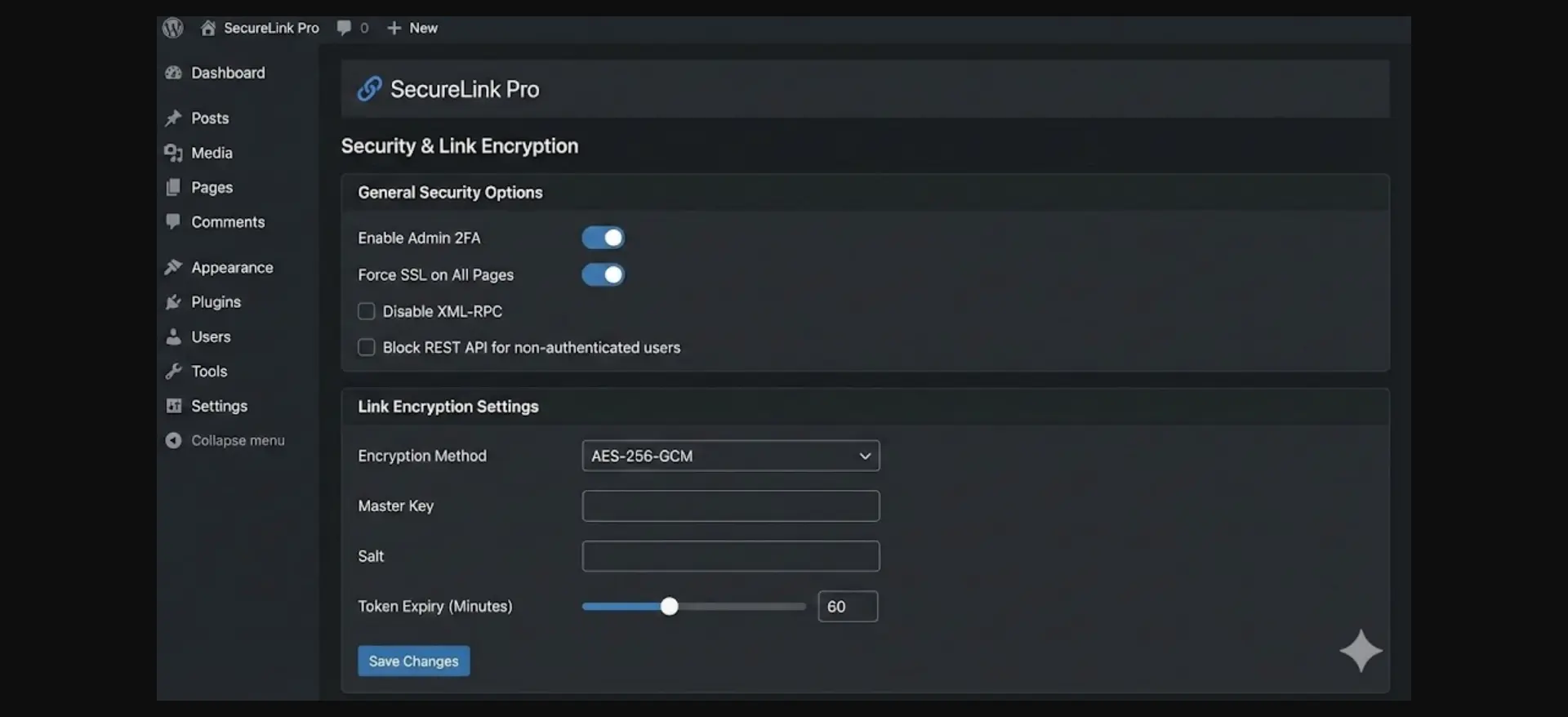
Navigate to WP Safelink → Settings → Security to access encryption options.
#Basic Encryption (Recommended Minimum)
Enable these settings: Encrypt URLs (On), Encryption Method (AES-256), Site Key (Auto-generated). This provides protection against casual bypass attempts.
#Advanced Encryption (High-Value Content)
For premium downloads or affiliate links: Time-Based Tokens (On), Token Expiry (1-24 hours), IP Binding (On), Referrer Check (Strict).
#Security Features Explained
#AES-256 Encryption
WP Safelink uses AES-256 (Advanced Encryption Standard), the same encryption used by banks, government agencies, and VPN services. AES-256 is considered unbreakable with current technology.
#HMAC Verification
Each encrypted link includes an HMAC (Hash-based Message Authentication Code) that prevents URL tampering, replay attacks, and forgery attempts.
#Anti-Bot Protection
WP Safelink includes JavaScript challenges, optional CAPTCHA integration, rate limiting, and User-Agent filtering to block known scrapers.
#Common Security Mistakes
#Mistake 1: Using Default Settings
The default “Light” encryption is meant for testing. For production, switch to “Standard” or “Strong” encryption and enable time-based tokens.
#Mistake 2: Predictable Patterns
Don’t use patterns like /go/1/, /go/2/. Use random slugs instead—WP Safelink generates random slugs automatically.
#Mistake 3: Long Token Lifetimes
Setting tokens to “never expire” defeats the purpose. Even 7 days is too long. Stick to 1-24 hours.
#Mistake 4: No HTTPS
Encryption is pointless over HTTP. Your site MUST use HTTPS—get free SSL from Let’s Encrypt.
#Testing Your Security
Perform these tests before going live:
- View Source Test: Visit a protected page, view source, confirm no raw download URLs are visible
- Direct Access Test: Copy an encrypted link, open in incognito browser—should redirect or show error
- Expiry Test: Generate a link with short expiry, wait, confirm link no longer works
#Security Best Practices Checklist
Before going live, verify:
- AES-256 encryption enabled
- Time-based tokens active
- Token expiry set appropriately
- HTTPS enforced site-wide
- Referrer validation configured
- Bot protection enabled
- Direct file access blocked
- Random slugs (not sequential)
#Conclusion
Link encryption isn’t optional for download sites—it’s essential. Without proper protection, you’re leaving money on the table and making it easy for others to profit from your content.
WP Safelink provides enterprise-grade encryption that prevents link sharing and bypass, blocks bots and scrapers, validates legitimate traffic, and integrates with your existing setup.
Take 10 minutes to configure these settings properly. The protection they provide is worth far more than the setup time.
Security is an ongoing process. Review your settings quarterly and after any major WordPress updates.
Turn your traffic into revenue with WP Safelink
Join 2,000+ publishers monetising every download link since 2017. Use code NEWHOPE for 25% off — from just $9/year.