One click, three to five ad pages 1:05

One click, three to five ad pages 1:05
Monetizing a WordPress website with Google AdSense is a common goal for many site owners. However, simply placing ad units on your pages often yields modest results. In an increasingly competitive online landscape, finding innovative strategies to maximize your ad revenue is crucial. What if there was a method that not only enhanced your AdSense earnings but also subtly guided user engagement? Enter safelink pages – a powerful, yet often overlooked, technique that can significantly boost your income. This guide will explore how you can leverage safelink pages to potentially double your AdSense earnings, transforming your website into a more lucrative venture.
Safelink pages are interstitial pages that act as a gateway between a user clicking an outbound link on your site and reaching their final destination. This method can double AdSense earnings by significantly increasing ad impressions and click-through rates, offering users a quick detour that maximizes ad exposure before they proceed to their desired content. It’s a strategic approach to increase AdSense revenue by ensuring more visibility for your ads, making it a powerful safelink AdSense strategy.
At its core, the safelink AdSense strategy is about optimizing user flow to maximize ad exposure. Imagine your website offers valuable downloadable content, external resource links, or even affiliate links. Traditionally, a user clicks a link and is immediately taken off your site. While this is straightforward, it represents a missed opportunity for further monetization.
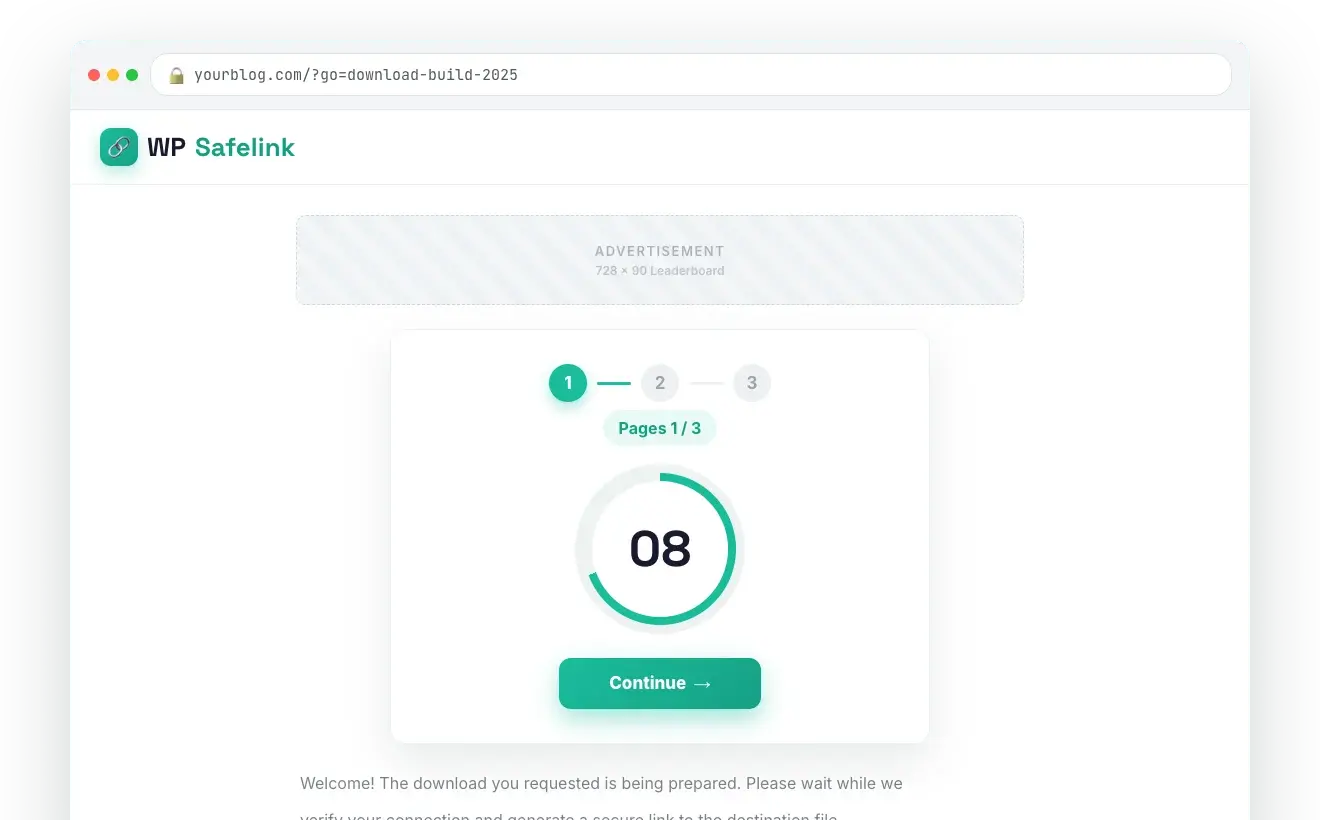
With safelink pages, this interaction is re-routed. When a user clicks an external or downloadable link, they are first directed to a dedicated “safelink” page on your domain. This page serves a specific purpose: to present them with relevant information, a brief waiting period (e.g., 5-10 seconds), and, critically, several well-placed AdSense ad units. After the timer expires, the user is automatically redirected to their intended destination.
Every visit to a safelink page counts as an additional pageview on your site. Since AdSense ads are displayed on these pages, this directly translates to more ad impressions. If your site generates hundreds or thousands of outbound clicks daily, routing even a fraction of these through safelink pages can lead to a substantial increase in overall ad impressions, which is a primary factor in how Google calculates your earnings. More impressions mean more opportunities for users to see and click your ads, paving the way to potentially double AdSense earnings.
Unlike cluttered content pages where ads might blend into the background, safelink pages are designed with a singular focus. Users landing on these pages are typically in a state of anticipation, waiting for their download or external link. During this short waiting period, their attention is more focused on the page’s elements, including the ads.
Well-designed safelink pages can present ads in a less intrusive yet highly visible manner. Because the user’s primary goal (the download/link) is momentarily paused, they are more likely to notice and, if interested, click on the ads presented. This focused attention can lead to a higher click-through rate (CTR) compared to ads placed amidst dense content, significantly contributing to an increase AdSense revenue.
The implementation of a strategic safelink AdSense strategy offers several distinct advantages that can profoundly impact your bottom line. It’s not just about adding more ads; it’s about intelligent placement and optimizing the user journey.
Every time a user leaves your site, that’s a moment of potential monetization lost. Safelink pages convert this “exit intent” into an additional earning opportunity. The brief waiting period isn’t just a delay; it’s a dedicated window where the user’s attention is captured and directed, making them more receptive to ads. This strategic capture of otherwise lost attention is key to seeing your AdSense earnings multiply.
While safelink pages don’t directly circumvent ad blockers, they can indirectly help. Users who reach a safelink page are typically highly motivated to access the content they clicked for. If they encounter an ad blocker message or if the ads are crucial for the page’s functionality (e.g., releasing the download link), they might be more inclined to temporarily disable their ad blocker or reconsider its use for your site, especially if your content is highly valued. Furthermore, well-integrated native-style ads on these pages can sometimes evade simpler ad-blocking scripts.
While it might seem counterintuitive, a well-implemented safelink strategy can actually enhance user engagement. If the safelink page offers a clear purpose, a minimal wait time, and relevant, non-intrusive ads, users often perceive it as a standard part of the process, especially for accessing premium or popular content. The extra pageview contributes to a higher “time on site” metric, which Google often favors in its ranking algorithms. This can further amplify your overall site performance and, in turn, your AdSense potential.
Instead of relying solely on ads within your primary content, safelink pages allow you to consolidate additional monetization efforts. You can use these pages not just for AdSense but also for displaying other relevant information, quick announcements, or even small internal promotions, all while keeping the primary goal of increasing AdSense revenue at the forefront. This integrated approach is a sophisticated safelink AdSense strategy for today’s webmasters.
Implementing a safelink AdSense strategy manually can be a complex and time-consuming endeavor, especially for WordPress users. This is where a dedicated plugin like WP Safelink comes into play. WP Safelink simplifies the entire process, allowing you to easily create and manage safelink pages on your WordPress site, turning external links into powerful revenue generators. It’s designed specifically to help you increase AdSense revenue with minimal fuss.
WP Safelink is a robust WordPress plugin engineered to automate the conversion of external links on your website into safelink pages. It offers a suite of features that make it incredibly effective for maximizing ad impressions and CTRs. You can learn more and get your copy of this powerful plugin at Themeson’s WP Safelink page.
Ready to start transforming your outbound links into lucrative AdSense opportunities? Follow these detailed steps to implement a powerful safelink AdSense strategy using WP Safelink.
Your first step is to acquire the WP Safelink plugin.
Plugins > Add New.Upload Plugin button.Install Now.Activate Plugin.Once activated, you’ll find a new menu item for “WP Safelink” in your WordPress dashboard.
WP Safelink > Settings./go/ or /redirect/).Ads > By ad unit > Display ads).To truly appreciate the potential of a safelink AdSense strategy, it’s helpful to compare it against traditional AdSense implementation. This table highlights key differences and why safelinks can be a useful tool for your income.
| Feature/Metric | Traditional AdSense Setup | Safelink AdSense Strategy |
|---|---|---|
| Ad Impressions | Limited to actual content page views. | Significantly higher; each outbound click generates an additional page view on the safelink page. More opportunities to increase AdSense revenue. |
| Click-Through Rate (CTR) | Varies greatly; ads compete with main content for attention. | Potentially higher; users are focused during the brief waiting period, making them more attentive to ads. Directly helps to double AdSense earnings. |
| User Experience (Initial thought) | Direct, immediate redirection. | Brief, intentional delay (e.g., 5-10 seconds) before redirection. |
| User Experience (Actual Impact) | Seamless, but misses a monetization point. | Can be seen as slightly delayed, but if content is highly valued and the process is clear, users accept it. Enhances monetization. |
| Monetization Focus | On-page content consumption. | Outbound link engagement, converting exit intent into revenue. A key part of a robust safelink AdSense strategy. |
| Setup Complexity (Manual) | Relatively simple: paste ad code. | Complex: requires custom page creation, redirection logic, timer implementation. (Simplified with WP Safelink). |
| Revenue Potential | Standard, dependent on page views and CTR. | Significantly higher potential due to increased impressions and focused attention, leading to a strong chance to double AdSense earnings. |
| Value Proposition | Monetize content users read. | Monetize the path users take to external resources/downloads. |
Simply installing WP Safelink and enabling it isn’t enough to guarantee optimal results. To truly double AdSense earnings and sustain them, you need to follow best practices for both technical implementation and user experience.
While the goal is to increase AdSense revenue, annoying your users will lead to higher bounce rates and damage your site’s reputation in the long run.
Where and how you place your AdSense units on the safelink page is critical.
Safelink pages are most effective for specific types of content.
Analytics are your best friend in refining your safelink AdSense strategy.
Always ensure your implementation adheres to Google AdSense program policies.
When considering a safelink AdSense strategy, two primary concerns often arise: AdSense policy compliance and potential negative impact on user experience. Let’s address these head-on.
Yes, when implemented correctly and ethically, a safelink strategy is generally compliant with AdSense policies. Google’s policies focus on providing a good user experience and preventing artificial inflation of ad impressions or clicks.
Tools like WP Safelink are designed with these compliance requirements in mind, providing a structured way to implement the strategy without violating AdSense terms.
This is a valid concern, and the answer largely depends on your implementation.
Ultimately, if implemented thoughtfully, a safelink strategy can significantly increase AdSense revenue without alienating your audience. It’s about finding the right balance between monetization and user experience.
The power of a safelink AdSense strategy extends across various website types and niches. Here are a few examples where this method can shine and help you to double AdSense earnings:
The common thread is websites that serve users by providing access to external resources or downloadable content. By intelligently placing a safelink page in this user journey, you convert a simple exit into a potent monetization opportunity, directly helping to increase AdSense revenue and get closer to your goal to double AdSense earnings.
In the dynamic world of online monetization, simply “setting and forgetting” your AdSense units is no longer a viable strategy for significant growth. The intelligent application of a safelink AdSense strategy presents a powerful, yet often underutilized, pathway to substantially increase AdSense revenue and potentially double AdSense earnings. By strategically interposing a dedicated, ad-optimized page between your content and external links, you transform otherwise lost exit opportunities into valuable ad impressions and clicks.
This approach is not about trickery or compromising user experience; it’s about smart monetization that values user flow while maximizing your earning potential. With tools like WP Safelink, the complexity of implementing such a strategy is drastically reduced, making it accessible to any WordPress site owner aiming for higher profits. By focusing on user experience, adhering to AdSense policies, and continuously optimizing, you can unlock a new level of profitability for your website. Don’t let valuable outbound traffic leave your site unmonetized – empower your website to earn more.
Stop leaving money on the table. The opportunity to significantly increase AdSense revenue and truly double AdSense earnings on your WordPress site is within reach. By implementing a smart safelink AdSense strategy with WP Safelink, you’re not just adding more ads; you’re optimizing your entire monetization funnel, turning every outbound click into a powerful earning opportunity.
WP Safelink provides the robust, user-friendly tools you need to transform your website’s earning potential. Don’t miss out on maximizing your ad revenue.
Click here to get WP Safelink now and start your journey towards significantly higher AdSense income. Use discount code NEWHOPE at checkout to get 25% off your purchase!
Explore the full features and benefits of WP Safelink and join the ranks of smart publishers who are making their AdSense work harder for them.
Yes, when implemented correctly and ethically, a safelink strategy is generally compliant. The key is to ensure transparency, provide clear navigation, and never force or encourage accidental clicks on ads. The safelink page should offer a clear path to the destination after a reasonable countdown, and ads must be distinct from the continue button. Tools like WP Safelink help ensure compliance through proper setup and functionality.
The impact on user experience largely depends on your implementation. A well-designed safelink page with a short, reasonable timer (e.g., 5-10 seconds), clear instructions, and non-intrusive ad placement is often well-received by users, especially if your content is valuable. Conversely, long timers, cluttered pages, or confusing navigation can lead to frustration. Prioritizing user experience through thoughtful design and settings is crucial for long-term success.
Websites that frequently link to external resources or offer downloadable content are ideal candidates. This includes software download sites, tutorial and resource portals, ebook and template repositories, and even blogs that consistently link out to other websites or tools. Any site where users regularly click outbound links can significantly increase AdSense revenue using this strategy.
You can often see an immediate impact on ad impressions and potentially CTR once safelink pages are properly integrated and your site generates outbound clicks. Significant increase AdSense revenue can be observed within a few days to a few weeks, depending on your site’s traffic volume and the number of outbound links converted. Consistent monitoring and optimization will help you realize the full potential to double AdSense earnings over time.
Join 2,000+ publishers monetising every download link since 2017. Use code NEWHOPE for 25% off — from just $9/year.