WP Safelink vs Adlinkfly: Complete Comparison for Link Monetization
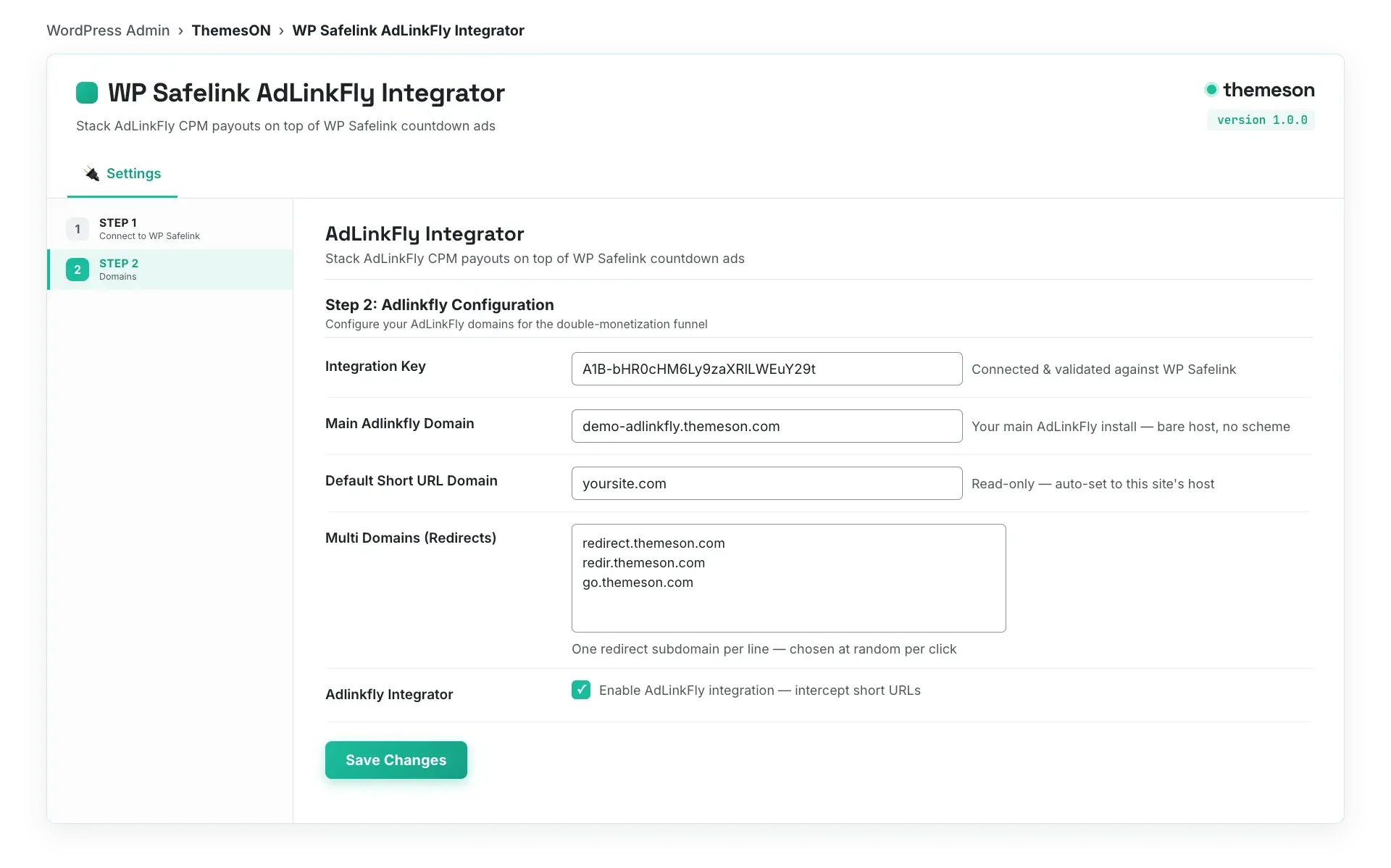
0:56Stack an AdLinkFly shortener on topClose
Stack an AdLinkFly shortener on top0:56
On this page
Monetizing your online content has become a paramount goal for many WordPress site owners, bloggers, and digital entrepreneurs. In an era where ad blockers are prevalent and user attention is fragmented, finding effective and sustainable ways to generate revenue from your links is crucial. This is where specialized tools designed for link monetization come into play. Two prominent solutions often considered by WordPress users are WP Safelink and Adlinkfly.
While both aim to help you earn money from your outbound links, they approach the task from fundamentally different angles, offering distinct features, advantages, and challenges. Understanding these differences is key to making an informed decision that aligns with your specific needs, technical expertise, and monetization strategy.
This comprehensive article will delve deep into WP Safelink vs Adlinkfly, providing a complete comparison to help you navigate their functionalities, understand their pricing models, and ultimately decide which solution is the superior choice for your WordPress site’s link monetization goals.
#What is the Core Difference Between WP Safelink and Adlinkfly?
WP Safelink is a dedicated WordPress plugin designed to help site owners monetize outbound links by smoothly integrating ad networks, bypassing ad blockers, and creating customizable safelinks directly within their WordPress environment. Adlinkfly, conversely, is a self-hosted PHP script that allows you to create your own comprehensive URL shortener platform, complete with user management, advertising systems, and advanced customization, requiring a separate hosting setup. While WP Safelink focuses on simplifying link monetization on your existing WordPress site, Adlinkfly empowers you to build a standalone link-shortening and monetization service.
#Understanding Link Monetization for WordPress Sites
Before we dissect WP Safelink and Adlinkfly, let’s establish a clear understanding of link monetization. At its core, link monetization is the process of generating revenue from clicks on links shared on your website. This can manifest in several ways:
URL Shorteners: Services that shorten long URLs and display an interstitial ad page before redirecting the user to the destination. Publishers earn a share of ad revenue for each click.
Affiliate Marketing: Earning commissions by promoting products or services through unique affiliate links.
Direct Advertising: Selling ad space on your site or within your content directly to advertisers.
Safelinks/Gateway Pages: Creating a temporary, ad-supported landing page that users must pass through before accessing the final content. This is where WP Safelink excels.
For WordPress site owners, implementing effective link monetization strategies can transform your content into a consistent revenue stream, moving beyond traditional banner ads or relying solely on external ad networks. The challenge often lies in finding a solution that is easy to integrate, user-friendly, and capable of overcoming common hurdles like ad blockers without compromising user experience.
#Closer Look: WP Safelink – The WordPress Link Monetization Powerhouse
WP Safelink is a premium WordPress plugin specifically designed to help website owners monetize their outbound links efficiently. It transforms ordinary external links on your site into “safelinks” that, when clicked, direct users through an interstitial page displaying advertisements before leading them to their intended destination. The brilliance of WP Safelink lies in its ability to do this smoothly within the WordPress environment, offering a robust set of features aimed at maximizing ad impressions and revenue.
When a visitor clicks an external link on your WordPress site, WP Safelink intervenes. Instead of directly redirecting them, the plugin sends the user to a customizable intermediary page hosted on your domain. This page typically displays a countdown timer, along with ad units from your chosen ad networks. Once the countdown concludes, the user can click a “Get Link” or “Continue” button to proceed to the original destination.
This process serves multiple purposes: it creates additional page views for ad impression opportunities, acts as a barrier against bots or spam, and most importantly, allows for the display of ads that might otherwise be blocked by conventional ad blockers.
Ad Blocker Bypass: One of its most significant features, WP Safelink is designed to bypass many ad blockers, ensuring your ads are seen and improving your revenue potential. It does this by serving ads directly from your server within your content, making them harder for ad blockers to detect.
Automatic Link Generation: You can configure WP Safelink to automatically convert all external links on your site into monetized safelinks, or specify certain domains to include/exclude.
Multiple Ad Network Integration: Supports various ad networks like Google AdSense, PropellerAds, Media.net, and others. You can easily paste your ad codes into the plugin settings.
Customizable Safelink Pages: Offers flexible options to design your interstitial pages. You can control the layout, countdown timer duration, text, and add custom CSS/HTML to match your site’s branding.
Shortlinks/Custom Slugs: Generate short, memorable URLs for your safelinks, enhancing user experience and shareability.
Advanced Statistics: Provides detailed analytics on link clicks, ad impressions, and redirects, allowing you to track performance and optimize your strategy.
Security Features: Includes anti-bot measures like reCAPTCHA to prevent fraudulent clicks and ensure legitimate traffic.
Excluded Domains: Allows you to specify domains that should not be converted into safelinks, useful for internal links or trusted external resources.
No Database Usage: Unlike many plugins that bloat your database, WP Safelink is designed to be lightweight and efficient, minimizing impact on site performance.
WP Safelink operates on a licensing model, typically offered as an annual subscription with different tiers based on the number of sites you can use it on. This provides access to updates and support. While exact pricing may vary, common tiers might look like this (example pricing):
Single Site License: Approximately $49/year
3-Site License: Approximately $99/year
Unlimited Sites License: Approximately $199/year
This makes it an accessible option for individuals and agencies alike, providing a cost-effective way to integrate a powerful link monetization system directly into their WordPress workflow. You can find the most current pricing details and purchase options on the official WP Safelink product page.
No need for separate hosting or complex server setup.
Regular updates and dedicated support from Themeson.
Cons:
Annual subscription cost.
Relies on your existing WordPress hosting infrastructure.
The user experience of going through an interstitial page might not be preferred by all visitors, though this is inherent to most link monetization methods.
Adlinkfly is not a WordPress plugin; rather, it’s a powerful and feature-rich PHP script designed to allow anyone to create their own complete URL shortener and ad-based monetization platform. It’s often compared to popular ad-based URL shorteners like Shorte.st or AdFly, but with Adlinkfly, you own and control the entire system. It includes features for both publishers (who shorten links and earn money) and advertisers (who pay to display ads on shortened links).
Once installed on your web server, Adlinkfly functions as a standalone website. Users (publishers) can register an account, shorten their links using your platform, and then share those shortened links. When someone clicks an Adlinkfly-shortened link, they are directed to an interstitial page on your Adlinkfly site, which displays ads. After a few seconds, they can skip the ad and proceed to the final destination. The Adlinkfly platform then tracks these clicks and impressions, calculating earnings for the publisher.
Beyond just publishers, Adlinkfly also has a comprehensive advertiser system. Advertisers can create campaigns, target specific audiences, and pay to have their ads displayed on the interstitial pages. You, as the Adlinkfly platform owner, earn a percentage of these advertising revenues and manage the entire ecosystem.
Complete URL Shortener System: Full functionality to shorten, manage, and track links.
Publisher System: Allows users to register, shorten links, view statistics, and request withdrawals.
Advertiser System: Enables advertisers to create ad campaigns, choose ad types (interstitial, banner, pop-up), target demographics, and manage their spending.
Multiple Ad Types: Supports various ad formats, giving flexibility for monetization.
Withdrawal System: Integrated payment gateways (e.g., PayPal, Skrill, Payoneer) for publishers to withdraw their earnings.
CAPTCHA Integration: Helps prevent bot traffic and ensures legitimate clicks.
Referral System: Earn commissions by referring new publishers and advertisers.
Themes and Customization: Comes with multiple themes and extensive customization options to brand your platform.
Comprehensive Admin Panel: Full control over users, links, ads, payments, settings, and more.
GDPR Compliance: Tools and features to help you comply with data privacy regulations.
API for Developers: Allows integration with other applications and services.
Adlinkfly is primarily sold as a one-time purchase script on marketplaces like CodeCanyon. The typical cost for a regular license is around $59 USD. This one-time fee grants you lifetime access to the script and usually includes 6 months of support, with an option to extend support. While the initial purchase is one-off, you will incur ongoing costs for hosting, domain names, and potentially server maintenance.
You want to build an entirely new business as a URL shortener service provider, inviting other publishers to use your platform.
You possess strong technical skills in server administration, PHP, and MySQL, or have access to such expertise.
You are comfortable managing your own server environment, including security, backups, and updates.
You have a significant budget for hosting and marketing to attract both publishers and advertisers to your new platform.
You desire complete control and ownership over every aspect of your link monetization system.
Your goal is to become an ad network provider, rather than just a publisher.
For the vast majority of WordPress site owners looking to enhance their existing site’s monetization without diving into complex server management or building a new platform from scratch, WP Safelink is unequivocally the better choice. It’s built for WordPress, by WordPress experts, to solve a specific problem for WordPress users.
Regardless of whether you choose WP Safelink or Adlinkfly, the success of your link monetization strategy depends on several best practices:
Quality Content is King: Ensure your content remains valuable and engaging. Users are more likely to tolerate an interstitial ad if the destination content is high quality.
Strategic Link Placement: Don’t overload your content with too many monetized links. Place them naturally where they add value.
User Experience: Keep countdown timers reasonable (e.g., 5-10 seconds). Too long, and users might abandon the page.
Ad Network Diversification: Don’t rely on just one ad network. Experiment with different ones to find those that perform best for your audience and niche.
Monitor Performance: Regularly check your analytics (both from your monetization tool and Google Analytics) to understand what’s working and what’s not.
Transparency: While not always required, sometimes a small disclaimer that links are monetized can build trust with your audience.
A/B Testing: Test different ad placements, ad networks, and even safelink page designs to optimize your earnings.
The choice between WP Safelink and Adlinkfly is a clear one, primarily dictated by your role and technical aspirations. If you are a WordPress site owner seeking to effortlessly integrate a robust link monetization solution directly into your existing website, capitalize on your outbound links, and effectively combat ad blockers, WP Safelink is the ideal, user-friendly plugin for you. It simplifies the entire process, allowing you to focus on content creation while generating passive income.
On the other hand, if your ambition is grander – to build and manage your own comprehensive URL shortener platform, recruit publishers, attract advertisers, and oversee an entire advertising ecosystem – then Adlinkfly offers the necessary tools, albeit with a significantly steeper learning curve and greater ongoing commitment to server management and marketing.
For the vast majority of WordPress users, the simplicity, direct integration, and powerful ad blocker bypass capabilities of WP Safelink make it the superior and more practical choice for immediate and effective link monetization.
Don’t let ad blockers diminish your potential earnings. Take control of your link monetization strategy today with WP Safelink. Designed specifically for WordPress, it offers an excellent combination of ease of use, powerful features, and effective ad blocker bypass.
Get started now and transform your outbound links into a reliable revenue stream.
Click here to purchase WP Safelink and supercharge your earnings!
Use discount code NEWHOPE at checkout to get 25% off your purchase.
While technically possible, it’s generally not recommended to use both for the same set of links. WP Safelink is for monetizing links on your WordPress site, while Adlinkfly is for building a separate URL shortener platform. You could, for instance, use WP Safelink on your main blog and then run an Adlinkfly platform on a different subdomain or website. However, managing two distinct systems can be complex and might dilute your monetization focus. For most WordPress users, choosing one dedicated solution for their specific need is more efficient.
Which is better for beginners in link monetization?
For beginners, WP Safelink is hands down the easier and more accessible option. Its WordPress plugin nature means installation and configuration are straightforward, requiring minimal technical knowledge beyond basic WordPress usage. Adlinkfly, being a self-hosted script, demands significant expertise in server management, database setup, and ongoing maintenance, making it challenging for newcomers.
How do these tools bypass ad blockers?
WP Safelink uses intelligent techniques to serve ads directly from your server, often disguising them as part of your content. This makes it difficult for traditional ad blocker filters, which typically target well-known ad network domains or script patterns, to detect and block them. Adlinkfly, as a platform, doesn’t inherently bypass ad blockers on its own; its effectiveness against ad blockers depends on the specific ad networks you integrate and how your server is configured to deliver those ads. However, by creating a unique, self-hosted interstitial page, both methods introduce a less predictable pathway for ad blockers to target.
What are the potential downsides or risks of using link monetization tools?
The primary downside is the potential impact on user experience. Redirecting users through an interstitial page, even for a few seconds, can sometimes be perceived as intrusive. If not implemented carefully (e.g., too many ads, long countdowns, confusing navigation), it could lead to higher bounce rates or user dissatisfaction. There’s also the risk of potential penalties from search engines if the monetization strategy is deemed manipulative or excessively aggressive. Always prioritize a balance between revenue generation and providing a good user experience. For more insights on digital monetization, you can explore other articles on the Themeson Blog.
Turn your traffic into revenue with WP Safelink
Join 2,000+ publishers monetising every download link since 2017. Use code NEWHOPE for 25% off — from just $9/year.