Double Monetization with WP Safelink Pro
Quick answer: AdSafelink can be paired with a WP Safelink Pro site so that a single visitor click earns on two ad surfaces instead of one. This is an optional, PRO-only feature:...
On this page
AdSafelink can be paired with a WP Safelink Pro site so that a single visitor click earns on two ad surfaces instead of one. This is an optional, PRO-only feature: when it is connected, every visit to one of your AdSafelink short links runs through your AdSafelink interstitial and your WP Safelink Pro countdown / AdSense page before the visitor reaches the destination. This guide explains what double monetization is, how to enable it in a few plain steps, how it works under the hood, and how to fix the handful of things that can go wrong.
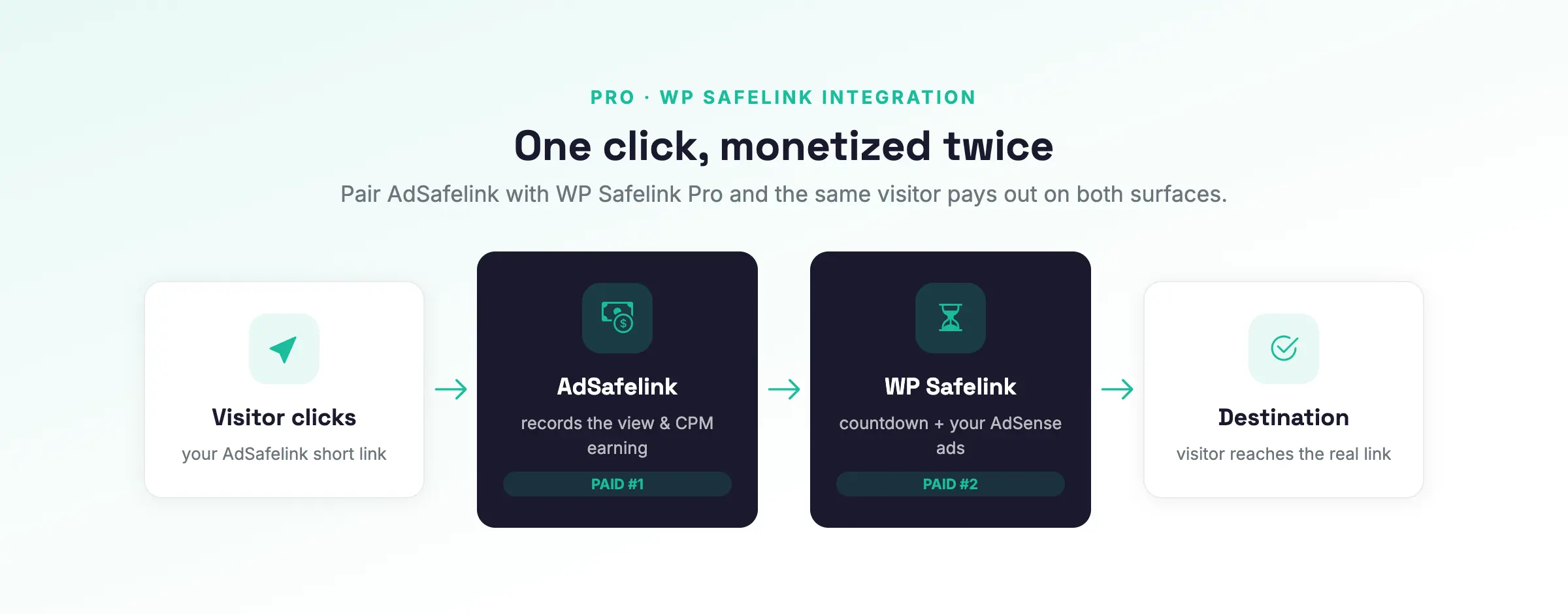
#What double monetization is (and why it pays twice)
Normally an AdSafelink short link is monetized once: the visitor lands on your interstitial, the earning engine credits the click, and the visitor is released to the destination. Double monetization inserts a second paid step in the middle of that same flow.
When AdSafelink is paired with a WP Safelink Pro site, a single click traverses this loop:
- AdSafelink interstitial — the visitor opens your AdSafelink short link and sees your AdSafelink interstitial, banners, and countdown. AdSafelink runs its own earning engine here (country-CPM payout, referral credit, and a statistics row for the click).
- WP Safelink countdown / AdSense — instead of releasing the visitor straight to the destination, AdSafelink hands them off to your paired WP Safelink Pro landing page. There the visitor goes through the WP countdown timer and your AdSense placements.
- Destination — when the WP countdown completes, the visitor is returned to AdSafelink, which confirms the pass and releases them to the real destination URL.
The visitor experiences this as one continuous flow (short link → interstitial → countdown → destination). You collect ad revenue on both surfaces from the same click — one alias, two monetization passes, with earnings logged on both sides. There is no second set of links to manage and no duplicated content.
A key design goal: the handshake works against an already-deployed, unmodified WP Safelink Pro install. AdSafelink speaks the exact handoff protocol that WP Safelink Pro already implements, so nothing on the WordPress side needs new code — only a configuration toggle.
#Requirements
- An AdSafelink install you administer (you will use Admin → Integrations).
- A separate WP Safelink Pro WordPress site that is licensed as PRO. On a free or unlicensed WP Safelink install the handoff hooks are not registered and the loop silently does nothing.
- The WP Safelink Pro site must be reachable over the public internet from your AdSafelink server (the connect step makes a server-to-server request to the WP site).
#Operator pairing — step by step
You pair once per WP site. There are three short stages: configure WordPress, connect AdSafelink, then test the loop.
#Step 1 — On WP Safelink Pro: enable the handoff and copy the key
- In WordPress, open WP Safelink Pro → Settings. Confirm the plugin is licensed as PRO (the handoff is a PRO feature).
- Find the integration handoff option and enable it. This is what registers the return-hop hooks that move the visitor through the countdown and bounce them back to AdSafelink.
- Set the handoff target URL to your AdSafelink site URL (for example
https://your-site.com). This tells WordPress where to send the visitor back to after the countdown completes. - Open the Integration tab and copy the Integration Key. It looks like
XXX-XXXXXXXXXXXXXXXXXXXXXXXX— a short 3-character prefix, a single hyphen, then a longer encoded blob. This key encodes your WP site’s own address and doubles as proof that you own that site. Copy it exactly; do not trim, re-wrap, or URL-encode it.
#Step 2 — On AdSafelink: one-click Connect WP Safelink
Log into AdSafelink as an administrator and open Admin → Integrations. In the Connect WP Safelink panel, paste the Integration Key you copied and submit.
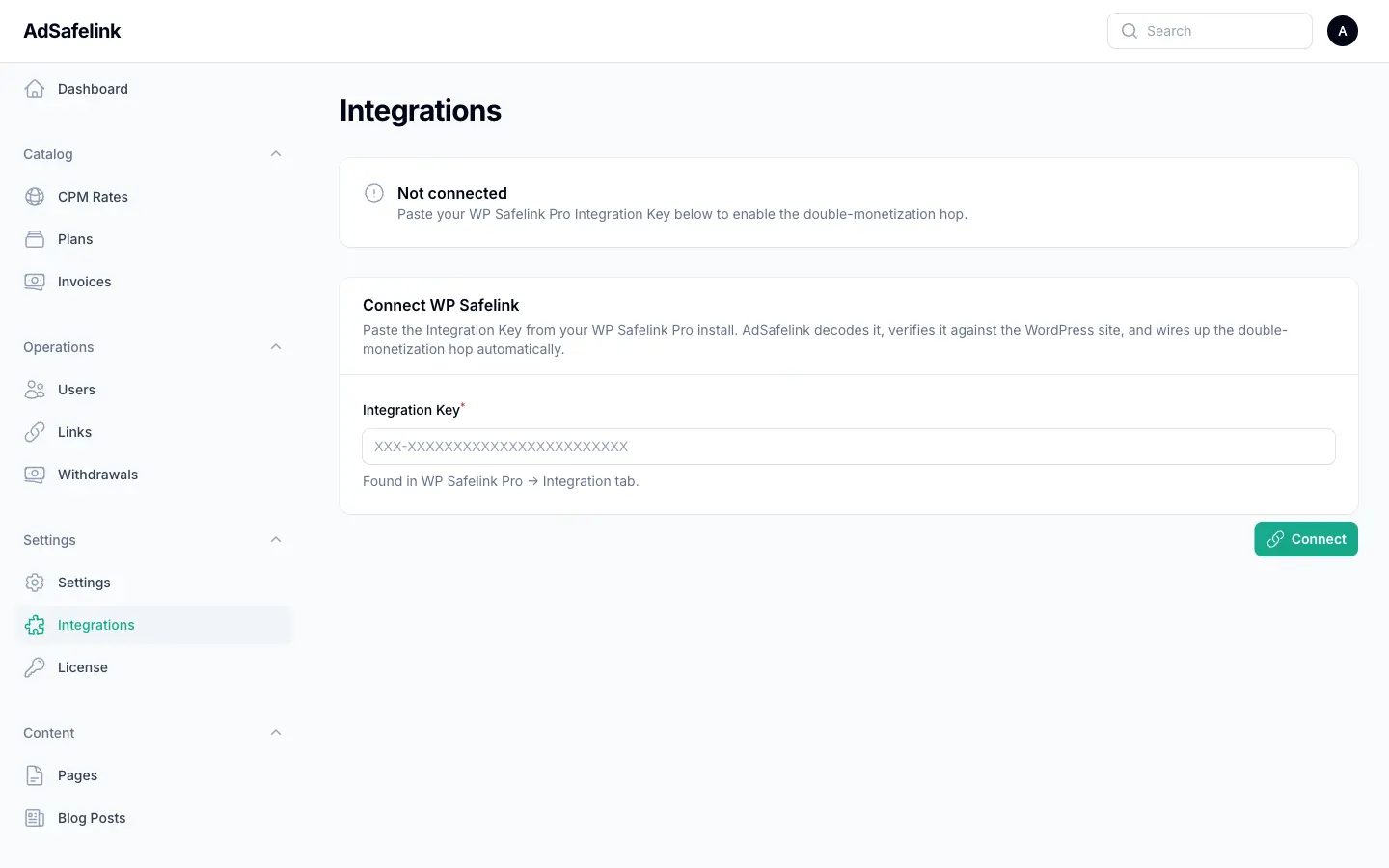
AdSafelink does the rest for you:
- It decodes the key locally to recover your WP site URL, and checks that the result is a valid
httporhttpsaddress. - It round-trips the same key back to your WP site’s public validate endpoint to confirm the key really belongs to a reachable WP Safelink Pro install whose address matches.
- On success, it wires up the integration automatically — recording the WP site URL, deriving the shared secret, enabling the handoff, and marking the integration as connected. You never copy a secret by hand; the shared secret is derived from the WP site URL, so it is identical on both sides as long as the URL matches exactly.
The Integrations screen then shows your WP site as connected. If the round-trip fails or the site is unreachable, AdSafelink shows the error and saves nothing — fix the issue and retry. You can later use Disconnect on the same screen to clear the integration completely.
#Step 3 — Test the loop
- Pick or create any AdSafelink short link and open it in a browser.
- You should see the AdSafelink interstitial and countdown as usual.
- On release, instead of going straight to the destination, the browser hops to the WP Safelink countdown page.
- Complete the WP countdown / AdSense page.
- WordPress returns you to AdSafelink, which verifies the pass and releases you to the real destination URL.
Then confirm earnings on both sides:
- AdSafelink — a statistics row for that alias with a recorded view and (where the visitor’s country resolves to a payout) publisher earnings.
- WP Safelink Pro — the countdown view / AdSense impression recorded in the WP plugin’s own statistics.
If the visitor reaches the destination but skips the WP countdown, the handoff did not engage — see Troubleshooting below. This is almost always a site-URL mismatch or a WP site that is not PRO with the handoff enabled.
#Turning the pairing on and off
You do not have to disconnect to pause double monetization. On Admin → Integrations you can disable the WP Safelink handoff while keeping the connection configured; AdSafelink then serves its own interstitial and redirects straight to the destination (single monetization). Re-enable it at any time to resume the loop. Use Disconnect only when you want to clear the pairing entirely.
#How it works under the hood
The pairing rides on a single signed token that is passed back and forth between the two sites — a proof that the visitor actually completed the WP countdown. No WordPress code changes are required because AdSafelink implements the same handoff protocol WP Safelink Pro already uses.
The flow uses a status value that moves from 0 to 1:
- First hop (AdSafelink → WordPress). When the visitor is released from the AdSafelink interstitial, AdSafelink builds a small signed token describing the click with
status = 0(“not yet passed”) and a timestamp, then redirects the visitor to your WP landing page with that token attached as adataparameter. - WordPress side. WP Safelink Pro reads the token, flips the status to
1, re-signs it, runs the visitor through the countdown and AdSense page, and then redirects back to your AdSafelink short link with the updated token. - Return hop (WordPress → AdSafelink). AdSafelink verifies the returned token and accepts it only if the status is
1, the link alias matches, and the round trip completed within a 5-minute window. Only a validstatus = 1token releases the visitor to the destination and credits the earning.
Because the token is signed with a secret derived from the WP site URL, a visitor cannot forge a completed pass — they do not hold the secret. The 5-minute window is generous enough to cover the real time a visitor spends on the countdown, while still rejecting stale or replayed tokens.
#Troubleshooting
Most issues come down to two things: the WP site URL must match exactly, and the WP site must be PRO with the handoff enabled.
| Symptom | Cause and fix |
|---|---|
| Visitor reaches the destination but skips the WP countdown. | The handoff did not engage, so WordPress quietly fell back to a normal page. Almost always a site-URL mismatch (below) or the WP site is not PRO / the handoff is not enabled (below). |
| The WP site URL must match byte-for-byte. | The shared secret is derived from the WP site’s address, so the two sites must agree on it exactly. A difference in scheme (http vs https), www (present vs absent), or a trailing slash produces a different secret, and the token fails to verify with no visible error — just a bypass. AdSafelink stores the URL exactly as encoded in the key and never rewrites it, so fix the mismatch at the source (your WordPress site’s address setting) and re-connect with a fresh key. |
| “The WP site rejected the key” on Connect. | The WP validate endpoint is an identity check: it confirms only when the key decodes back to that exact site’s own address. Any change to the bytes (scheme, www, or slash) is rejected. Re-copy a fresh Integration Key from the WP Integration tab and paste it unmodified. |
| “Invalid integration key format.” | The key must be a 3-character prefix, a hyphen, then the encoded blob (standard, not URL-safe). Paste it exactly as copied — do not trim it, re-wrap it across lines, or URL-encode it. |
| “Could not reach the WP site.” | The WP site’s public REST endpoint must be reachable from your AdSafelink server. Check that the WP site is online, that its REST API is not blocked by a firewall or security plugin, and that the connection completes within the connector’s timeout. |
| The WP site must be PRO with the handoff enabled. | WordPress only registers the return-hop hooks when the WP Safelink license is PRO and the integration handoff toggle is on. On a non-PRO or unconfigured WP site the loop does nothing and AdSafelink falls back to a plain interstitial-and-redirect. Note that a successful Connect does not by itself prove the loop will run — the PRO + handoff requirement is enforced when a visitor is handed off, not at connect time. Verify both the PRO license and the handoff toggle in WP Safelink Pro settings. |
| Return hop rejected / no earning credited. | AdSafelink only credits the click when the returned token has status 1, the alias matches the link being served, and the return arrives within 5 minutes of the first hop. A visitor who lingers past the window, or whose token does not match the link, is treated as an ordinary hit — by design. |