How to Build an Auto-APK Download Site with Playposter
On this page
The APK download niche is one of the most lucrative spaces in online publishing. Millions of users search for Android apps daily, and with the right setup, you can capture that traffic and turn it into consistent revenue. In this tutorial, we’ll build a complete auto-APK download site using Playposter.
#Why APK Download Sites Are Profitable
Before we dive into the technical setup, let’s understand why this niche works:
#Massive Search Volume
Every day, millions of people search for:
- “Download WhatsApp APK”
- “Latest Instagram APK”
- “Game name + APK download”
These searches happen because users want access to apps not available in their region, older versions of apps, modified or premium versions, or apps without Google Play restrictions.
#High Ad Revenue Potential
APK sites generate excellent ad revenue because users spend time browsing multiple apps, download pages have high engagement, return visitors are common, and mobile traffic converts well with the right ad formats.
#Passive Income Model
Once set up, an APK site runs on autopilot. New apps and updates are added automatically, keeping your content fresh without daily effort.
#Prerequisites
Before starting, you’ll need:
- Web Hosting – A reliable host with good bandwidth (apps have large images)
- Domain Name – Something memorable and APK-related
- WordPress Installation – Fresh install recommended
- Playposter License – Available from Themeson
- APK Theme (optional but recommended) – Designed for app showcase
#Step 1: Domain and Hosting Setup
#Choosing Your Domain
Good APK site domain examples: apkcentral.com, downloadhub.io, appstore-dl.com. Avoid trademarked terms like “playstore” or specific app names in your domain.
#Hosting Requirements
For APK sites, prioritize:
- Storage: At least 50GB (images accumulate)
- Bandwidth: Unmetered or high limits
- PHP Memory: 256MB minimum
- Database: Optimized MySQL/MariaDB
Recommended hosts: Cloudways, Vultr, DigitalOcean with ServerPilot.
#Step 2: WordPress and Theme Installation
Use your host’s one-click installer or manually set up WordPress. Ensure you use a strong admin password, remove default content, and set permalinks to “Post name”.
Playposter works with any theme, but the APK Theme from Themeson offers pre-designed app listing layouts, mobile-optimized download buttons, schema markup for apps, screenshot galleries, and rating displays.
#Step 3: Installing and Configuring Playposter
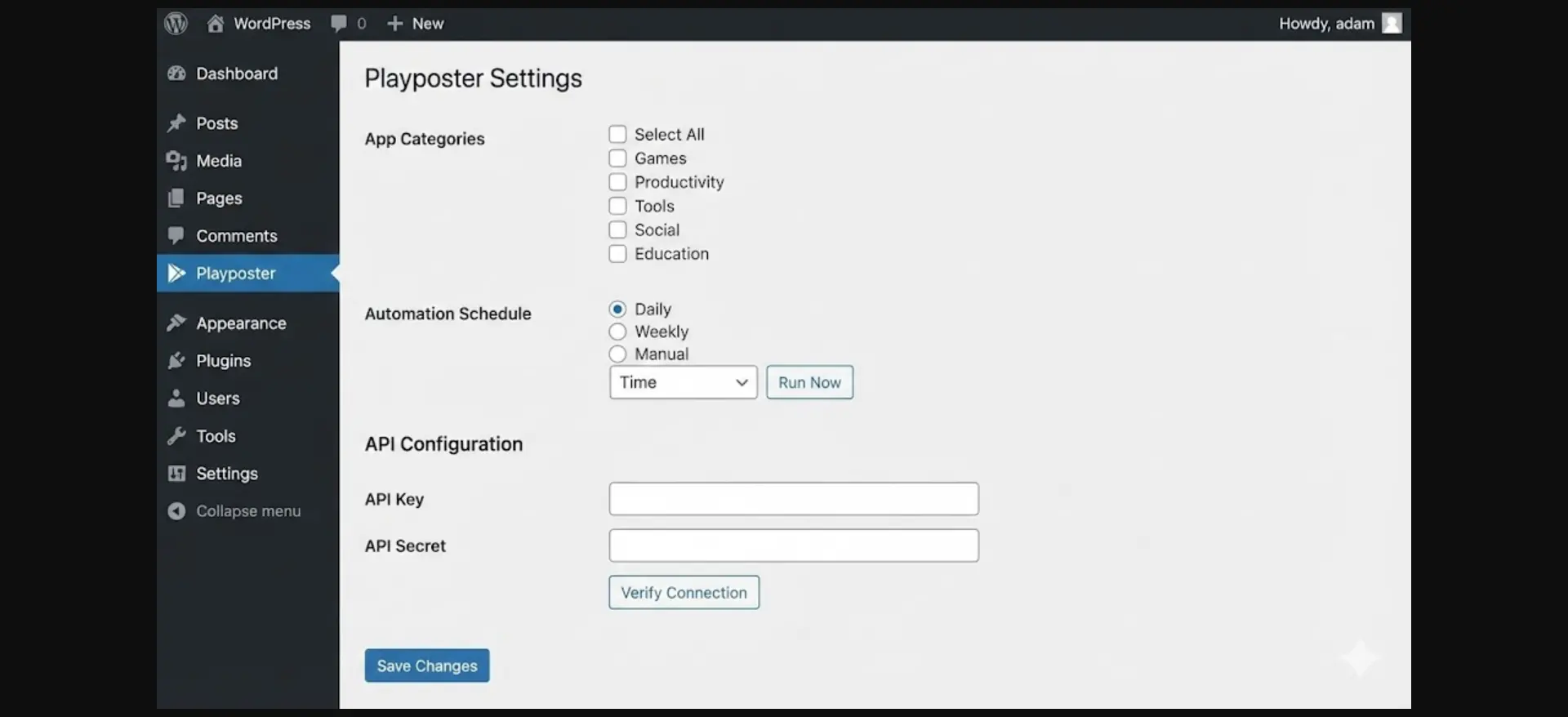
#Installation
- Go to Plugins → Add New → Upload Plugin
- Select the Playposter zip file
- Activate the plugin
- Enter your license key when prompted
#Initial Configuration
Navigate to Playposter → Settings:
General Settings:
- Site Name: Your APK site name
- Default Author: Select admin or create dedicated author
- Post Status: “Publish” for immediate posting
- Enable Logging: Yes (for troubleshooting)
Data Source Settings:
- Primary Source: Google Play Store
- Region: Select your target market (US/Global)
- Language: English (or your preferred language)
- Categories: Select app categories to fetch
#Step 4: Designing Your Post Template
The post template determines how each app is displayed. Your template should include:
- App Header – App icon, name, developer name, rating stars
- Quick Info Box – Version number, file size, Android requirement, downloads count
- Description Section – Full app description, what’s new
- Screenshot Gallery – Responsive image gallery with lightbox
- Download Section – Clear download button, file information, installation instructions
#Step 5: Setting Up Categories
Organize your content with meaningful categories:
- Games – Action, Puzzle, Racing, Strategy
- Apps – Social, Productivity, Entertainment, Utilities
- Tools – Security, System, Developer
Create these in Posts → Categories, then map them in Playposter → Category Mapping.
#Step 6: Configuring Automation Schedule
#Posting Frequency
For new sites, start with 20-30 posts per day, gradually increasing to 50-100 as site authority grows. For established sites, 100+ posts daily is sustainable—focus on trending and popular apps.
#Timing Settings
- Active Hours: 6 AM – 11 PM (your target timezone)
- Posts Per Hour: 2-5 posts
- Weekend Posting: Enable (people download more on weekends)
#Step 7: Monetization Setup
#Google AdSense Placement
Optimal ad positions for APK sites:
- Above app icon – Leaderboard (728×90)
- After description – Large rectangle (336×280)
- Before download button – In-content ad
- Sidebar – Skyscraper (300×600)
- Below download – Native ad unit
#WP Safelink Integration
For maximum revenue, integrate WP Safelink:
- Install WP Safelink plugin
- Set download links as safelinks
- Configure 2-3 intermediate pages
- Add ads to each safelink page
This can increase revenue by 200-400% compared to direct downloads.
#Step 8: SEO Configuration
Playposter handles most SEO automatically: title tags with app name, meta descriptions from app summary, schema markup for software applications, and image alt tags.
Additional optimization: Install Yoast SEO or Rank Math, set up XML sitemap, configure robots.txt properly, and submit to Google Search Console.
#Step 9: Launch and Monitor
#Pre-Launch Checklist
- Test template with sample posts
- Verify download links work
- Check mobile responsiveness
- Configure caching
- Set up analytics
#Launch Sequence
- Start automation at low volume (10 posts)
- Check for errors in logs
- Verify posts look correct
- Gradually increase to target volume
#Scaling Your APK Site
#Traffic Goals
- Month 1: 1,000 daily visitors
- Month 3: 10,000 daily visitors
- Month 6: 50,000+ daily visitors
#Revenue Expectations
- Initial: $100-500/month
- 3 months: $500-2,000/month
- 6 months: $2,000-10,000/month
These figures depend on traffic quality, ad optimization, and niche competitiveness.
#Conclusion
Building an auto-APK download site with Playposter is a proven method for creating passive income. The initial setup takes a few hours, but once running, the site essentially manages itself.
The key to success is quality hosting and setup, proper template design, strategic monetization, and consistent monitoring.
Ready to begin? Get Playposter and start building your APK empire today.
Start Building Your APK Download Site Today
Join 288+ site owners using Playposter to create profitable APK download portals on autopilot. Plugin + theme included — launch in under 30 minutes.