Membership Plans & Payments
Quick answer: AdSafelink is a multi-user platform: publishers sign up, shorten links and earn on valid views. Membership plans are how you, the operator, decide which publishers get which capabilities — custom...
On this page
AdSafelink is a multi-user platform: publishers sign up, shorten links and earn on valid views. Membership plans are how you, the operator, decide which publishers get which capabilities — custom aliases, bulk tools, detailed statistics, direct links, higher API access and a higher payout multiplier. Every plan carries a set of feature flags and limits that the member area, earning engine and API read at runtime to gate what a publisher can do. This guide explains how plans work, how the optional Stripe and PayPal gateways turn paid upgrades into activated subscriptions, and how to settle upgrades manually when you prefer to take payment offline.
#How plans work
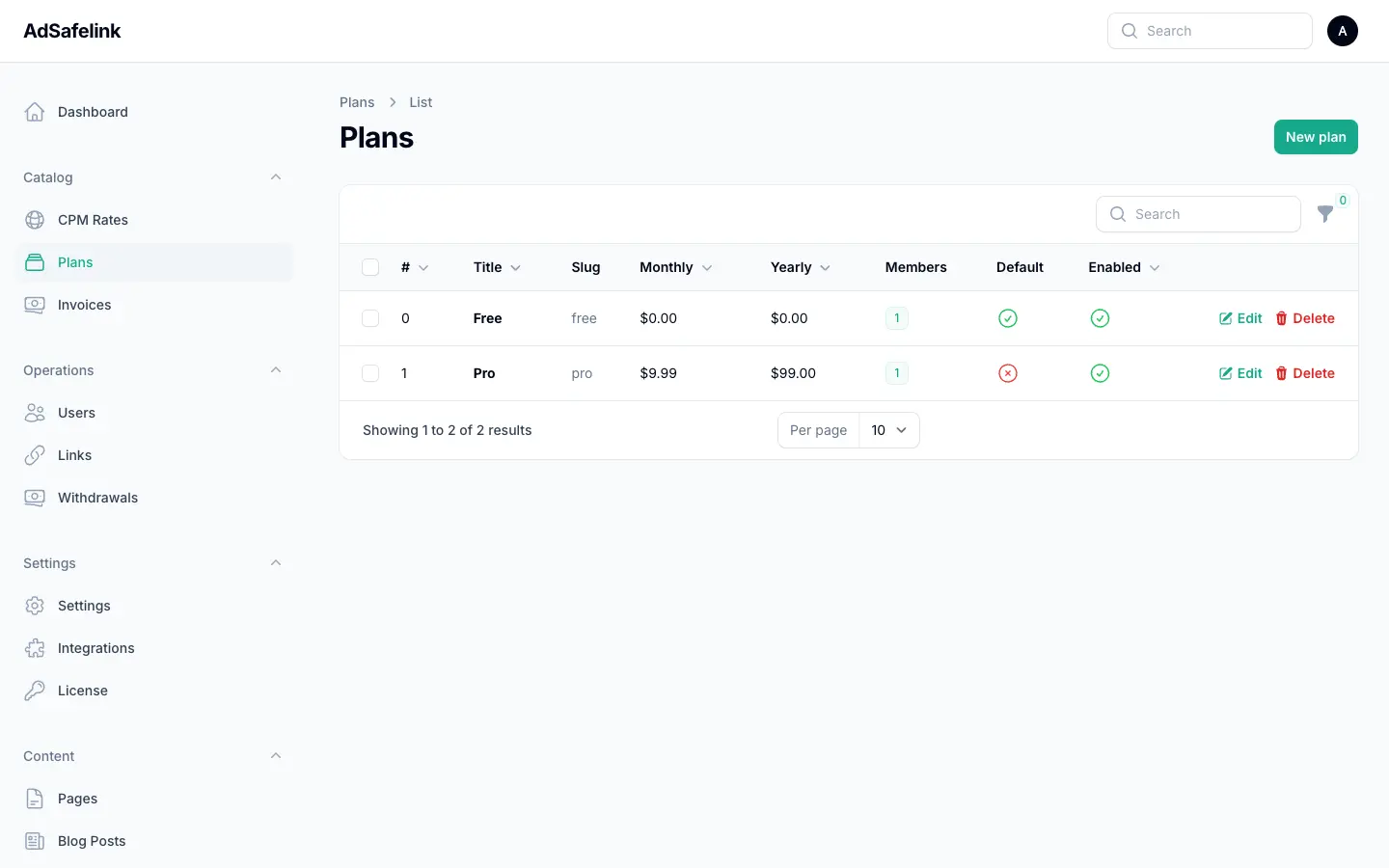
A plan is a named tier with a price (monthly and yearly), a display position, an enabled flag, and a JSON features map. Publishers are assigned to exactly one plan. A fresh install ships with two tiers seeded for you:
- Free — the default plan. New members land here automatically, and any publisher whose paid plan lapses is returned here. Price is zero for both periods.
- Pro — a paid tier that unlocks the premium feature flags (custom alias editing, bulk tools, detailed stats, direct links, full API access and a higher payout multiplier).
You are free to rename these, change their pricing, add more tiers, or disable a tier entirely. The only rule: keep exactly one plan marked as the default (free) plan, because that is the plan members are downgraded to on expiry.
#The default plan rule
AdSafelink resolves a publisher’s effective plan as follows: if they hold a paid plan whose expiry is in the past, they immediately fall back to the default plan — premium features are revoked the moment the subscription lapses, without waiting for the nightly expiry job. Otherwise their assigned plan applies. If a member has no plan at all, the default plan is used. This is why a single, clearly marked default plan is required for the system to behave predictably.
#Creating and editing plans
In the admin panel, open Catalog → Plans. Each plan has two sections.
#Plan details
| Field | Meaning |
|---|---|
| Title | The public name shown to publishers (for example, “Pro”). |
| Slug | The URL-safe identifier; lowercase with dashes. Auto-generated from the title on create. |
| Description | A short line shown beside the plan on the upgrade page. |
| Price (monthly) / Price (yearly) | The amount charged per period, in your configured currency. Set both to 0 for a free tier. |
| Display position | Lower numbers show first on the upgrade page. |
| Enabled | Whether members can see and select the plan. Disabled plans are hidden but existing members keep them until expiry. |
| Default (free) plan | Marks this as the fallback tier. Keep exactly one. |
#Features & limits
This is the heart of a plan. Every flag below is read live by the application, so changing a plan instantly changes what its members can do — no re-login required.
| Flag | What it controls | Free default |
|---|---|---|
Custom alias (custom_alias) |
Lets the publisher choose their own alias when shortening, instead of a random one. | On |
Edit link (title / description) (edit_link) |
Lets the publisher edit a link’s title and description after creation. | Off |
Edit URL / alias after create (edit_url) |
Lets the publisher change a link’s destination URL or alias after it has been created. | Off |
Create direct (no-interstitial) links (direct) |
Lets the publisher create links that skip the interstitial ad page and redirect straight through. | Off |
Disable ads on own links (disable_ads_own) |
Lets the publisher turn off the ad interstitial on their own links. | Off |
Detailed statistics (stats) |
Unlocks the full statistics breakdown (per-link and account-level views/earnings over time, top countries, referrers). Members without it see only summary numbers. | Off |
Bulk shrink (member UI) (bulk_shrink) |
Unlocks the member-area bulk shortener, where many URLs are pasted at once. | Off |
API: quick shorten (api_quick) |
Allows the basic POST /api/v1/shorten endpoint with the publisher’s API token. |
On |
API: bulk (api_bulk) |
Allows bulk shortening through the API. | Off |
API: full (api_full) |
Allows full API access. | Off |
Earns referral commission (referral) |
Whether the publisher earns commission on the activity of users they referred. | On |
Payout multiplier (CPM) (payout_multiplier) |
A multiplier applied to the publisher’s CPM earnings. 1.0 = the base CPM; 1.25 pays them 25% more per valid view. |
1.0 |
Max links (max_links) |
A cap on how many links the publisher may hold. 0 = unlimited. |
0 (unlimited) |
Any flag you leave unset on a plan falls back to the safe Free-plan default shown above, so you only need to flip the flags that differ for a tier.
#How plan limits gate publisher features
Plan flags are not cosmetic — they are enforced at the point of use throughout the app. Knowing where each one bites helps you design tiers with confidence.
- Custom alias — when a publisher shortens a link, the shortener honors a requested alias only if their plan grants
custom_alias; otherwise a random alias is generated. - Direct links — a publisher can create a no-interstitial link only if their plan grants
direct. Without it, requests for a direct link fall back to the standard interstitial type. - Bulk shrink — the member bulk-shorten page checks
bulk_shrink. Members without it see the page locked and any submission is rejected with a message that bulk shortening is not available on their plan. - Detailed statistics — the statistics page checks
stats. Members without it get summary figures only; members with it get the full breakdown. - API access — the public API checks
api_quickbefore accepting a shorten request, and the richer tiers gate onapi_bulk/api_full. - Payout multiplier — when a valid view is recorded, the earning engine looks up the link owner’s plan and multiplies the country CPM by
payout_multiplierbefore crediting their balance. A higher-tier publisher literally earns more per identical click. - Referral commission — referral payouts are credited only when the referrer’s plan has
referralenabled. - Max links — caps the number of links a publisher can create;
0means no cap.
Because gating reads the effective plan, an expired paid plan loses all of these the instant it lapses — the publisher is treated as a default-plan member until they renew.
#Payment gateways
AdSafelink ships with two online gateways for plan upgrades — Stripe (cards) and PayPal — plus a manual path for offline payments. Both online gateways are optional; if you configure neither, AdSafelink still records upgrade orders and lets you settle them by hand.
#Where the keys live
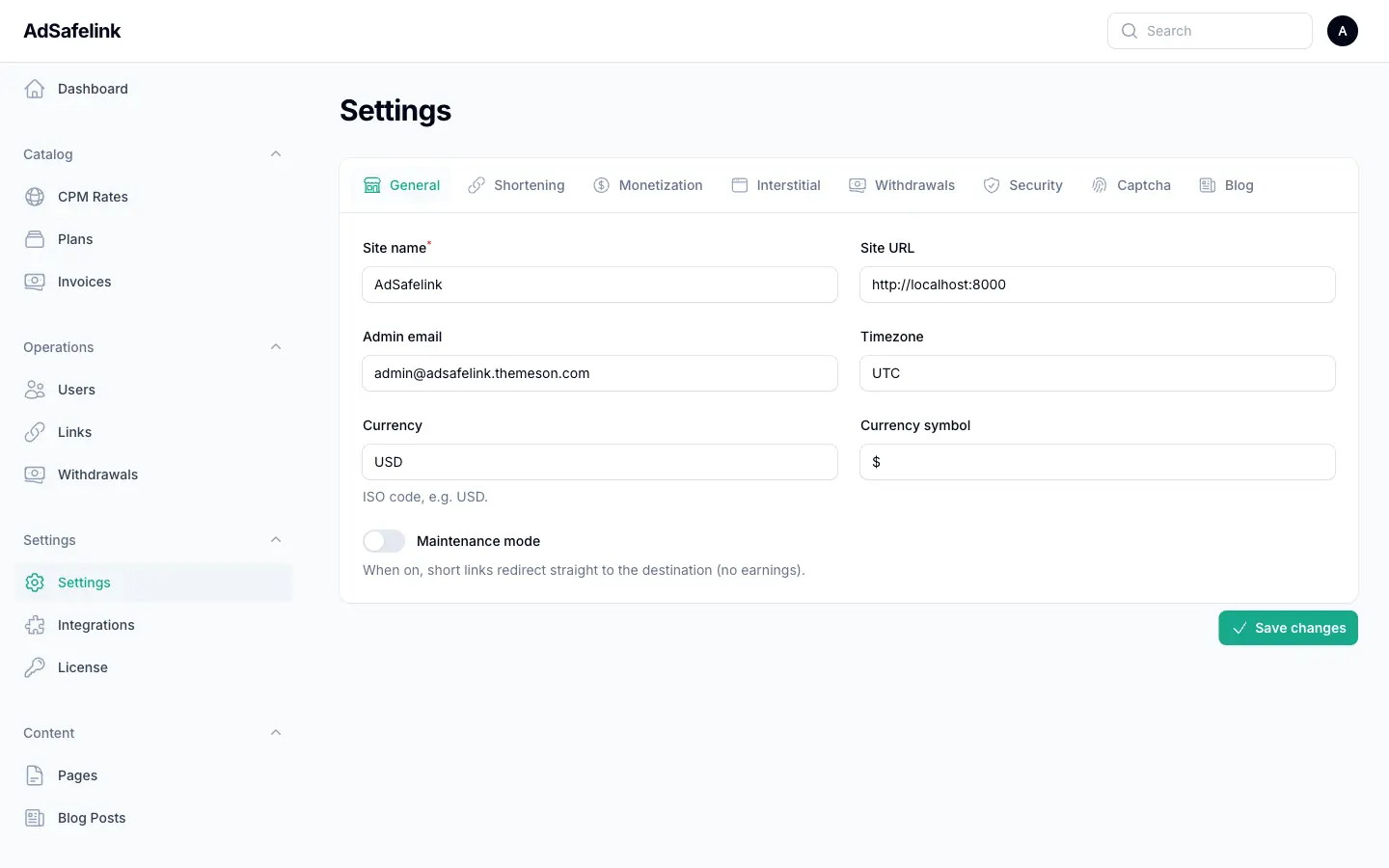
For security, AdSafelink keeps your gateway API credentials in environment variables (your .env file), never in the database and never in client-side code. The admin settings screen only carries the on/off toggles and your currency. Set the secrets in your environment file:
# Stripe
STRIPE_SECRET=sk_live_your_secret_key
STRIPE_WEBHOOK_SECRET=whsec_your_webhook_signing_secret

# PayPal
PAYPAL_MODE=live          # or "sandbox" while testing
PAYPAL_CLIENT_ID=your_client_id
PAYPAL_CLIENT_SECRET=your_client_secret
PAYPAL_WEBHOOK_ID=your_webhook_id
A gateway is considered usable only when its credentials are present: Stripe needs a secret key, and PayPal needs both a client ID and client secret. After editing the environment file, rebuild the configuration cache so the new values take effect:
php artisan config:cache#Enabling a gateway
Two things must be true for a gateway to appear on a publisher’s upgrade page:
- Its enabled toggle is on (
stripe_enabled/paypal_enabledin settings — both default to off). - Its credentials are configured in the environment, as above.
When a gateway is enabled, members see it as a payment option: Stripe appears as “Credit Card (Stripe)” and PayPal as “PayPal”. Your store currency and currency symbol (set on the general settings tab) are used for plan prices, the Stripe checkout session and the PayPal order.
#The currency must match
Both gateways verify, on the way back, that the amount and currency they processed match the invoice and your configured currency. If you change your store currency after publishers have started upgrading, make sure your gateway accounts are set up for the same currency, or confirmations will be rejected as a mismatch.
#The upgrade flow
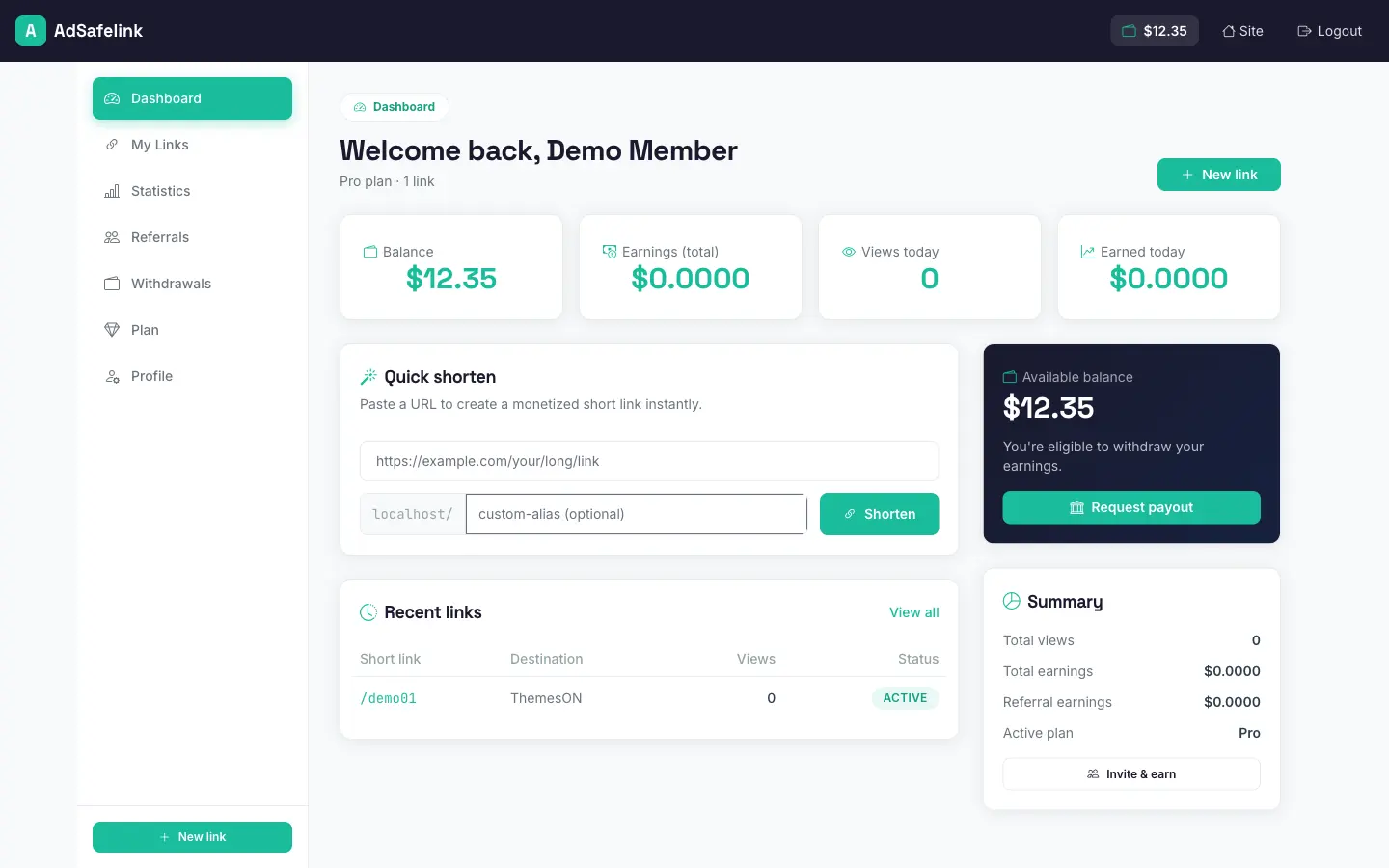
From a publisher’s perspective, upgrading is three steps; behind the scenes AdSafelink turns it into a verifiable, idempotent transaction.
- Choose a plan and period. On their Plan page the publisher sees the enabled plans, their current plan, their plan expiry date, and their invoice history. They pick a tier, a billing period (monthly or yearly), and an enabled gateway.
- Pay. AdSafelink creates an unpaid invoice for the chosen plan, period and amount, then hands the publisher off to the gateway’s checkout page (Stripe Checkout or PayPal approval).
- Activate. On a confirmed payment, AdSafelink assigns the new plan to the account and extends the expiry by one month or one year. The publisher is returned with a success message and their premium features are live immediately.
#Confirmation is server-verified, not trusted from the browser
AdSafelink never activates a plan based on the browser redirect alone. For Stripe, it re-reads the checkout session from Stripe before crediting; for PayPal, it captures the order server-side. In addition, each gateway sends a signed webhook that is the authoritative source of activation — so even if the buyer closes the tab before the redirect completes, the plan still activates when the webhook arrives. Configure these webhook endpoints in your gateway dashboards:
| Gateway | Webhook URL |
|---|---|
| Stripe | https://your-site.com/pay/stripe/webhook |
| PayPal | https://your-site.com/pay/paypal/webhook |
Activation is idempotent: the webhook and the browser return hop can both fire for the same payment, but AdSafelink locks the invoice row during activation so a subscription is never double-extended. Renewals also stack — if a publisher renews early, the new period is added on top of their remaining time rather than overwriting it.
#If a publisher cancels or the payment is not yet confirmed
If a buyer cancels on PayPal, the invoice is marked failed and their plan is left unchanged. If a payment is still processing when the buyer returns, AdSafelink shows a soft “we are confirming your payment” notice and lets the webhook finalize it shortly after — nothing is lost.
#Invoices and manual “mark paid”
Every upgrade attempt creates an invoice you can inspect under Catalog → Invoices in the admin. Invoices are created by the payment flow, so they are read-only — but they give you a complete ledger of who ordered what, through which gateway, and whether it settled.
| Status | Meaning |
|---|---|
| Unpaid | The order was created and handed to a gateway, but payment has not been confirmed. |
| Pending | The order was recorded but no online gateway was available to take payment; it is awaiting manual handling. |
| Paid | Payment confirmed and the plan activated. |
| Failed | The payment was cancelled or could not be completed. |
The invoice list can be filtered by status and by gateway (Stripe, PayPal or Manual), so you can quickly find everything waiting on you.
#Taking payment offline
If you have no online gateway enabled, a publisher’s upgrade order is still recorded. They are told the order is saved and that online payment is not configured yet, and asked to contact you to complete the upgrade. Once you have received their payment by whatever means you arrange (bank transfer, a local payment method, an invoice paid elsewhere), settle it in the admin:
- Open Catalog → Invoices and find the order.
- Use the Mark paid action. You may enter an optional reference (a transaction or receipt number for your records).
- Confirm. This records the payment and activates the plan on the publisher’s account — the same activation path as an online payment, including the period extension.
The “Mark paid” action is available on any invoice that is not already paid, which also lets you rescue an online payment that settled out-of-band.
#Plan expiry and downgrade
Paid plans are time-limited. AdSafelink handles the end of a billing period in two complementary ways:
- Immediate feature revocation. The moment a paid plan’s expiry passes, the publisher’s effective plan becomes the default (free) plan, so premium features stop working right away — there is no grace window where an expired member keeps Pro features.
- Scheduled cleanup. A background job runs twice daily and formally downgrades any user whose expiry has passed back to the default plan, clearing their expiry date. This keeps account records tidy and is what permanently moves a lapsed member to Free.
For this to run, your scheduler (the Laravel cron entry) must be active on your server, as covered in the installation and deployment guides. If the scheduler is not running, members will still lose premium features at expiry (because the effective-plan check is immediate), but their stored plan record will not be tidied up until the job runs.
#Operator checklist
- Keep exactly one plan marked as the default (free) plan.
- Define your paid tier(s) and set their feature flags deliberately — especially
payout_multiplier,stats,bulk_shrink, the API flags andmax_links. - Put gateway secrets in your
.env, runphp artisan config:cache, then turn on the matching enabled toggle for each gateway you want live. - Register the Stripe and PayPal webhook URLs in your gateway dashboards so activations are reliable.
- Confirm your store currency matches your gateway accounts.
- Make sure the scheduler is running so expired plans are cleaned up.
- Use Invoices → Mark paid to settle any offline or pending upgrades.