Prerequisites & Server Requirements
Quick answer: Before you install AdSafelink on your own server, make sure the environment meets a handful of standard requirements. AdSafelink is a self-hosted Laravel application, so the same components you would...
On this page
Before you install AdSafelink on your own server, make sure the environment meets a handful of standard requirements. AdSafelink is a self-hosted Laravel application, so the same components you would provision for any modern PHP app apply here: a supported PHP version with a few common extensions, a MySQL database, Redis, Composer, Node, and a web server whose document root points at the application’s public/ folder. This page lists everything you need so the built-in install wizard passes its environment check on the first try.
#At a glance
If you only read one section, read this table. The install wizard verifies the items marked “wizard-checked” automatically; the rest are required for the application to run but are not part of the on-screen check.
| Component | Requirement | Wizard-checked? |
|---|---|---|
| PHP | 8.3 or newer (8.2 minimum) | Yes |
| PHP extensions | mbstring, openssl, intl, bcmath, curl, pdo_mysql, gd |
Yes |
| Writable directories | storage/ and bootstrap/cache/ |
Yes |
| Database | MySQL 8 | Tested at the Database step |
| Redis | Used for cache, queue, and sessions | No |
| Composer | Composer 2 | No (used before the wizard) |
| Node.js | 18 or newer, with npm | No (used before the wizard) |
| Web server | Nginx, Apache, or LiteSpeed, document root at public/ |
No |
| HTTPS | Recommended for all production installs | No |
#PHP version and extensions
AdSafelink targets PHP 8.3 or newer. The install wizard enforces a hard minimum of PHP 8.2, but 8.3+ is recommended and is what the application is built and tested against. Anything older than 8.2 will fail the environment check and the wizard will not let you continue.
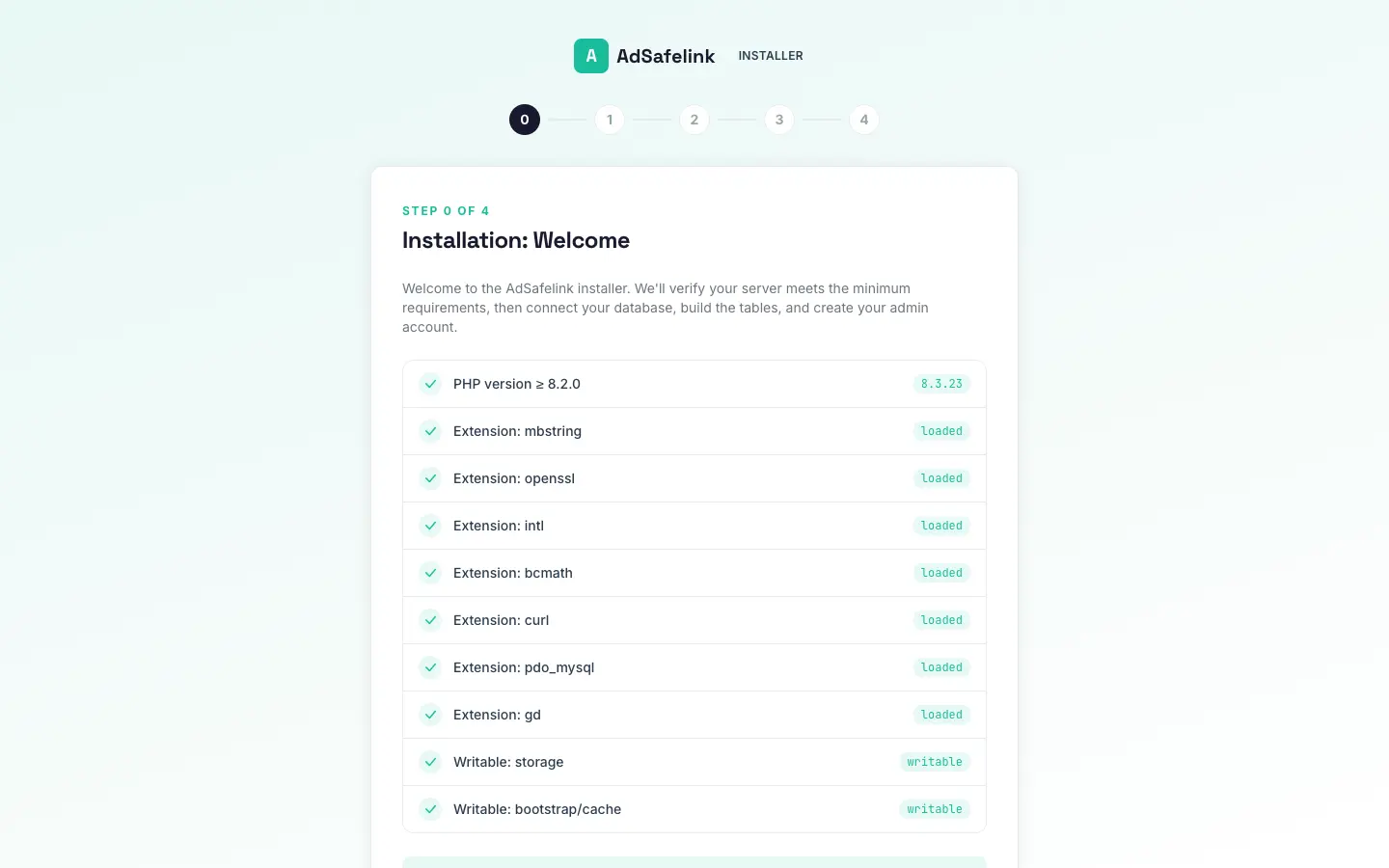
The following PHP extensions must be installed and enabled. The Welcome screen of the install wizard checks each one and shows it as loaded or missing:
mbstring— multibyte string handling used throughout the app.openssl— encryption for sessions, the license cache, and the WP Safelink integration handshake.intl— internationalization helpers (formatting, locale handling).bcmath— high-precision math used by the earning engine (per-view payouts are stored at nine decimal places, so sub-cent CPMs must not round to zero).curl— outbound HTTPS requests, including license validation and the one-click WP Safelink connect.pdo_mysql— the database driver used to connect to MySQL.gd— image processing.
In addition, install the Redis PHP extension (commonly php-redis) so the application can talk to your Redis server for caching, queues, and sessions. Redis itself is covered below.
You can confirm which extensions are present from the command line:
php -v
php -m
If an extension is missing, install the matching package for your PHP version through your operating system’s package manager (for example php8.3-mbstring, php8.3-intl, php8.3-bcmath, php8.3-gd) and restart PHP-FPM (or your web server) so the change takes effect.
#Database (MySQL 8)
AdSafelink stores all of its data in MySQL 8. Before you start the install wizard, create:
- An empty database for AdSafelink.
- A database user with full privileges on that database.
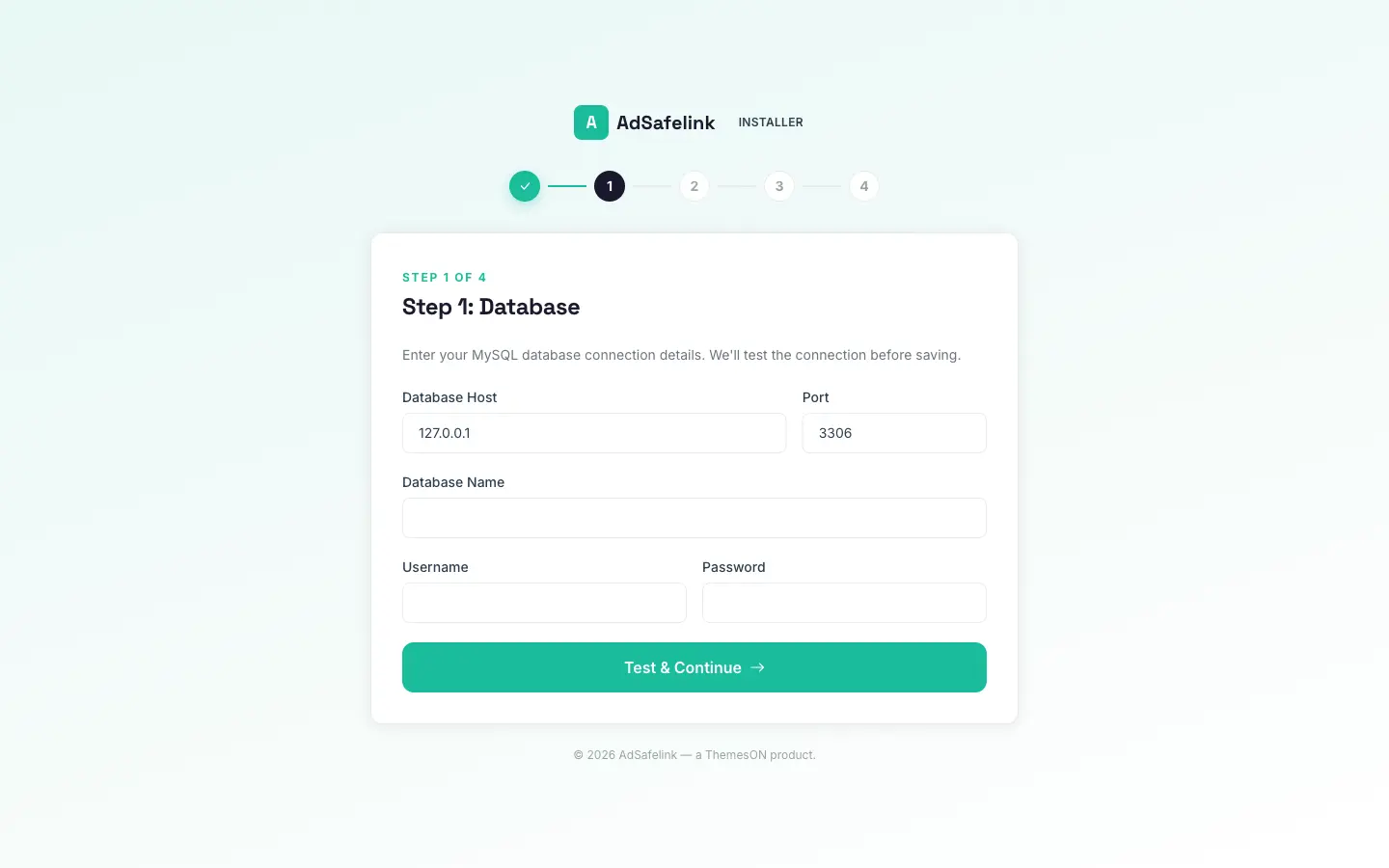
You do not create any tables by hand — the wizard builds the schema for you. During the Database step you enter the host (defaults to localhost), port (defaults to 3306), database name, username, and password. The wizard opens a live connection to verify the credentials before continuing, so make sure the database exists and the user can reach it from the web server.
#Redis
AdSafelink uses Redis for three things:
- Cache — including the hot-path short-link cache that keeps redirects fast.
- Queue — background jobs (plan expiry, license re-checks, statistics rollups, and similar) run through a queue worker backed by Redis.
- Sessions — visitor and member sessions are stored in Redis.
Install and run a Redis server reachable from the application, and make sure the php-redis extension is enabled (see above). You will point AdSafelink at Redis through its environment configuration so that cache, queue, and session drivers all use it.
#Composer and Node.js
These two tools are used before you reach the install wizard, to prepare the application files on your server.
- Composer 2 installs the PHP dependencies. From the application root you run
composer install(use--no-dev --optimize-autoloaderfor production). - Node.js 18 or newer, with npm, builds the front-end assets. From the application root you run
npm cifollowed bynpm run build.
You can verify both are present:
composer --version
node --version
npm --version
#Web server and document root
AdSafelink runs behind any standard PHP web server — Nginx, Apache, or LiteSpeed — paired with PHP-FPM. The single most important configuration detail is the document root:
Point your site’s document root at the application’s public/ folder, not at the application root.
The application root contains your configuration, dependencies, and storage, none of which should ever be served to the public. Only the contents of public/ are meant to be web-accessible, and the front controller (public/index.php) bootstraps the whole application from there.
Your web server should route all non-file requests to public/index.php so that AdSafelink’s routing can handle them. A typical Nginx location block looks like this:
root /path/to/adsafelink/public;
index index.php;

location / {
    try_files $uri $uri/ /index.php?$query_string;
}

location ~ .php$ {
    include snippets/fastcgi-php.conf;
    fastcgi_pass unix:/run/php/php-fpm.sock;
}

# Deny access to hidden files (except ACME challenges)
location ~ /.(?!well-known).* { deny all; }
On Apache, the equivalent is a DocumentRoot pointed at public/ with mod_rewrite enabled; the application ships with an .htaccess rule set that forwards requests to the front controller. On LiteSpeed, configure the document root at public/ and the bundled rewrite rules apply the same way.
#HTTPS
HTTPS is strongly recommended for every production install. AdSafelink handles member logins, payouts, and a signed handshake with WP Safelink Pro, and several flows assume a secure origin. Obtain a TLS certificate (for example with a free certificate authority) and serve the site over https://your-site.com. You can choose to generate short links on HTTPS in the application settings; serving the whole site over HTTPS keeps that consistent.
#Writable directories
Two directories must be writable by the user that runs PHP (the web server / PHP-FPM user). The install wizard checks both and will not let you continue until they are writable:
storage/— logs, compiled views, cached data, and uploaded files.bootstrap/cache/— the framework’s configuration and route caches.
If either shows as not writable on the Welcome screen, fix the ownership and permissions so the PHP process can write to them, for example:
chown -R www-data:www-data storage bootstrap/cache
chmod -R ug+rw storage bootstrap/cache
Replace www-data with whatever user your web server and PHP-FPM run as.
#What the install wizard checks
When you load AdSafelink for the first time you are taken to the install wizard. Its first screen, Installation: Welcome, runs an automatic environment check and shows a pass/fail row for each requirement:
- PHP version meets the minimum.
- Each required extension (
mbstring,openssl,intl,bcmath,curl,pdo_mysql,gd) is loaded. storage/andbootstrap/cache/are writable.
The Install button only becomes available once every row passes. If any row fails, resolve it using the guidance above and reload the page — the check re-runs each time. The database connection is verified separately at the next step, when you enter your MySQL credentials.
#Quick pre-flight checklist
- PHP 8.3+ installed (8.2 minimum), with
mbstring,openssl,intl,bcmath,curl,pdo_mysql,gd, andredisextensions enabled. - MySQL 8 database and user created (empty database).
- Redis server running and reachable.
- Composer 2 and Node 18+ available; dependencies installed and assets built.
- Web server document root pointed at the application’s
public/folder, with requests routed topublic/index.php. - HTTPS certificate in place for
https://your-site.com. storage/andbootstrap/cache/writable by the PHP user.
With all of the above in place, the Welcome screen will pass cleanly and you can move on to running the installer. Continue with the installation guide to complete the setup.