CPM Rates & How Earnings Work
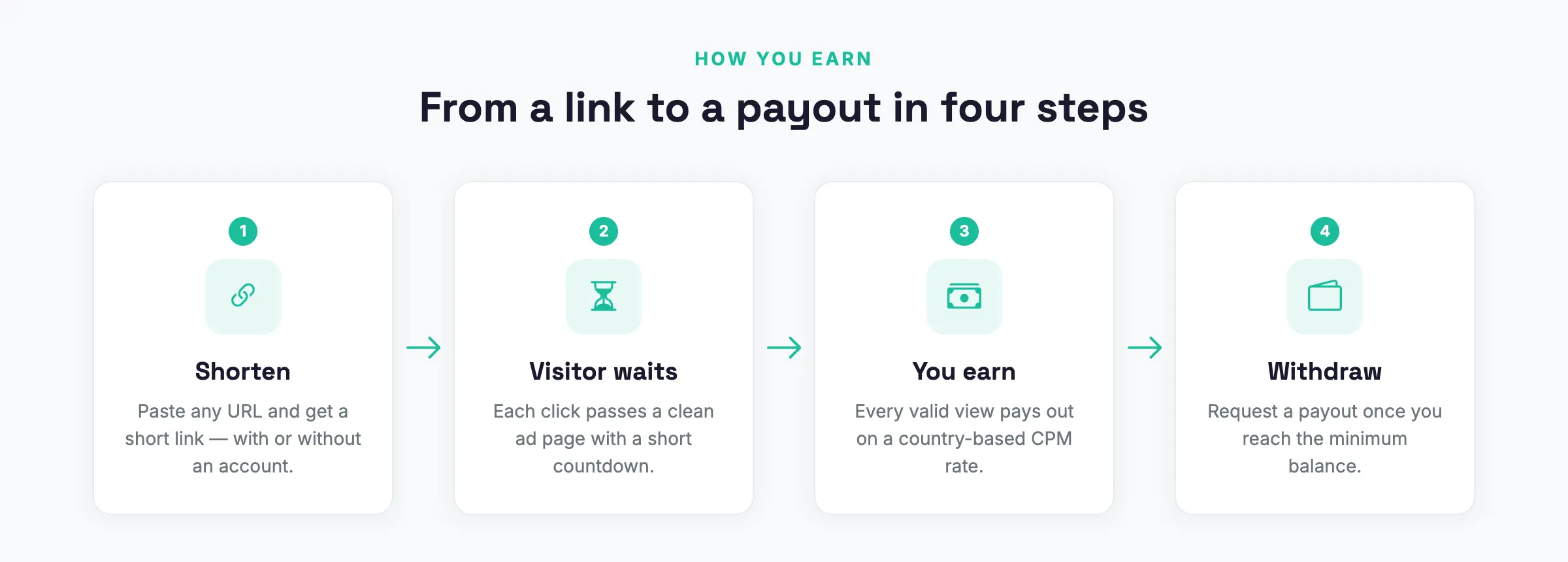
Quick answer: AdSafelink pays your publishers on a CPM basis — “cost per mille,” meaning a payout per 1,000 valid views of their short links. As the operator, you control exactly how...
On this page
AdSafelink pays your publishers on a CPM basis — “cost per mille,” meaning a payout per 1,000 valid views of their short links. As the operator, you control exactly how much a thousand views is worth in each country, and AdSafelink handles the rest: detecting the visitor’s country, deciding whether a view is genuine, calculating the earning, and crediting it to the publisher’s balance. This guide explains how CPM rates are configured, how the earning formula works, what makes a view “valid,” how referral commissions are added, and how balances accrue toward withdrawals.
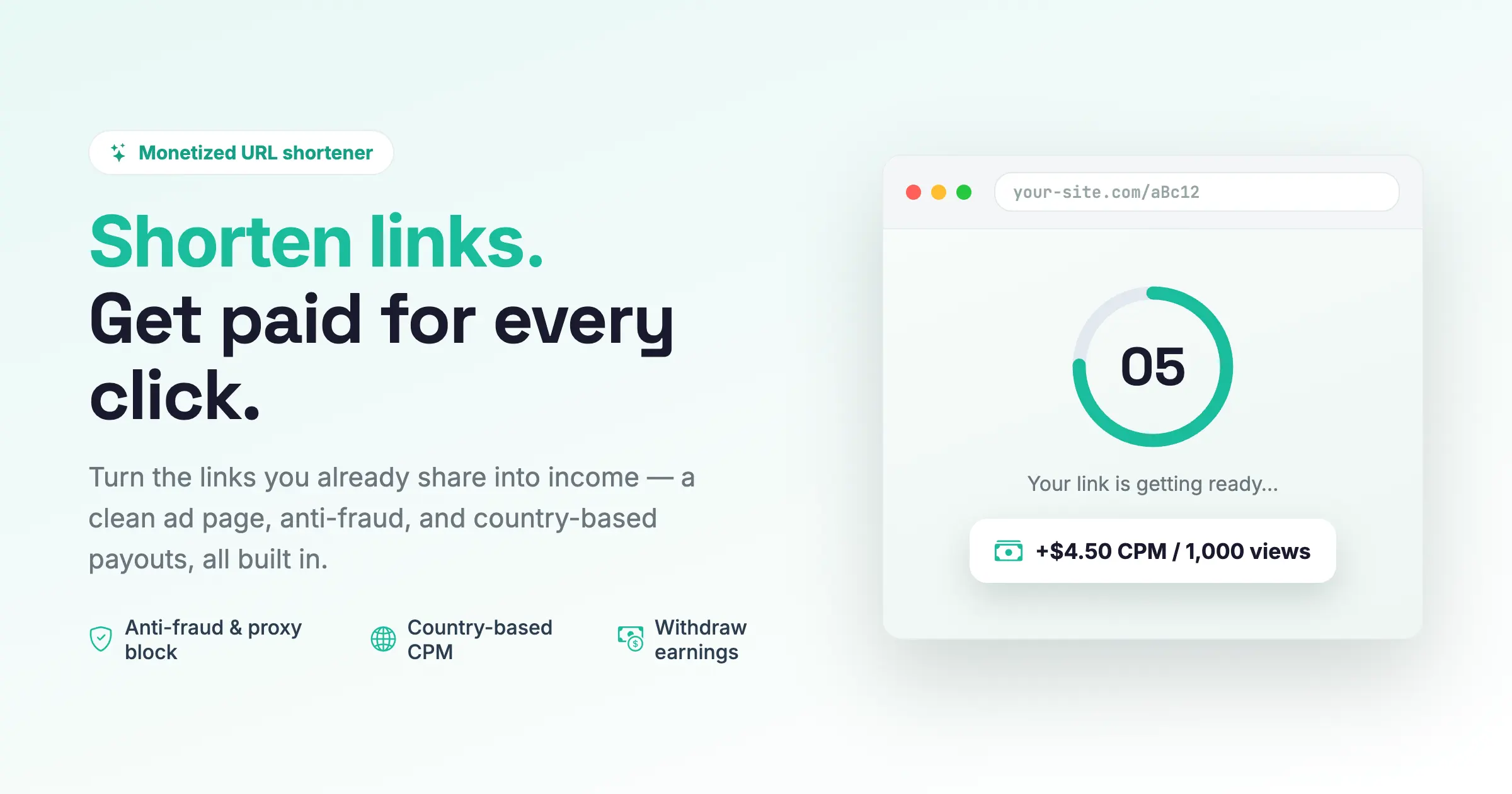
#What CPM means in AdSafelink
Every time someone opens one of your publishers’ short links and completes the interstitial page, AdSafelink evaluates that view. If the view passes every validity check, the link owner earns a small amount of money. That amount is driven by a single number you control: the CPM rate — the payout for one thousand valid views.
Because ad value varies enormously by geography, AdSafelink uses a country-based CPM table. A view from a high-value advertising market can be worth several times more than a view from a low-value one, and you decide the exact figures. There is no advertiser bidding, no campaign marketplace, and no per-link rate negotiation — just a clean operator-set table of “this country pays this much per 1,000 views,” plus a global default for everywhere else.
#The CPM Rates screen
Open Admin → CPM rates (found under the Catalog navigation group). This is the heart of your monetization configuration. Each row maps a country to a publisher CPM — the payout per 1,000 valid views for visitors from that country.
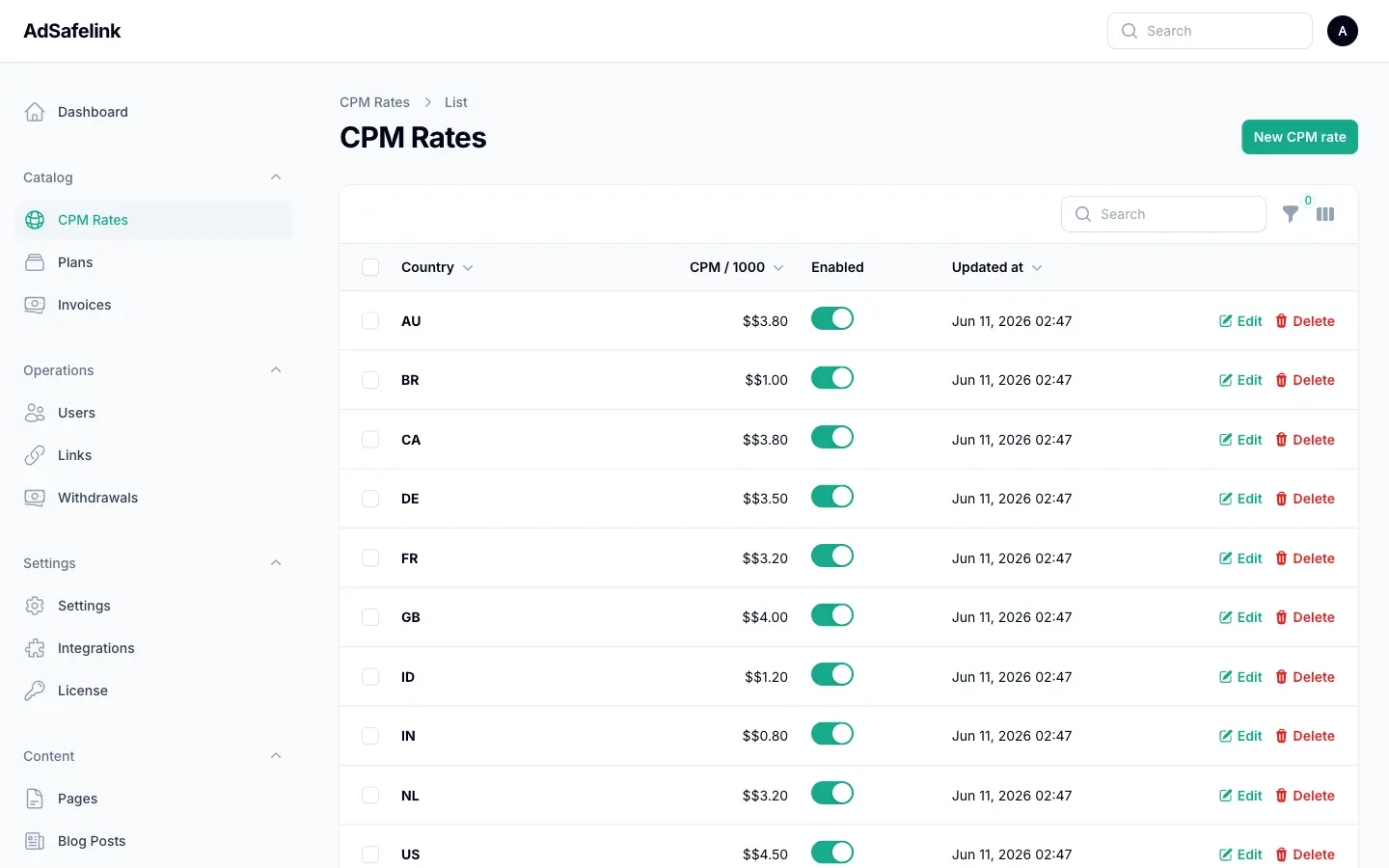
Each CPM row has three fields:
| Field | What it does |
|---|---|
| Country | A two-letter ISO-3166 alpha-2 country code, uppercase — for example US, GB, ID, IN. Each country can appear only once. |
| Publisher CPM | The payout per 1,000 valid views from that country, in your site currency. Supports up to four decimal places (e.g. 4.5000). |
| Enabled | A toggle. When off, the row is ignored and visitors from that country fall back to the global default rate. |
To add a market, click to create a new row, enter the country code and the CPM, and save. To change a rate, edit the row inline or open it. AdSafelink caches the CPM table for performance, so the panel automatically refreshes the cache whenever you toggle, edit, or delete a rate — your changes take effect right away.
#The global default rate
You can’t list every country on Earth, and you don’t need to. AdSafelink keeps a single global default CPM in Admin → Settings (the default_cpm setting under Monetization). Any visitor whose country is not in your CPM table — or whose country row is disabled — earns at this default rate instead.
This gives you a simple, two-tier strategy:
- Add explicit rows for the high-value or high-traffic countries you care about most.
- Set a sensible global default for the long tail of everywhere else.
If you wanted to, you could even set the global default to 0 so that only the countries you explicitly list earn anything. The lookup order is always: matching enabled country row → global default → zero.
#A starting set of rates
A fresh install seeds an example CPM table you can tune or replace. It looks like this (figures are illustrative — set your own based on your ad income):
| Country | Code | Example CPM (per 1,000 views) |
|---|---|---|
| United States | US |
4.50 |
| United Kingdom | GB |
4.00 |
| Canada | CA |
3.80 |
| Australia | AU |
3.80 |
| Germany | DE |
3.50 |
| France | FR |
3.20 |
| Netherlands | NL |
3.20 |
| Brazil | BR |
1.00 |
| Indonesia | ID |
1.20 |
| India | IN |
0.80 |
The seeded global default is a modest middle figure. Treat these numbers as a template: your real rates should reflect what your advertising actually earns, with a margin retained for the platform.
#How a country is detected
Before AdSafelink can look up a CPM, it needs to know where the visitor is. It resolves the country in this order:
- Cloudflare country header. If your site sits behind Cloudflare and the
CF-IPCountryheader is trusted, AdSafelink uses it directly. This is the fastest and most reliable option, and it is enabled by default. - GeoIP database fallback. If no Cloudflare header is present, AdSafelink looks the visitor’s IP up in a local GeoLite2 country database (if you have configured one).
If neither source can resolve a country, the view earns nothing — see “Invalid country” below. Configuring geolocation correctly is therefore essential to earnings; the deployment guide covers how to put your site behind Cloudflare or install a GeoIP database.
#The earning formula
The core of AdSafelink is deliberately simple. On a valid view, the publisher earns:
earning = CPM / 1000That is the payout for a single valid view: the per-thousand CPM divided by one thousand. There is no rounding down to zero — earnings are tracked to eight decimal places internally, so even a fraction of a cent per view accumulates accurately over thousands of views.
#Plan payout multiplier
Before the division, AdSafelink applies the link owner’s plan payout multiplier. Membership plans (configured under Admin → Plans) carry a payout_multiplier feature — 1.0 for the standard Free tier, and typically higher for paid tiers (for example 1.25). The effective CPM is:
effective CPM = country CPM (or default) × plan payout multiplier
earning       = effective CPM / 1000
This lets you reward upgraded publishers with a higher rate without maintaining a separate CPM table per plan.
#Worked example
Suppose a visitor from the United States opens a link owned by a publisher on a paid plan:
- Country resolves to
US→ CPM table returns 4.50 per 1,000 views. - The owner’s plan has a payout multiplier of 1.25.
- Effective CPM = 4.50 × 1.25 = 5.625 per 1,000 views.
- Earning for this one view = 5.625 ÷ 1000 = 0.005625.
If that publisher receives 1,000 valid US views on the paid plan, they earn about 5.63 in your site currency. The same 1,000 valid views from a country at a 1.00 CPM on the Free plan (multiplier 1.0) would earn about 1.00. This is exactly why the country table and the plan multiplier matter so much: identical traffic volumes can produce very different revenue.
#What makes a view “valid”
CPM monetization invites click fraud, so not every visit earns money. Each view runs through a validity gauntlet, and the first failing check decides the outcome. Only a view that passes every check is paid; everything else is recorded with a reason code so you can audit it later. The checks, in order, are:
| Check | A view is voided when… |
|---|---|
| Owner active | The link owner’s account is disabled rather than active. |
| Earnings enabled | You have switched the publisher-earnings master toggle off platform-wide. |
| Country resolves | No country could be determined for the visitor (no Cloudflare header and no GeoIP match). Recorded as Invalid Country. |
| Not anonymous | The link has no owner (an anonymously shortened link). Anonymous links never earn. |
| Not a self-click | The signed-in visitor is the link’s own owner, and self-click earning is off. This stops publishers from earning on their own links. |
| IP unchanged | The visitor’s IP changed between loading the interstitial and completing it — a common automation/replay signal. |
| Referer allowed | The view came from a referring domain on your blocklist (supports exact domains and *.example.com wildcards). |
| Not a proxy/VPN | Proxy/VPN blocking is enabled and the visitor’s IP is flagged as a proxy or VPN. (Optional — see below.) |
| Under the daily IP cap | An optional operator cap on paid views per IP per day has been reached. |
| Unique today | That IP has already earned a paid view for the day. By default each IP earns one paid view per day, so refreshing or revisiting the same link doesn’t earn again. |
When all of these pass, the view earns. When any fails, AdSafelink still records a statistics row (unless you have configured it to store only paid clicks) tagged with the void reason — Proxy/VPN, Not Unique, Self Click, Invalid Country, Blocked Referer, and so on. These reasons appear in your statistics and let you see exactly how much traffic was filtered and why.
#The uniqueness rule in plain terms
The single most important validity rule is uniqueness: a given visitor (identified by IP) earns at most one paid view per link-owner per day by default. This is what keeps a publisher from refreshing a page a thousand times to fake earnings. You can adjust the per-day allowance and add an optional hard daily cap per IP in settings, but the default of one paid view per IP per day is the safe, AdLinkFly-style behavior.
#Optional proxy/VPN blocking
Proxy and VPN traffic is a major source of fraudulent views. AdSafelink can check each visitor IP against a proxy-detection service, but this is optional and only runs when both conditions are met:
- The proxy/VPN block setting is turned on, and
- You have configured an API key for the proxy-detection service.
If either is missing, the check is skipped and views are not voided on this basis. The check also “fails open” — if the detection service is unreachable, AdSafelink does not void the earning over an API hiccup. See the Integrations settings for how to enable this.
#Referral commission
AdSafelink includes a built-in referral program so your publishers can grow your platform for you. When a publisher signs up through someone else’s referral link (an ?ref=username attribution captured at registration), that referrer can earn a commission on the new publisher’s valid views — paid out of your platform margin, not deducted from the publisher’s own earning.
On each valid, earning view, AdSafelink also credits the referrer when all of the following hold:
- Referrals are enabled platform-wide.
- The link owner was referred by another user.
- That referrer’s account is active and their plan grants the referral-earning feature.
- Your configured referral percentage is greater than zero.
The commission is a percentage of the publisher’s earning for that view:
referral earning = publisher earning × (referral percent / 100)For example, with a referral percentage of 20%, a view that earns the publisher 0.004500 also credits 0.000900 to their referrer. Both figures are stored on the same statistics row, so referral income is fully traceable. Set the referral percentage under Admin → Settings (Monetization).
#How balances accrue
Every valid view credits the publisher’s publisher balance immediately and atomically. There is no nightly batch to wait for — the moment a view passes validation, the earning is added to the owner’s running balance (and the referrer’s, if applicable), and a statistics row is written recording the country, IP, referer, ad type, void reason, publisher earning, and referral earning.
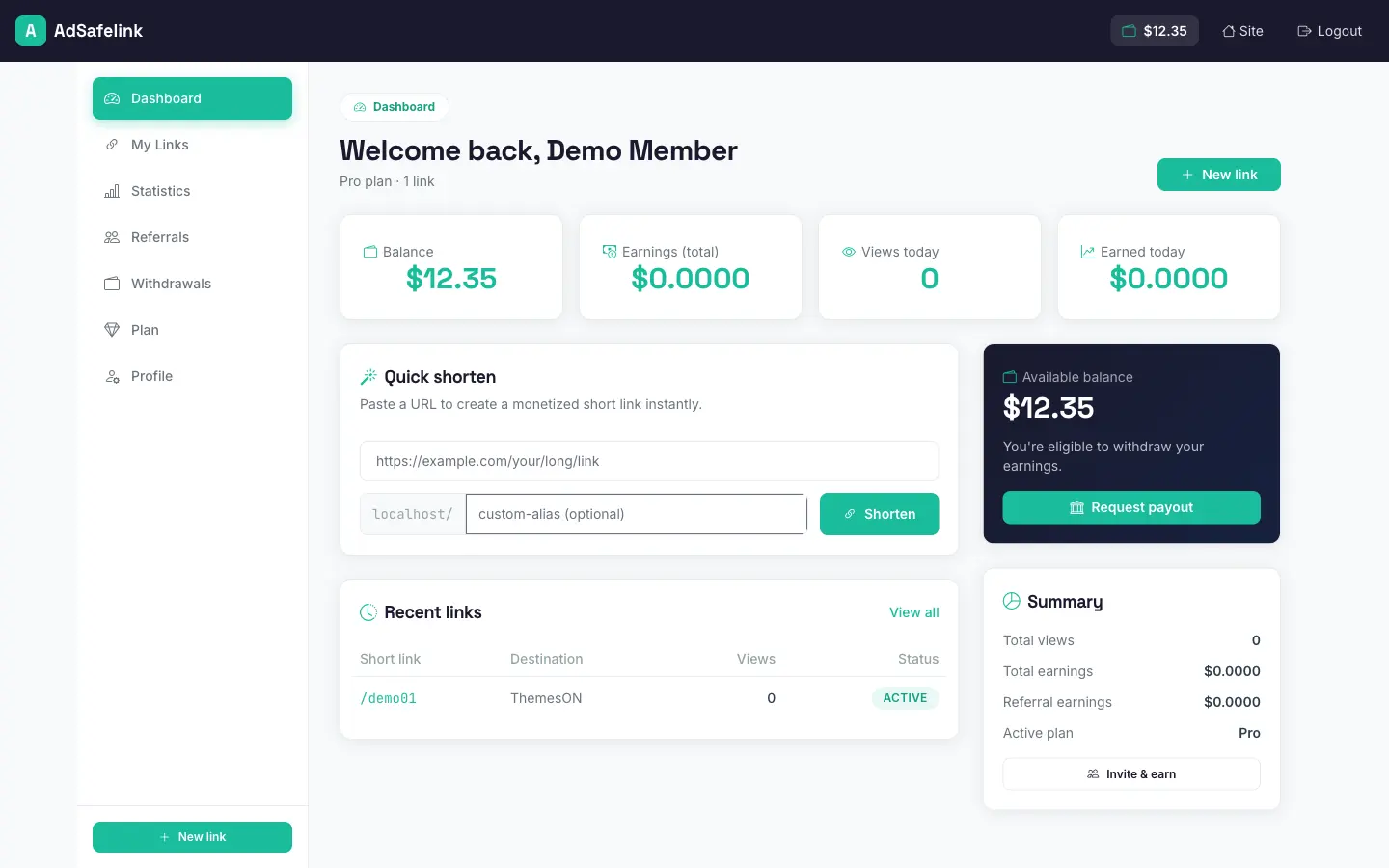
Publishers see their accumulated balance, today’s and total views and earnings, and recent activity on their dashboard. When their balance reaches your configured minimum, they can request a withdrawal, which enters your approval queue.
The earnings balance is what withdrawals draw from. You review and approve each payout in Admin → Withdrawals, where requests move through pending → approved → completed (or returned). For the full payout workflow — methods, minimums, fees, and approval — see the Withdrawals documentation.
#Tuning your CPM strategy
A few operator-friendly principles for setting rates:
- Base rates on real ad income, with a margin. Your CPM is what you pay out; keep it comfortably below what your interstitial ads actually earn so the platform stays profitable.
- Prioritize your real traffic mix. Add explicit rows for the countries that send you the most views, and set a fair global default for the rest.
- Use the plan multiplier as an upgrade incentive. A higher payout multiplier on paid tiers is often a more compelling reason to upgrade than feature flags alone.
- Watch your void reasons. If a large share of views are voided as Proxy/VPN, Not Unique, or Invalid Country, that’s a signal to revisit your fraud settings or geolocation configuration before adjusting rates.
Set the rates once, keep an eye on your statistics, and AdSafelink will calculate, credit, and track every publisher’s earnings automatically.