AdSense Safety Best Practices
Quick answer: Monetizing download links with AdSense is profitable, but only if you protect your account from the invalid traffic that gets publishers banned. WP Safelink ships with the exact tools you...
On this page
Monetizing download links with AdSense is profitable, but only if you protect your account from the invalid traffic that gets publishers banned. WP Safelink ships with the exact tools you need to stay safe — an anti-bot shield, real-visitor verification, and clean ad placement. This guide shows how to use them the right way.
#Why safelink sites are high-risk for AdSense
Download, APK, and streaming sites attract a lot of bots, scrapers, and proxy/VPN traffic — exactly the kind of “invalid clicks” Google’s systems flag. The goal isn’t to game ads; it’s to make sure only real human visitors ever see and interact with them. WP Safelink’s protections are built around that single principle.
#Turn on the Anti-Bot / Proxy / VPN Shield (PRO)
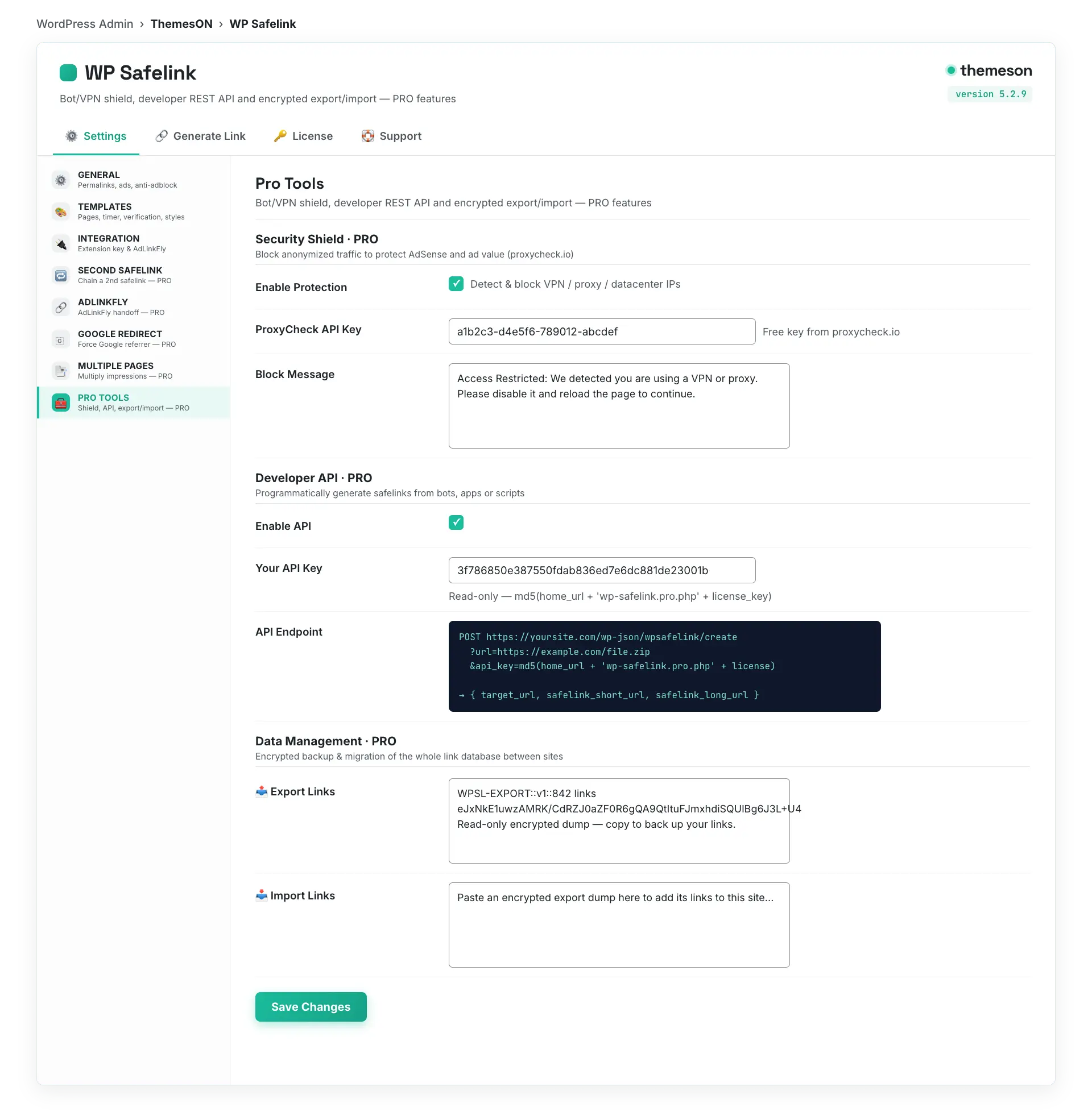
The Security Shield in the Pro Tools tab uses proxycheck.io to detect and block anonymized traffic before any ad loads, so bots and VPN users never generate impressions or clicks against your account.
- Go to WP Safelink → Settings → Pro Tools.
- Tick Enable Protection under Security Shield.
- Paste your free proxycheck.io API key into ProxyCheck API Key.
- Optionally customize the Block Message shown to blocked visitors.
- Save Changes and test from a known VPN to confirm it’s blocked.
| Setting | Default | What it does |
|---|---|---|
| Enable Protection | no | Switches on proxy/VPN/bot blocking via proxycheck.io |
| ProxyCheck API Key | (empty) | Your proxycheck.io key — required for the shield to query |
| Block Message | Access Restricted: …VPN or proxy… | The message anonymized visitors see instead of the safelink page |
💡 Note: The Anti-Bot Shield is a PRO-only feature (license key ending in -pro, -agency, or -lifetime). It’s the single most important protection for keeping an AdSense account healthy on a high-traffic download site.
#Verify real visitors before showing ads
Human Verification filters out automated traffic at the door. Add a verification gate so only people who pass it reach the countdown page where your ads live.
- Open Settings → Templates and enable Human Verification.
- Choose a Verification Method: a simple button click, or reCAPTCHA, hCaptcha, or Cloudflare Turnstile for stronger bot filtering.
- For a captcha provider, paste the matching Site Key and Secret Key from that provider.
- Save Changes and test the flow end to end.
For stubborn bots, a real captcha (reCAPTCHA, hCaptcha, or Turnstile) is far stronger than the button-only option. See Human Verification for provider setup details.
#Place ads where they earn without breaking policy
WP Safelink gives you four ad slots around the action button. Use them for genuinely viewable placements and never crowd the download button.
| Ad slot | Setting label | Recommended use |
|---|---|---|
| Top before button | Advertisement Top (Before Button) | A 300×250 unit above the countdown |
| Top after button | Advertisement Top (After Button) | A second visible unit near the timer |
| Bottom before button | Advertisement Bottom (Before Button) | A 300×600 unit lower on the page |
| Bottom after button | Advertisement Bottom (After Button) | A closing unit after the action area |
- Keep a clear gap between any ad and the download button so no one clicks an ad by mistake — accidental clicks count as invalid traffic.
- Never label an ad as “Download” or style it to look like the action button.
- Use the Time Delay countdown (default 5 seconds) to give ads time to load and be seen — this is legitimate dwell time, not forced clicking.
- Paste your real AdSense code into the four ad slots; the defaults are placeholders only.
#Use anti-adblock the safe way
WP Safelink’s Anti Adblock detection (General tab) asks visitors to disable their ad blocker before proceeding, so blocked impressions don’t silently eat your revenue. Keep the messaging polite and honest — explain that ads keep the downloads free. Never pair anti-adblock with any mechanism that auto-clicks or refreshes ads.
#Avoid invalid clicks — the golden rules
- Never click your own ads, and never ask friends, family, or visitors to click them.
- Don’t use traffic exchanges, paid-to-click services, or bought traffic — they’re the fastest way to a ban.
- Keep ads clearly separate from the download button and any interactive element.
- Enable the Anti-Bot Shield and Human Verification together so machines and anonymized users are filtered before they ever load an ad.
- Monitor your AdSense invalid-traffic reports and tighten your shield settings if anything looks off.
#What it looks like
💡 Note: Layer your defenses: Anti-Bot Shield blocks proxies and VPNs, Human Verification filters bots, and clean ad placement prevents accidental clicks. Together they keep only real human attention on your ads — which is exactly what keeps an AdSense account safe and earning.