Developer REST API
Quick answer: The Developer REST API lets you create safelinks programmatically — from a bot, mobile app, autoposter, or any script — instead of pasting URLs into the admin one at a...
On this page
The Developer REST API lets you create safelinks programmatically — from a bot, mobile app, autoposter, or any script — instead of pasting URLs into the admin one at a time. Send a target URL and your API key to a single endpoint and WP Safelink returns both the short and the long (encrypted) safelink, ready to publish. It is a PRO-only feature.
💡 Note: This is a WP Safelink PRO feature. It is unlocked only when your site is activated with a PRO license key (wpsafelink-pro, -agency, or -lifetime). On non-PRO plans the tab shows an upgrade banner. See License Activation to upgrade or activate your key.
If you run an automated download or APK site that posts new content on a schedule, the REST API is how you safelink every link without manual work. Each request is authenticated by a secret api_key unique to your site and license, so only you can mint safelinks.
#How to enable
- Go to WP Safelink › Settings › PRO TOOLS.
- Under Developer API, tick Enable API.
- Copy Your API Key — it is generated as
md5(home_url + 'wp-safelink.pro.php' + license_key)and is read-only. - Use the API Endpoint example shown on the page as your quick-start.
- Click Save Changes.
#Endpoint
Send a POST (or GET) request to /wp-json/wpsafelink/create with the target url and your api_key. The response contains the original target plus both safelink formats.
POST https://yoursite.com/wp-json/wpsafelink/create
Content-Type: application/x-www-form-urlencoded

url=https://yoursite.com/files/app.zip&api_key=YOUR_API_KEY

# ---- example response ----
{
  "target_url": "https://yoursite.com/files/app.zip",
  "safelink_short_url": "https://yoursite.com/go/abc12345",
  "safelink_long_url": "https://yoursite.com/?wpsafelink=KEYwApbsCadfEeFlgiHnik..."
}
A quick cURL test from your terminal:
curl -X POST https://yoursite.com/wp-json/wpsafelink/create \
  -d "url=https://yoursite.com/files/app.zip" \
-d "api_key=YOUR_API_KEY"#Configuration
| Setting | Default | What it does |
|---|---|---|
Enable API (restapi_enable) | No (off) | Activates the /wpsafelink/create endpoint. Requests fail while this is off. |
Your API Key (restapi_apikey) | md5(home_url + ‘wp-safelink.pro.php’ + license_key) | Read-only secret that authenticates every request. Send it as the api_key parameter. Keep it private. |
API Endpoint (restapi_example) | (auto-generated) | Read-only example showing the full /wpsafelink/create?… URL and a quick-start so you can copy-paste a working call. |
#What it looks like
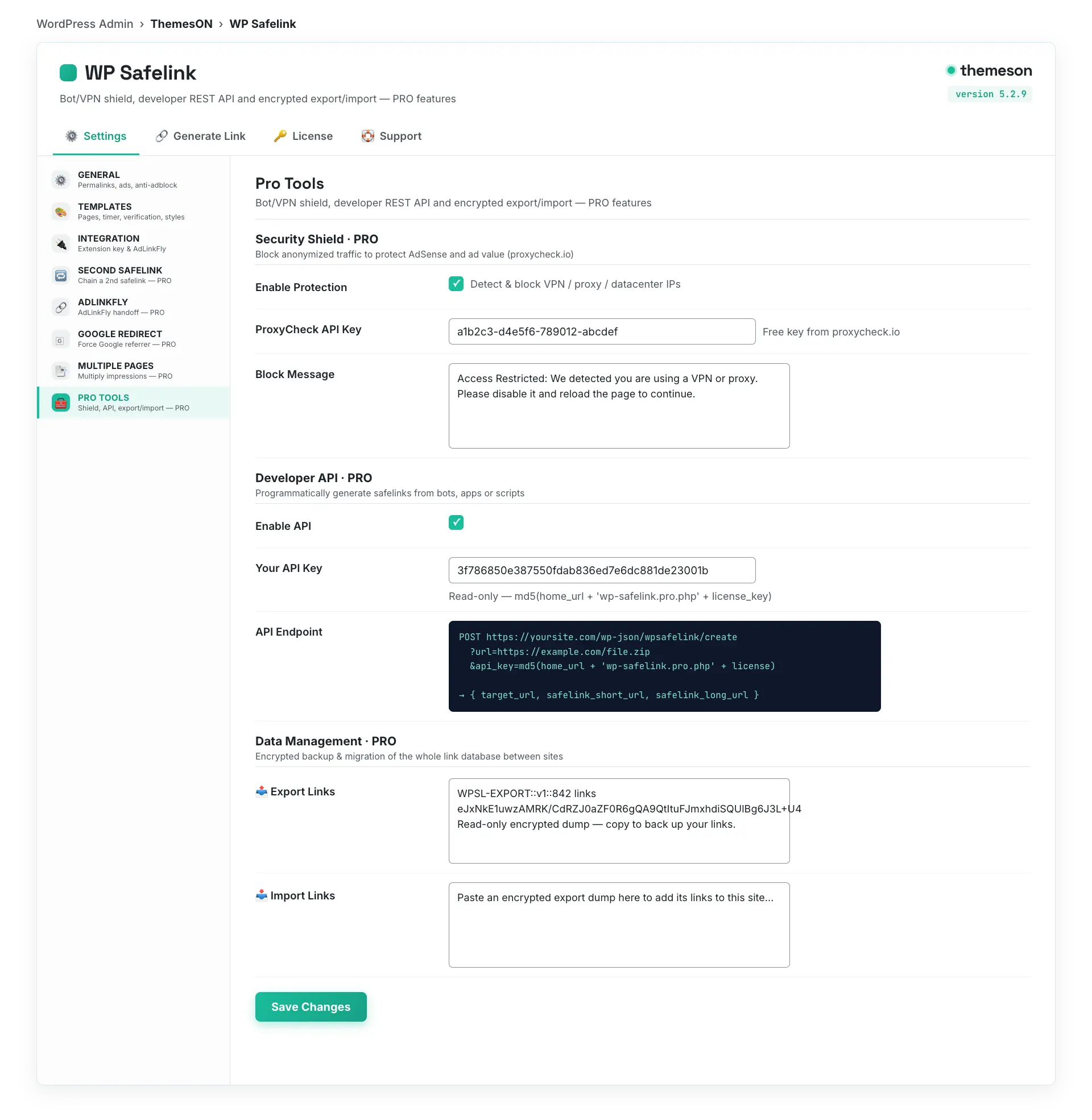
💡 Note: Your api_key is derived from your domain and license key — treat it like a password and never expose it in client-side code. The endpoint returns the same short and encrypted formats described in Creating Safelinks, so links from the API behave exactly like links made in the Generate Link tab.