Auto Convert Link Overview
Quick answer: Auto Convert Link is the WP Safelink extension that turns a whole movie, streaming, or download blog into a monetized site automatically. Once it is switched on, every outbound download...
On this page
Auto Convert Link is the WP Safelink extension that turns a whole movie, streaming, or download blog into a monetized site automatically. Once it is switched on, every outbound download link on your pages is rewritten into a safelink on the fly — no shortcodes, no manual conversion, and no editing your existing posts. You keep writing ordinary <a href="https://...">Download</a> links, and your readers are quietly routed through your WP Safelink Pro countdown pages so you earn AdSense revenue from every click.
#Why you need it
The flagship WP Safelink Pro plugin monetizes downloads by sending visitors through an ad-filled countdown page before they reach the real file. Normally you have to paste each download URL into the plugin (or a shortcode) to get a safelink back. That is fine for a few links a week — but it is completely unworkable for a movie, APK, or software blog that publishes dozens of external download links in every post. Auto Convert Link removes that manual work entirely.
#How it works
- The plugin captures the full HTML of every front-end page as it renders.
- It scans every
<a>link on the page. - For each qualifying link, it encrypts the original URL and rewrites the
hrefin place so it points to a same-site bouncer. - When a reader clicks, that same-site link instantly redirects them to your remote WP Safelink Pro install, which shows the monetized countdown before handing over the real download.
Because the conversion happens automatically at render time, your link text, button styling, and post content stay exactly as you wrote them — only the destination changes.
#The double-hop, simply put
A converted link is built in two layers. The outer link lives on your own domain so it looks like an ordinary same-site link in the page source; the inner (encrypted) layer is the one that carries the visitor to your WP Safelink Pro site:
Reader clicks "Download" on your movie blog (Site B)
        ↓
href is now:  https://your-blog.com/?safelink=<base64url blob>
        ↓  (your blog catches ?safelink= and redirects)
Redirects to: https://your-safelink.com/?wpsafelink=<encrypted URL>
        ↓  (WP Safelink Pro: countdown page + ads)
After the countdown, the reader reaches the real download link.#What it looks like
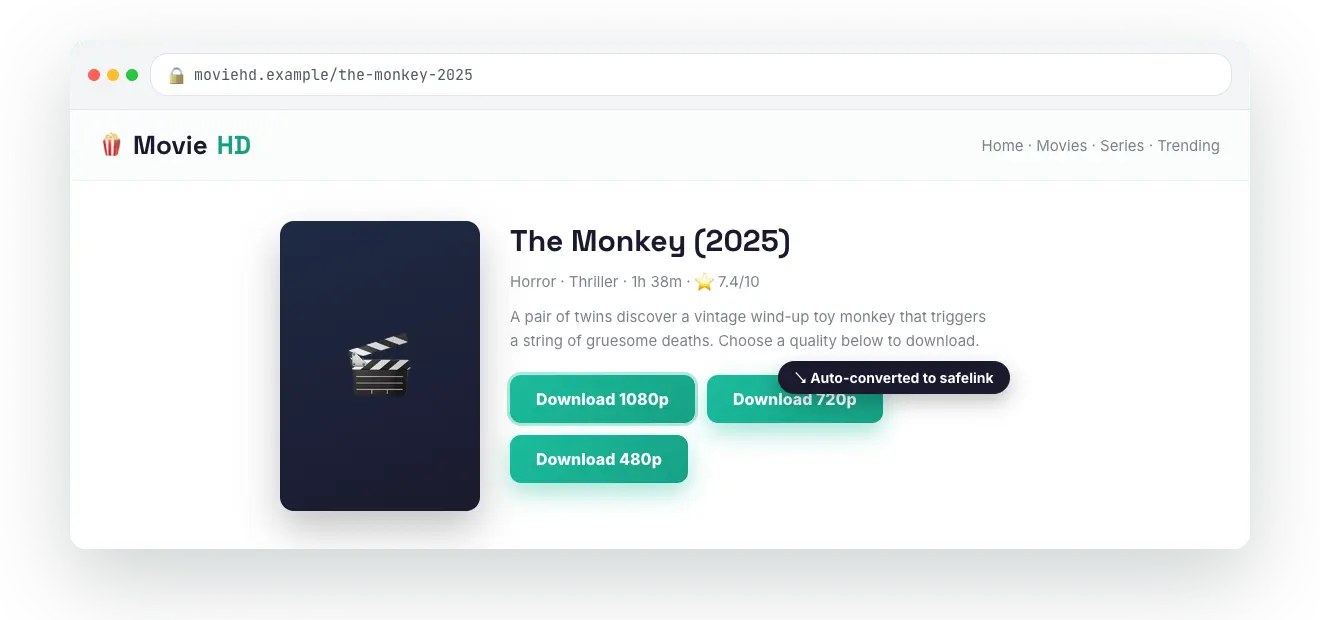
#What you get
- Zero per-link work — turn it on once and the entire site is monetized.
- Existing posts covered — old links are converted automatically too; you never have to go back and edit them.
- Same-site links — the rewritten
hreflooks like an internal link, hiding the encrypted WP Safelink Pro URL. - Two filtering modes — convert everything except a list of trusted domains, or convert only specific file hosts. See Include vs Exclude Mode.
- AES-256 encryption — the same secure scheme used by WP Safelink Pro, so the real download URL is never exposed in your HTML.
💡 Note: Auto Convert Link is a separate plugin that runs on your content/movie blog. It does not need a WP Safelink Pro license on the blog itself — but it must be paired with a live, licensed WP Safelink Pro install using an Integration Key. See Installing Auto Convert Link to get started.