General Settings Reference
Quick answer: The General tab is the heart of WP Safelink — it controls how your safelink URLs are shaped, where the plugin reads its content from, which AdSense and ad blocks...
On this page
The General tab is the heart of WP Safelink — it controls how your safelink URLs are shaped, where the plugin reads its content from, which AdSense and ad blocks appear on every interstitial page, and how the built-in anti-adblock shield behaves. This page documents every field on the General tab so you can monetize download links with confidence.
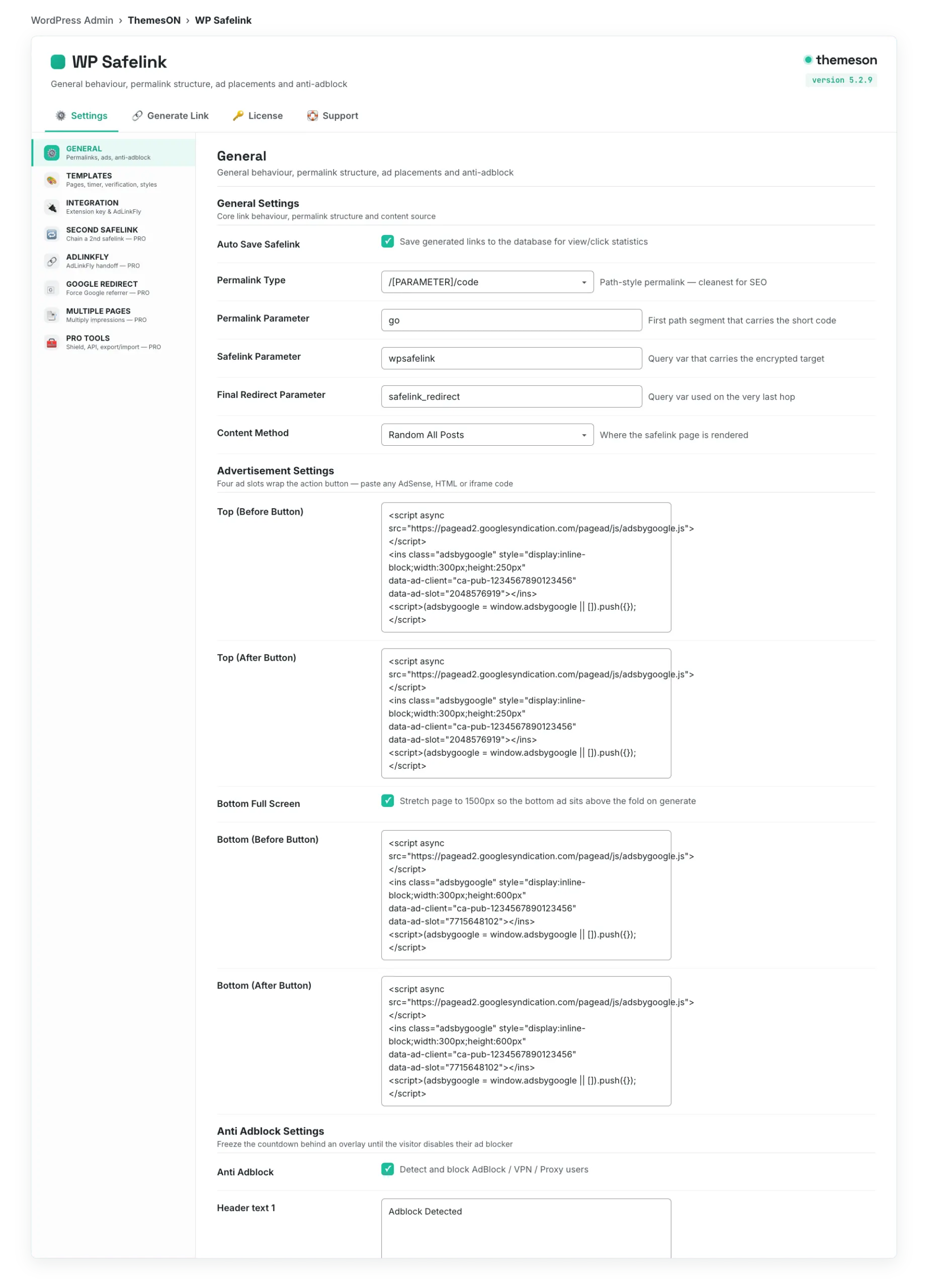
In WordPress admin, open WP Safelink → Settings and the sidebar lands you on the GENERAL tab by default. The tab merges three logical sections: General Settings, Advertisement Settings and Anti Adblock Settings.
#What it looks like
#General Settings
These options decide the shape of your safelink URLs and where WP Safelink pulls the interstitial content from. The Permalink Type and parameter fields together form the public URL your visitors click.
| Setting | Default | What it does |
|---|---|---|
| Auto Save Safelink | No (off) | Saves every generated link to the database so view and click counts are tracked. Turn this on to use the statistics dashboard on the Generate Link tab. |
| Permalink Type | 1 — /[PARAMETER]/code | Picks the URL format: 1 = pretty path /go/code; 2 = query /?go=code; 3 = raw /?code. |
| Permalink Parameter | go | The word used in the safelink path (for example /go/abc12345). Change it to match your brand or to obfuscate the URL. |
| Safelink Parameter | wpsafelink | The query parameter that carries the encrypted target on the landing page. Rename it to make links harder to reverse-engineer. |
| Final Redirect Parameter | safelink_redirect | The parameter on the very last hop that decrypts and sends the visitor to the real destination. |
| Content Method | random — Random All Posts | Where the interstitial content comes from. random shows a random post on each visit; selected only uses the posts you list in Content IDs. |
| Content IDs | (empty) | One post ID per line. Only used when Content Method is set to Selected Posts — it restricts the safelink flow to those specific articles. |
💡 Note: Renaming the Permalink Parameter, Safelink Parameter or Final Redirect Parameter is a quick way to make your safelinks harder to bypass, but any links you already published will keep working only if you do not also change the encryption delimiter. Stick to letters and numbers for parameter names.
#Advertisement Settings
WP Safelink gives you four ad slots that wrap the action button on every safelink page — two above the button and two below it. Paste any AdSense unit, banner HTML, or ad-network iframe into these boxes. The more dwell time the countdown timer enforces, the more these slots earn.
| Setting | Default | What it does |
|---|---|---|
| Advertisement Top (Before Button) | 300×250 placeholder | Ad code shown above the action button, before it appears. Ideal spot for a responsive AdSense unit. |
| Advertisement Top (After Button) | 300×250 placeholder | Ad code shown above the button area after the countdown completes. |
| Advertisement Bottom Full Screen | Yes (on) | Stretches the page height to roughly 1500px when the link is generated, giving your bottom ad units more screen space and viewability. |
| Advertisement Bottom (Before Button) | 300×600 placeholder | Ad code shown below the action button, before it appears. A tall 300×600 skyscraper fits well here. |
| Advertisement Bottom (After Button) | 300×600 placeholder | Ad code shown below the button area after the countdown completes. |
💡 Note: These boxes accept raw HTML, JavaScript ad tags, and iframes, so you can mix AdSense, direct banners, and pop-under networks. Test on mobile too — many download visitors are on phones, so a responsive unit usually beats a fixed 300×250.
#Anti Adblock Settings
Anti-Adblock protects your revenue by detecting visitors who run an ad blocker and asking them to disable it before the timer continues. This keeps your AdSense impressions honest and stops freeloaders from skipping the monetized page entirely.
| Setting | Default | What it does |
|---|---|---|
| Anti Adblock | Off | Master toggle for adblock detection. When on, a full-screen overlay freezes the countdown until the visitor disables their ad blocker. |
| Header text 1 | Adblock Detected | The large headline shown on the anti-adblock overlay. Supports HTML so you can style it. |
| Header text 2 | Its seems you are using an ad blocker/VPN/Proxy/Custom DNS. Please disable it… | The supporting message under the headline that tells the visitor what to do. |
💡 Note: Anti-Adblock is a core WP Safelink feature available on every license. For deeper traffic protection — blocking VPNs, proxies and bots via proxycheck.io — see the PRO-only Security Shield on the Pro Tools tab, which requires a wpsafelink-pro license.