Include / Exclude Rules
Quick answer: Include and exclude rules decide which links the Blog JavaScript turns into safelinks and which it leaves alone. WP Safelink offers two conversion modes — include (convert only the hosts...
On this page
Include and exclude rules decide which links the Blog JavaScript turns into safelinks and which it leaves alone. WP Safelink offers two conversion modes — include (convert only the hosts you list) and exclude (convert everything except the hosts you list) — so you can monetize your file-download links while leaving navigation, social, and affiliate links untouched.
#The two conversion modes
| Setting | Default | What it does |
|---|---|---|
| Auto Convert Link Method | include | Switches between include mode and exclude mode for both the Blog JavaScript and server-side conversion. |
| Include Domain List | Empty | One host per line. In include mode, a link is converted only if its address contains one of these hosts. |
| Exclude Domain List | Empty | One host per line. In exclude mode, every link is converted except those containing a listed host (your own site is always spared). |
| Base URL Safelink | Your site URL (read-only) | The safelink base that converted links point to — the destination of every rewritten link. |
#Include mode — convert only what you list
In include mode (the default), nothing is converted unless its address matches a host in your Include Domain List. This is the safest choice for a mixed blog with lots of editorial, navigation, and affiliate links — you opt in only your actual download hosts.
- List your file hosts, one per line, for example:
mediafire.com,mega.nz,drive.google.com,zippyshare.com. - Every other link on the page is left exactly as written.
- Add a new host to the list and save to start monetizing it — no need to touch your posts.
#Exclude mode — convert everything except what you list
In exclude mode, every outbound link is converted except those that match a host in your Exclude Domain List. This is ideal for a dedicated download blog where almost every external link is a file you want monetized. Your own site is automatically spared, so internal navigation never gets wrapped.
- Use the exclude list to protect links you do not want monetized: your CDN, your safelink domain itself, and trusted destinations like
youtube.com,facebook.com, ortwitter.com. - Leave the list short and everything else — the real download hosts — gets converted automatically.
#How matching works
Both lists use simple substring matching against each link’s address. There is no scheme or host parsing, so keep these points in mind:
- Enter one host per line, like
example.com— nohttps://prefix and no trailing slash needed. - Matching is a plain substring check, so
example.comwill also match a subdomain likecdn.example.com. List the most specific host you need to be precise. - In exclude mode your own site is always added to the skip list automatically, so same-site links are never converted.
- Leaving the exclude list empty in exclude mode means every external link on the page is converted — use include mode if you want tighter control.
#What it looks like
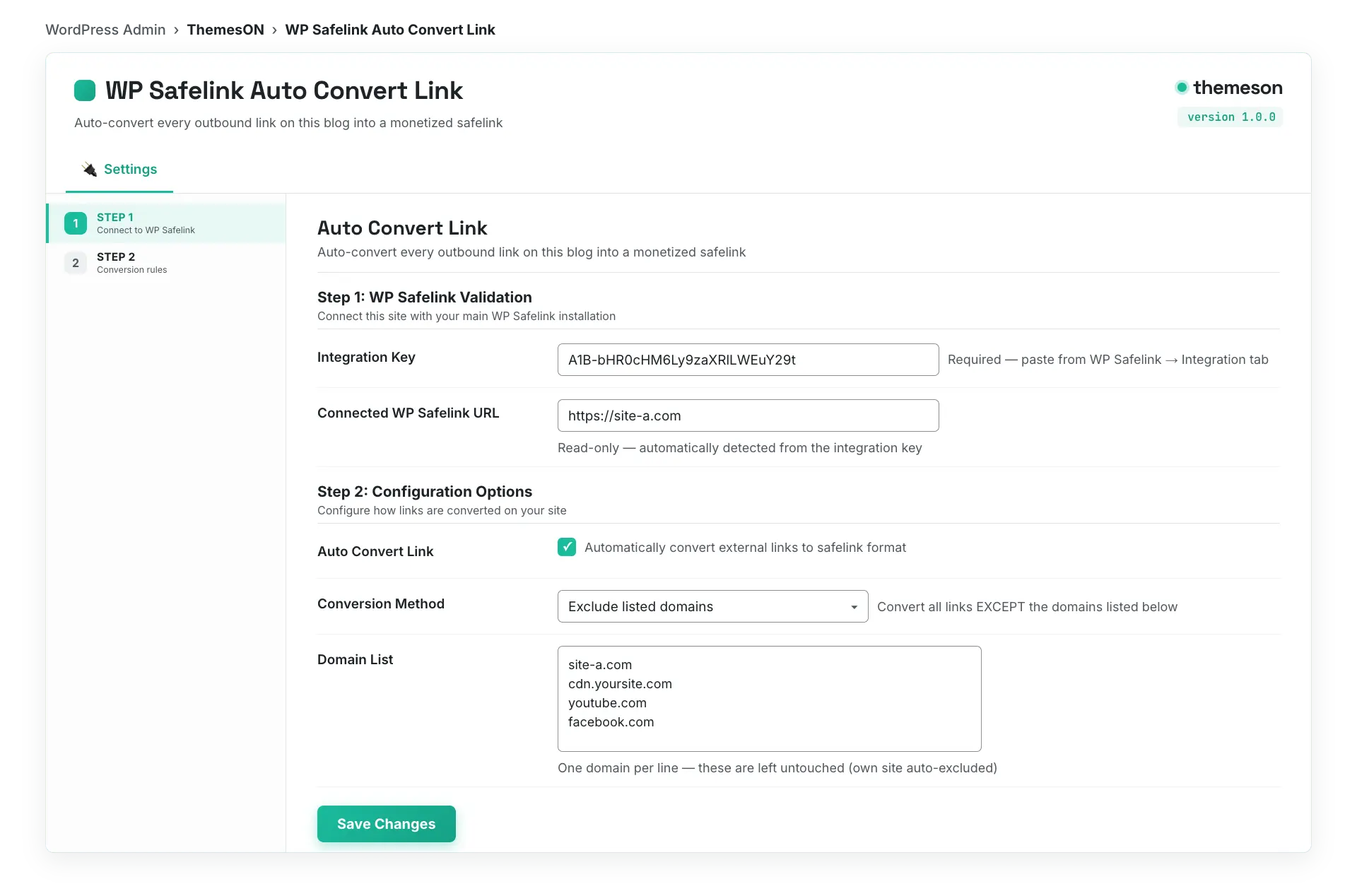
#Which mode should you choose?
- Dedicated download / movie / APK blog: use
excludemode and list only the handful of domains you want to protect. Everything else gets monetized. - General blog with mixed content: use
includemode and list only your file hosts. Editorial and affiliate links stay clean.
💡 Note: After editing either list, save your settings and clear your Cloudflare or page cache — the wpsafelink.js file is rebuilt on save and a cached copy can keep serving the old rules. See Installing the Blog JavaScript for the save-and-verify steps.