Anti-Bot, Proxy & VPN Shield
Quick answer: The Anti-Bot, Proxy & VPN Shield blocks anonymized traffic from reaching your WP Safelink pages, so bots, scrapers, datacenter IPs, and VPN/proxy users never trigger your AdSense or ad-network impressions....
On this page
The Anti-Bot, Proxy & VPN Shield blocks anonymized traffic from reaching your WP Safelink pages, so bots, scrapers, datacenter IPs, and VPN/proxy users never trigger your AdSense or ad-network impressions. This protects your ad account from invalid-traffic penalties and keeps your earnings clean and high-value. It is a PRO-only Security Shield powered by proxycheck.io.
💡 Note: This is a WP Safelink PRO feature. It is unlocked only when your site is activated with a PRO license key (wpsafelink-pro, -agency, or -lifetime). On non-PRO plans the tab shows an upgrade banner. See License Activation to upgrade or activate your key.
Ad networks like Google AdSense punish sites that serve ads to fraudulent or anonymized visitors. A single wave of proxy traffic on a busy safelink page can get an account limited or banned. The Shield checks each visitor’s IP against the proxycheck.io database in real time and quietly turns away anyone hiding behind a VPN, proxy, Tor exit node, or known datacenter range before any ad code loads.
#How it works
- A visitor opens one of your safelink pages.
- WP Safelink sends the visitor’s IP to the proxycheck.io API using your API key.
- If proxycheck.io flags the IP as a VPN, proxy, or hosting/datacenter address, the visitor is shown your custom Block Message instead of the safelink and ads.
- Clean, residential visitors pass straight through to the normal countdown flow, so real users are never inconvenienced.
#How to enable
- Create a free account at proxycheck.io and copy your API key from the dashboard.
- In WordPress go to WP Safelink › Settings › PRO TOOLS.
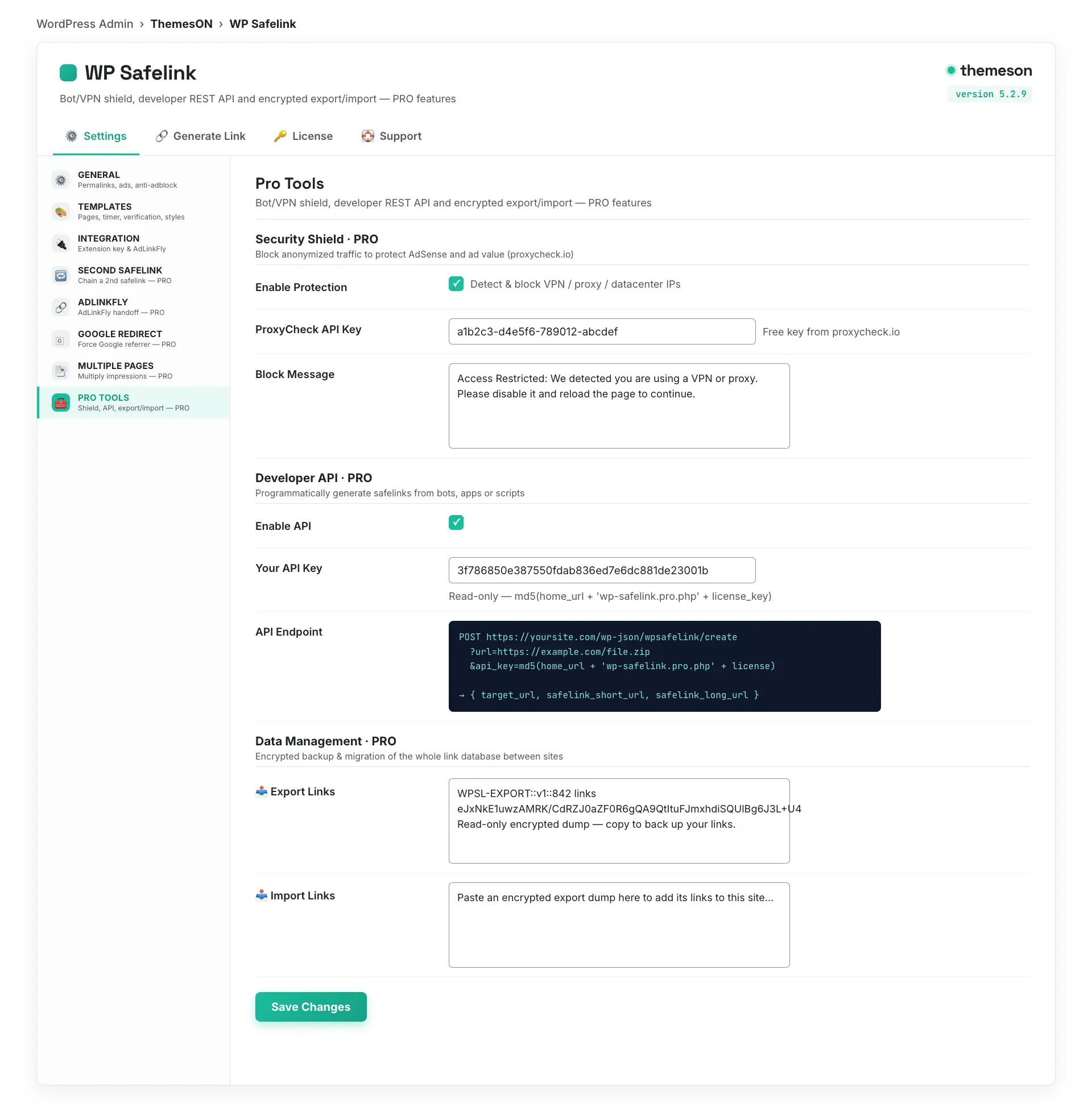
- Under Security Shield, tick Enable Protection.
- Paste your key into ProxyCheck API Key.
- Optionally customise the Block Message shown to blocked visitors.
- Click Save Changes. Protection is live immediately.
#Configuration
| Setting | Default | What it does |
|---|---|---|
Enable Protection (antiproxy) | No (off) | Master switch for the Anti-Bot / Proxy / VPN Shield. When on, every visitor IP is screened before the safelink page renders. |
ProxyCheck API Key (proxycheck_apikey) | (empty) | Your personal key from proxycheck.io. Required for the Shield to query the detection database. The free tier covers most small and mid-size sites. |
Block Message (antiproxy1) | Access Restricted: …VPN or proxy… | The HTML message shown to a blocked visitor in place of the safelink. Explain that they must disable their VPN/proxy to continue. |
#What it looks like
💡 Note: Get the free proxycheck.io plan first and confirm your key works before relying on the Shield. Pair it with Human Verification (reCAPTCHA, hCaptcha, or Turnstile) for layered bot defence: the Shield removes anonymized networks while verification stops automated clickers. Together they keep your AdSense impressions genuine and your account safe.