Include vs Exclude Mode
Quick answer: Auto Convert Link gives you two ways to decide which links get turned into safelinks: Exclude mode (convert everything except a list of trusted domains) and Include mode (convert only...
On this page
Auto Convert Link gives you two ways to decide which links get turned into safelinks: Exclude mode (convert everything except a list of trusted domains) and Include mode (convert only links from specific file hosts you list). Choosing the right mode keeps your editorial, affiliate, and navigation links untouched while still monetizing every download.
#Exclude mode (the default)
In Exclude mode, every outbound link on the page is converted into a safelink unless it matches a domain in your list. This is the best choice for a pure download blog where almost everything external is a file link you want monetized.
- Your own site URL is always excluded automatically, so internal and same-site links are never converted — you do not have to list your own domain.
- Use the domain list to spare extra domains: your WP Safelink Pro domain (so links are not double-wrapped), your CDN or image host, YouTube trailers, and social links.
- If you leave the list empty, the only thing protected is your own site — every external link on the page will be converted.
#Include mode
In Include mode, a link is converted only if it matches one of the domains in your list. Everything else on the page is left completely alone. This is the safer choice for a mixed blog with lots of editorial or affiliate links — you list only your actual file hosts (for example mediafire.com, mega.nz, drive.google.com) and nothing else is touched.
#How to choose your mode
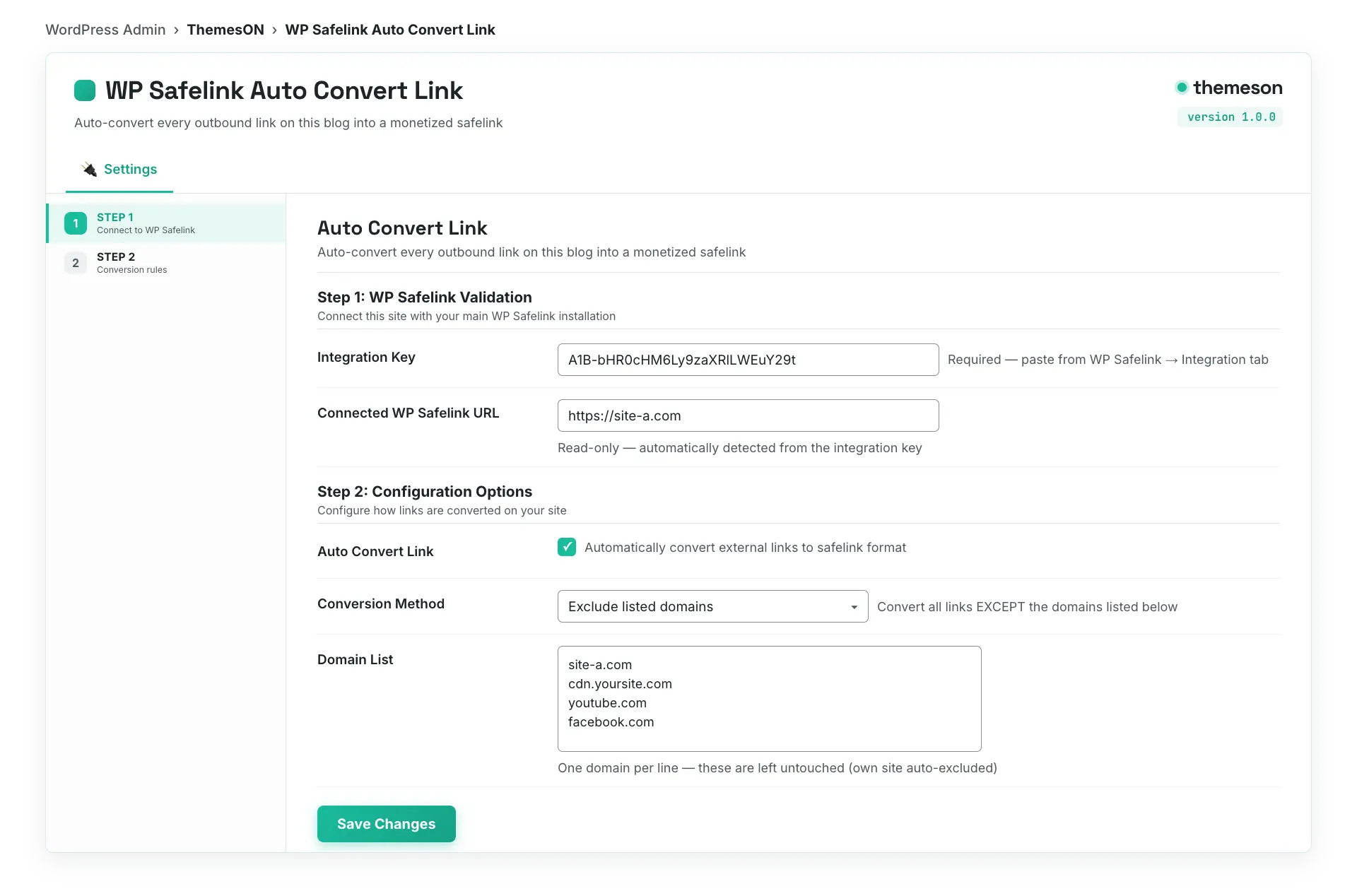
- Open WP Safelink Extension (Auto Convert Link) and go to Step 2: Configuration Options (you must be validated first — see Installing Auto Convert Link).
- Make sure Auto Convert Link is toggled ON.
- Set Conversion Method to Exclude for a download-only blog, or Include for a mixed content blog.
- Fill in the Domain List, one domain per line, to match your chosen mode.
- Click Save Changes.
#What it looks like
#Configuration
| Setting | Default | What it does |
|---|---|---|
| Auto Convert Link | yes | Master toggle for automatic link conversion. Conversion runs only when this is on. Turn it off to instantly stop rewriting links across the whole site. |
| Conversion Method | exclude | Exclude = convert all links EXCEPT domains in the list (your own site is auto-excluded). Include = convert ONLY links from domains in the list. |
| Domain List | — (empty) | One domain per line, e.g. example.com. In Exclude mode these are spared; in Include mode only these are converted. A live counter shows the number of domains. |
#Examples
Exclude list for a download blog (spare these, convert everything else):
your-safelink.com
cdn.your-blog.com
youtube.com
facebook.com
twitter.com
Include list for a mixed blog (convert only these file hosts):
mediafire.com
mega.nz
drive.google.com
💡 Note: Domain matching is a simple text match, not strict host parsing — example.com will also match example.com.evil.net or a path that contains that text. Be specific in your lists. On a blog with many non-download links, Include mode is the safest choice because it only ever touches the exact file hosts you name and leaves everything else alone.